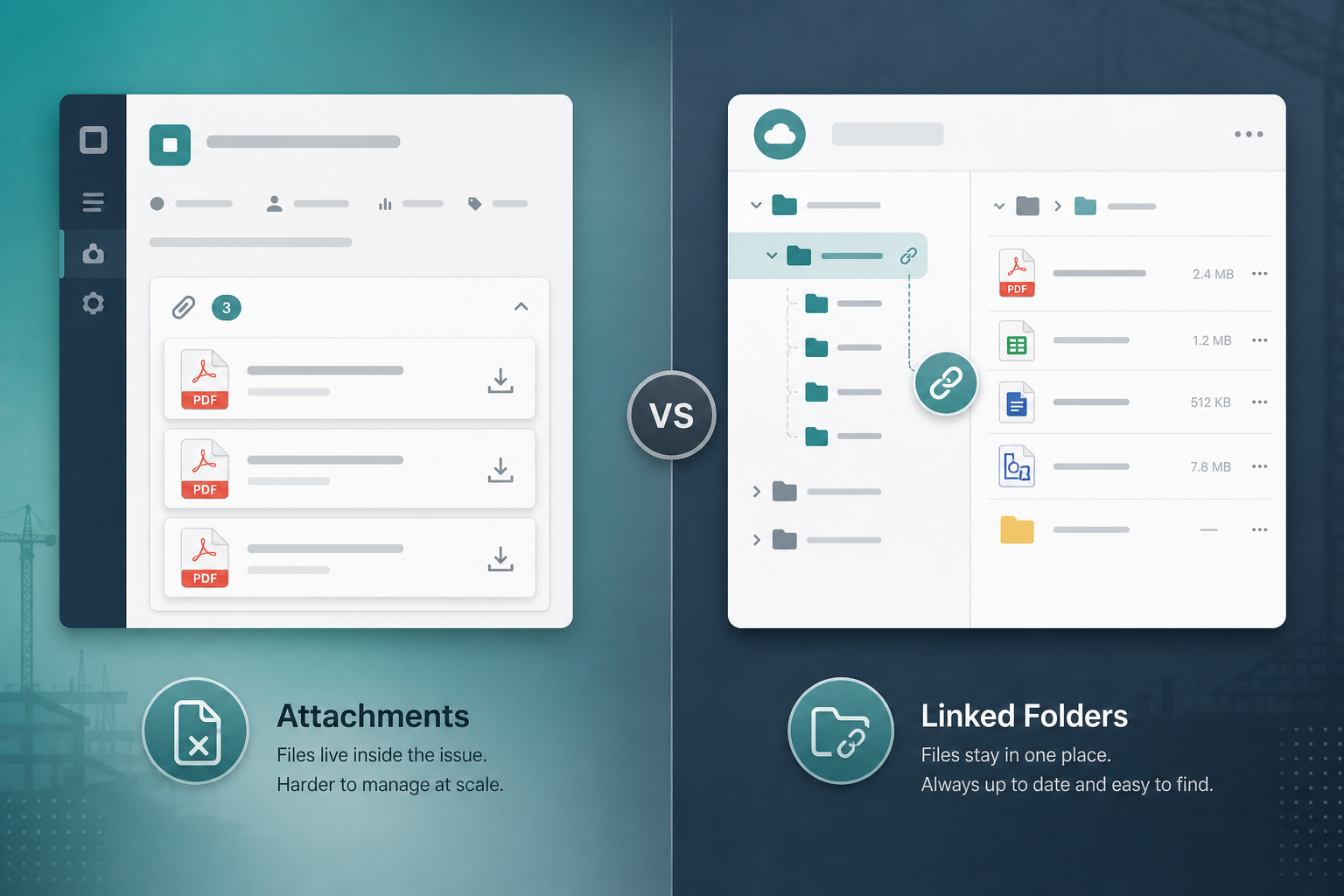
The delivery lead opened PAY-204 before the client review. Three attachments sat on the issue — spec_v2.pdf, spec_v2_final.pdf, and spec_v2_final_revised.pdf. A teammate had pasted a Nextcloud folder URL into a comment six weeks ago. Nobody was sure which file was authoritative.
Leadership asked the question that starts most Jira attachments vs file server evaluations:
"If the spec lives in Nextcloud, why are we attaching PDFs to every story?"
Sometimes attachments are correct. Often the team already has a Jira document management problem disguised as a tooling gap. Work happens in Jira. Deliverables live on Nextcloud. The decision is where project files should be authoritative — and how to link files to Jira issues without duplicates, stale URLs, or an attachment pile nobody trusts.
This buyer guide compares attachment-heavy Jira habits with link-first Nextcloud folder models so PMs and team leads can pick a file strategy before the next release review.
Quick decision flow
- If files are small, issue-local, and rarely revised → Jira attachments may be enough.
- If deliverables already live in shared project folders with versioning and role-based access → a link-first file server model usually fits better.
- If people paste Nextcloud URLs into comments because attachments feel wrong → evaluate structured Nextcloud Jira integration, not attachment policy slides alone.
- If both habits run in parallel → publish rules for which file types use which model before the next sprint.
This is a comparison by workflow, not a ranking.
Two questions buyers confuse
Teams evaluating file strategy usually mix two questions:
- "How do we put a file on this issue?"
- "Where should project deliverables live for the whole engagement?"
Jira attachments answer the first. A Nextcloud folder model answers the second. When every project PDF is treated like a screenshot, attachment volume grows. When nothing is attached, issue context goes thin for reviewers who rarely open the file server.
Neither question replaces the other. The expensive mistake is skipping the decision — then every squad picks its own habit.
What Jira attachments are good for
Atlassian documents that users with appropriate permissions can add attachments to an issue from the issue view. For many delivery teams, that is the right default.
Jira attachments tend to fit when:
- The file belongs to one issue and one conversation
- Size stays within your site's configured limits — verify current Jira Cloud attachment settings on Atlassian's documentation rather than assuming a fixed cap
- Reviewers expect to open the file without leaving Jira
- The asset is a screenshot, export, log snippet, or signed one-pager
- You do not need folder hierarchy, desktop sync, or file-server sharing outside Jira permissions
Common fits:
- Bug reproduction screenshots
- Single contract PDF on an onboarding ticket
- One-time audit exports
- Lightweight teams with few shared deliverables per client
In those cases, maintaining a parallel folder structure may add friction without solving a real problem.
Where attachment-heavy workflows break down
Attachments are convenient. They are not a full document-management strategy when delivery complexity crosses a threshold.
Duplicate authoritative copies
The same spec attached to an epic, three stories, and a QA ticket creates four Jira copies. Update the Nextcloud original and Jira still shows old attachments unless someone re-uploads everywhere.
Version confusion
Filenames like spec_final.pdf proliferate. Comments help briefly. They do not scale across twenty active issues.
Wrong tool for large or shared assets
Design packages, video rushes, CAD exports, and multi-file deliverable trees often already live on a file server. Attaching fragments into Jira scatters context.
Permissions mismatch
Jira issue permissions decide who sees an attachment. External collaborators, client folder access, and group-folder models on Nextcloud follow different rules. A file "on the ticket" is not the same as a file "in the client project folder."
Discovery across issues
Project managers ask:
"Where is the latest approved SOW for this client?"
Search across attachments and comment URLs is slower than opening one linked project folder — especially when multiple epics share the same deliverable set.
Storage and admin load
Attachment growth accumulates inside the Jira tenant. That may be fine for small files. It becomes a planning question when teams attach large binaries by habit.
What a link-first Nextcloud folder model adds
Many delivery teams already treat Nextcloud as the system of record for project folders and client deliverables. Nextcloud's public documentation covers folder sharing, permissions, and app passwords for service integrations — patterns admins recognize from enterprise file hosting.
A link-first model means:
- Deliverables stay in Nextcloud
- Jira issues point to the right folder
- Editors work in Nextcloud permissions and versioning
- Jira carries context, not necessarily another binary copy
That model tends to fit when:
- One folder serves multiple issues on the same client or release
- Roles outside Jira — clients, contractors, partners — need file-server access
- PMs want browse-and-open behavior from the issue without re-uploading
- Folder naming follows project or issue conventions
The trade-off: Jira alone is no longer the only place to look. Teams must link consistently or they recreate the pasted-URL problem.
Open-in-Nextcloud Workflow From the Jira Issue
The link-first model works only if the issue gives users a reliable path back to the file server.
A practical issue workflow should support:
- Open the Jira issue that owns the delivery context.
- See the linked Nextcloud folder in a consistent files panel, not buried in a comment.
- Browse the current file list before uploading another attachment.
- Refresh the panel after someone adds or renames files in Nextcloud.
- Open the folder in Nextcloud when users need native sharing, version history, desktop sync, or permission-controlled collaboration.
- Change the linked folder when the delivery taxonomy moves, instead of leaving old URLs behind.
That workflow preserves the useful part of Jira attachments — issue-local context — while keeping the authoritative file set in Nextcloud. It also prevents the worst hybrid pattern: a stale attachment on the ticket plus a newer version in the project folder.
Comparison by delivery job
| Delivery job | Jira attachments | Nextcloud linked folders |
|---|---|---|
| Single-issue screenshot or log | Strong fit | Usually unnecessary |
| One PDF on one ticket | Strong fit | Optional |
| Shared spec across epic + stories | Weak — duplicates | Strong — one folder, many links |
| Client-facing folder with external access | Weak — Jira permissions only | Strong — file-server sharing |
| Large binaries or media packages | Often poor fit | Strong fit |
| Find latest approved file quickly | Weak at scale | Strong when folder discipline exists |
| Review file inside Jira only | Strong fit | Requires panel or link workflow |
| Desktop sync / offline editing | Not a Jira strength | Strong Nextcloud fit |
| Audit trail on folder permissions | Jira audit + attachment history | Nextcloud admin models |
This is a job comparison, not a product ranking.
Five signals you have outgrown attachments-only
- The same deliverable appears on multiple issues and updates drift out of sync.
- PMs search comments for folder URLs instead of opening a known project directory.
- External collaborators need file-server access Jira attachments do not provide.
- Large or multi-file packages get split across tickets because upload habits feel easier than folder discipline.
- Client reviews surface version arguments — attachments, email, and Nextcloud disagree.
The fifth signal is the document-management problem. Attachments did not fail. The team never chose a system of record.
Manual links, attachments, or structured integration
| Approach | What it looks like | Failure mode |
|---|---|---|
| Attachments only | PDFs and exports on each issue | Duplicates; weak shared-folder story |
| Manual URL paste | Nextcloud link in description or comment | Links go stale; no browse from issue |
| Link-first + discipline | Shared folder is authoritative; Jira references it | Needs ownership rules |
| Structured integration | Issue panel links folder; open in Nextcloud | Admin setup; verify permissions |
Most teams slide from the first row to the second without noticing. The jump to row three or four is a deliberate process decision.
Who owns what
| Role | Owns |
|---|---|
| Delivery lead / PM | Folder taxonomy; which deliverables are authoritative in Nextcloud |
| Issue assignees | Attaching issue-local files only when policy allows |
| Jira admin | Attachment settings; integration connection; egress approval |
| Nextcloud admin | Service account, group folders, external share policy |
Ambiguity produces pasted URLs, shadow attachments, and client reviews spent reconciling filenames.
The hybrid trap
Many teams use both — lightly.
Design drops finals in Nextcloud. Developers attach exports to tickets. PMs paste folder links in comments. On paper, everyone has options. In practice, nobody knows which copy signed off.
Common hybrid failures:
- Attachment on the issue contradicts the Nextcloud original
- Comment URL points to a moved or renamed folder
- New hire attaches
brief.pdfbecause they never saw the shared link - Client receives Jira export; internal team edits Nextcloud — two truths
The hybrid can work with explicit rules:
- Which file types must use the project folder
- Which issue types get a linked folder by default
- Whether attachments are allowed for drafts only
- Who updates links when folder structure changes
Without those rules, you get duplicate storage and duplicate arguments.
When Nextcloud for Jira is worth evaluating
If Nextcloud is already your file server and Jira is your delivery hub, manual URL paste is the default integration — and it fails quietly.
Backlog Bridge's public Nextcloud for Jira product page describes a Forge app for Jira Cloud that connects to any reachable HTTPS Nextcloud instance. Public vendor claims summarized in own words:
- Admins enter Nextcloud URL, service account, and app password; test connection before save
- Nextcloud files panel on each issue: linked folder, file list, refresh, change folder, open in Nextcloud
- Manual link to an existing folder or optional auto-create of
Jira/ISSUE-KEYfolders - Link-first workflow — file operations stay in Nextcloud
- Customer-managed egress — site admin approves outbound access to the Nextcloud domain
- App passwords stored with Forge encrypted secret storage; not shown again after save
- Product page states completely free with no user limits (verify on Marketplace before procurement)
Evaluate that direction when the recurring pain is lost folder context on issues — not when the primary problem is attaching small screenshots inside Jira.
No Atlassian Marketplace listing URL was provided in editorial metadata for this article, and listing details were not verified at the time of writing (July 2026). Search Marketplace for "Nextcloud for Jira" or vendor "Backlog Bridge" and verify current pricing, hosting, scopes, privacy tab, and install signals before installation.
Treat vendor copy as a sandbox trial hypothesis. Confirm behavior on your Nextcloud instance, issue types, and permission model.
Marketplace checks if you evaluate an app
Even when the integration direction is clear, procurement still needs listing facts that change over time:
- Hosting model (Jira Cloud vs Data Center — product page emphasizes Cloud)
- Pricing and trial terms at install time
- Requested scopes and Forge permissions
- Privacy & Security tab and vendor policy links
- Support and documentation URLs
I did not verify listing metadata in this research run. A human reviewer should capture date-stamped Marketplace notes before publishing procurement guidance.
What Jira admins should verify before connecting Nextcloud
Connecting a file server to Jira is an admin decision, not only a PM request.
- Can Jira Cloud reach your Nextcloud URL over HTTPS from Forge egress?
- Who approves customer-managed egress for your Nextcloud domain?
- Which Nextcloud service account owns linked folders, and what happens if that account is deactivated?
- Are app passwords rotated on a schedule per Nextcloud security policy?
- Which Jira users can see the Nextcloud files panel on issues they can browse?
- Do Nextcloud folder permissions still govern file access when opened from Jira?
- Will you link manually, auto-create
Jira/ISSUE-KEYfolders, or both? - What happens to issue folder mappings if the admin disconnects and reconnects?
Do not treat vendor marketing copy as procurement evidence. Confirm behavior with reproducible test issues.
Security and privacy notes
Public product copy for Nextcloud for Jira states:
- HTTPS-only connections with blocked private/metadata hosts as SSRF mitigation (vendor trust section)
- Credentials in Forge secret storage; only Jira administrators change connection settings (vendor FAQ copy)
- Files remain in Nextcloud; the app browses and links rather than turning Jira into a second file store
Admins should still read Marketplace privacy materials if procurement requires them, confirm egress approval records, and validate that the service account follows least privilege in Nextcloud.
Do not infer SOC 2, ISO, GDPR, DPA, Cloud Fortified, or Bug Bounty status without explicit published evidence. A human reviewer should verify before publishing compliance guidance.
Recommendation by team type
Stay attachment-first when:
- Files are small, issue-scoped, and rarely shared across tickets
- The team has no shared file-server discipline to maintain
- Reviewers rarely need folder context beyond one file on the issue
Move to link-first Nextcloud folders when:
- Deliverables already live in Nextcloud project directories
- Multiple issues share the same asset tree
- External collaborators use file-server sharing outside Jira
- PMs spend time hunting "latest spec" across attachments and comments
Use both only with rules when:
- Attachments handle ephemeral issue-local files
- Nextcloud holds authoritative deliverables
- You document which file types use which path
Evaluate Nextcloud for Jira when:
- Nextcloud is the file system of record and Jira is the work system of record
- Pasted folder URLs keep going stale
- You want issue-level browse and open without duplicating attachments
What to verify before choosing
If you stay attachment-first
- Confirm current Jira attachment size and permission settings on live Atlassian admin docs
- Publish naming guidance so
final_v3proliferation slows down - Decide when an attachment must move to the project folder instead
If you adopt link-first folders
- Define folder taxonomy per client, program, or issue key
- Name who creates folders and who links them from Jira
- Train teams not to attach duplicates of files that live in Nextcloud
- Test external collaborator access independently of Jira issue permissions
If you trial Nextcloud for Jira
- Run connection test in admin settings before team rollout
- Verify panel behavior on a real issue with many files
- Confirm open-in-Nextcloud actions respect Nextcloud login and share rules
- Capture Marketplace listing details at trial time with dates
Master checklist
File strategy (PM / delivery lead-owned)
- [ ] System of record named for client deliverables (attachments vs Nextcloud folder)
- [ ] File types mapped to attachment vs folder rules
- [ ] Folder taxonomy documented
- [ ] Hybrid rules published if both models stay in use
Jira admin
- [ ] Attachment limits and permissions reviewed
- [ ] Egress and HTTPS connectivity validated if integrating Nextcloud
- [ ] Service account and app password custody defined
- [ ] Trial behavior verified on representative issues
Before the next client review
- [ ] One authoritative spec location agreed
- [ ] Stale comment URLs cleaned or replaced with structured links
- [ ] Team trained on where to upload vs where to link
The buying question
Jira attachments vs file server is not a universal replacement debate.
Attachments fit issue-local files and lightweight delivery. Linked Nextcloud folders fit shared deliverables, versioning discipline, and roles that live partly outside Jira. Pick the system of record for project files first. Then wire Jira context — attachments, structured links, or both with explicit rules.
If Nextcloud already holds the files and Jira already holds the work, unstructured URL paste is the silent failure mode. A deliberate link files to Jira issues workflow is the decision worth making before the next review surfaces four versions of the same PDF.
See how Nextcloud for Jira approaches issue folder linking, the Nextcloud files panel, and HTTPS connection setup for teams running both systems.