
To build one Jira created vs resolved chart for multiple teams, create a shared, status-neutral saved filter that contains the work of every team, then use that filter as the chart's source. Keep the same period and resolution rules across Scrum and Kanban teams. The chart will show whether work is entering the selected scope faster than it is being resolved; it will not measure velocity, capacity, hours or individual productivity.
That distinction matters when several boards or spaces feed one delivery portfolio. A combined line can reveal a sustained intake gap, but only a stable filter and trustworthy Resolution field make the line interpretable.
This guide includes an exact saved-filter example, a reconstructed Jira configuration, a four-week calculation, and a downloadable team-level CSV.
Decide what the combined chart should answer
Atlassian describes the Created vs Resolved gadget as a difference chart for work items created and resolved over a period. Its reporting documentation frames the report as a way to see whether the overall backlog is growing or shrinking.
For multiple teams, use the chart to answer one bounded question:
Across the selected teams and work types, are new work items arriving faster than work items are being resolved?
Write the scope beside the dashboard. Include the team or space identifiers, included work types, excluded operational queues and reporting timezone. If the definition changes, note the date rather than silently comparing the new population with the old one.
Do not use this chart to answer a sprint-commitment question. Work can be created before a sprint, added during it, or moved between sprints. The initial-versus-final sprint scope guide covers commitment, additions, removals and carryover as a separate task.
Create one status-neutral filter for every team
The safest source filter defines membership, not the result you hope to see. Here is one complete example for three teams that use separate Jira projects and the standard Story, Task, and Bug work types:
project in (PAYMENTS, MOBILE, DATA)
AND issuetype in (Story, Task, Bug)
ORDER BY created ASC
Save it with this exact example name:
Delivery portfolio — created vs resolved scope
The ORDER BY clause does not change the chart counts; it only makes manual review predictable. Replace the project keys and work types with values that exist on your site. If subtasks belong in the portfolio definition, add them deliberately rather than allowing the scope to vary by team.
When teams share a space and use components as stable ownership boundaries, a base might be:
project = PLATFORM
AND component in (Payments, Mobile, Data)
These are templates, not universal team models. Use the field that your organization actually maintains. Run the query and inspect a sample from each team before saving it.
Avoid adding conditions that remove one side of the chart:
resolution is EMPTY
would exclude resolved work, while:
statusCategory = Done
would exclude most created work that is still open. A moving clause such as sprint in openSprints() also changes the population whenever a sprint opens or closes. Those queries can support a different report, but they are poor foundations for a stable intake-versus-resolution trend.
Leave the date range to the chart. Putting created >= ... in the base filter can exclude older work resolved during the reporting window. Putting resolved >= ... in it can exclude newly created unresolved work. The base filter should describe the population; the chart should apply the time buckets.
Save the search as a filter and share it with the dashboard audience. Atlassian documents that saved searches can be used in dashboard gadgets. A dashboard cannot give a viewer access to work or a private filter that the viewer is not allowed to see.
Add and configure the Created vs Resolved chart
Create or edit a Jira dashboard, add the Created vs Resolved gadget, and select the shared filter as its source. Atlassian changes navigation labels over time, but the configuration has the same reporting contract: selected population, period, lookback and chart behavior.
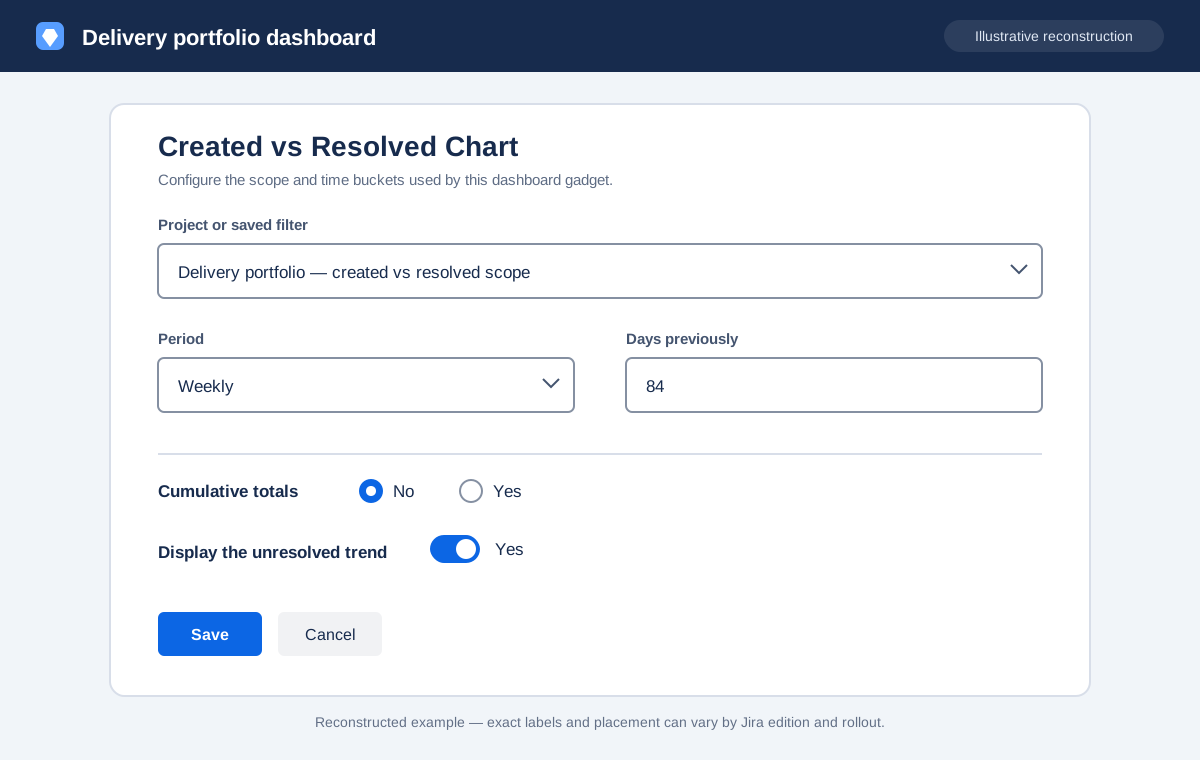
Accurately reconstructed configuration based on Atlassian's documented Created vs Resolved options; it is not a Jira screenshot. Exact control labels and placement can vary by Jira edition and rollout.
Use these values to reproduce the example:
| Configuration field | Example value |
|---|---|
| Project or saved filter | Delivery portfolio — created vs resolved scope |
| Period | Weekly |
| Days previously | 84 |
| Cumulative totals | No |
| Display the unresolved trend | Yes |
Eighty-four days covers roughly twelve weeks; the first or current bucket can still be partial depending on the run date. For a four-week validation run, keep the same weekly period and compare the most recent four complete rows with the downloadable example.
Use settings that match the review cadence:
| Decision | Practical starting point | Why |
|---|---|---|
| Time bucket | Weekly | Daily noise is usually too prominent for a multi-team delivery review |
| Lookback | 8–12 complete weeks | Long enough to see repetition without mixing distant operating models |
| Cumulative totals | Off for weekly flow; on for accumulated gap | Period counts show volatility; cumulative lines emphasize divergence |
| Unresolved trend | Show when available | It helps test whether the intake-resolution gap also appears in open work |
| Refresh | Match the dashboard review | A faster refresh does not improve source-data quality |
Use complete periods in stakeholder reviews. If the current week is only two days old, label it as partial or leave it out of the comparison. Also record the timezone used for the review, especially when teams close work across regions near a week boundary.
Created vs Resolved versus Created vs Resolved by Period
In native Jira, the documented chart name is Created vs Resolved. Its Cumulative totals control determines whether the chart progressively adds the values or reports each period independently. “Created vs Resolved by Period” is therefore best treated as a description of the native chart with cumulative totals turned off—not as a second built-in Jira gadget.
Marketplace apps may use Created vs Resolved by Period as a product-specific chart name and add different scopes, intervals, breakdowns, or drilldowns. Verify those features in the installed app's documentation; do not assume its fields behave like Jira's native gadget.
| Need | Native Created vs Resolved configuration | Interpretation |
|---|---|---|
| Compare each week independently | Cumulative totals: No | Each point reports that week's created or resolved count |
| See the accumulated difference across the window | Cumulative totals: Yes | Each point adds all earlier periods in the selected window |
| Break down one period by team or work type | Separate team filters, export, or a tool that explicitly supports breakdowns | The native combined chart does not explain the composition by itself |
Cumulative versus per-period interpretation
The same four weeks tell two different stories depending on the setting:
| View at week 4 | Created value | Resolved value | Difference shown | Best question |
|---|---|---|---|---|
| Per period | 15 | 20 | −5 for week 4 | Did resolution keep up during this week? |
| Cumulative | 75 | 68 | +7 across weeks 1–4 | Is the intake-resolution gap accumulating across the window? |
The cumulative gap is not automatically the current backlog size. It is the net difference between creation and resolution events inside the selected window. Work that existed before the window, changed filter membership, or was reopened can make the actual open-work total different.
Work through a four-week example
Assume the shared filter covers three teams. The example below is constructed teaching data, not a target or industry benchmark.
| Week | Created | Resolved | Net intake | Cumulative net |
|---|---|---|---|---|
| 1 | 19 | 14 | +5 | +5 |
| 2 | 17 | 18 | −1 | +4 |
| 3 | 24 | 16 | +8 | +12 |
| 4 | 15 | 20 | −5 | +7 |
| Total | 75 | 68 | +7 | +7 |
Over four weeks, the selected teams created 75 work items and resolved 68. The charted population therefore has seven more creation events than resolution events in the window. That is a signal to investigate; it is not automatically the current backlog size.
Download the four-week multi-team example CSV to inspect the dated team rows behind the combined totals. Team Alpha finishes at zero net intake, while Beta and Data account for the combined increase. One portfolio line cannot reveal that distribution.
Ask three questions before acting:
- Is the gap repeated across several complete periods, or driven by one intake event?
- Did the filter population, work-type mix or workflow change?
- Is the difference broad across teams, or concentrated in one queue?
A negative weekly net is not automatically good. A team might resolve many duplicates, cancellations or old low-value items. A positive net is not automatically bad when a planned discovery or migration creates work before execution begins. Pair the counts with the operating context.
Scrum versus Kanban configuration notes
The source filter should define stable team membership regardless of delivery method. The interpretation and review cadence differ:
| Configuration question | Scrum teams | Kanban teams |
|---|---|---|
| Source scope | Use stable project, component, or team fields; avoid sprint in openSprints() | Use stable project, component, service, or team fields; avoid transient board quick filters |
| Period | Weekly for a portfolio trend; use the Sprint Report for sprint commitment | Weekly is a practical starting point for continuous flow |
| Created means | Jira creation date, not “added to sprint” | Jira creation date, not necessarily “ready for service” |
| Resolved means | Resolution was set, even if sprint-close handling occurs later | Resolution was set, even if the board has downstream release states |
| Companion report | Sprint Report for commitment, additions, removals, and carryover | Control Chart or cumulative flow view for flow time and work in progress |
When Scrum teams use different sprint lengths or start dates, calendar weeks are the cleanest shared bucket. When combining Scrum and Kanban teams, keep the portfolio chart in calendar periods and use method-specific reports for the explanation behind the combined line.
Verify the Resolution field before trusting the line
The resolved series depends on Jira's Resolution field, not simply the visible name or color of a status. Atlassian says Jira Cloud reports rely on Resolution to mark work complete and recommends setting it when work transitions to a Done end state.
Across several teams, one misconfigured workflow can undercount resolutions for the whole portfolio. Run both checks against the same team scope:
project in (PAYMENTS, MOBILE, DATA)
AND statusCategory = Done
AND resolution is EMPTY
project in (PAYMENTS, MOBILE, DATA)
AND statusCategory != Done
AND resolution is not EMPTY
Atlassian's Resolution-field guidance uses these patterns to find Done work without a resolution and active work that already has one. Ideally, both searches return no unexpected results.
Inspect reopening transitions too. A work item that returns to active work should follow your administration policy for clearing Resolution. Do not repair historical records in bulk merely to make a chart look cleaner; have a Jira administrator assess workflow and reporting consequences first.
Troubleshoot misleading resolution data
| Symptom | Likely cause | Check or correction |
|---|---|---|
| Done work is missing from the resolved line | Done status has an empty Resolution | Run the first audit JQL and inspect the workflow transition that should set Resolution |
| Active or reopened work still looks resolved | Resolution remained populated after reopening | Run the second audit JQL and review the reopen transition's Resolution handling |
| One team's resolved count is unexpectedly low | That team's workflow follows a different Resolution rule | Compare the team's Done statuses and transition configuration with the other teams |
| Team-managed Jira Service Management closures are absent | Atlassian documents a native-gadget limitation involving the Resolution field | Use that project's Created and Done report series or have an administrator assess a supported Resolution strategy |
| Older resolutions disappear from the chart | The base filter contains a created or resolved date restriction | Remove chart-window dates from the membership filter and let the gadget apply the period |
| A viewer sees fewer items than the dashboard owner | Filter sharing or Browse Projects permissions differ | Test the saved filter as that viewer; share the filter without exposing restricted work |
| The current period drops sharply | The bucket is incomplete or team timezones differ | Compare complete periods and document the reporting timezone |
| Cumulative gap does not equal current open work | The chart starts with no opening-balance row, or scope/reopen events differ | Compare against a current unresolved count; describe the chart as windowed flow, not backlog inventory |
Keep one combined view and one diagnostic view
The combined gadget answers the portfolio question. It should not be the only view.
Create one team-level diagnostic using the same time buckets and definitions. That can be three matching gadgets, a separate report, or an exported table reviewed outside Jira. Keep the team filters mutually understood: if one team includes support requests and another excludes them, a side-by-side comparison needs that caveat.
The two levels serve different decisions:
| View | Question it can support | Question it cannot answer alone |
|---|---|---|
| Combined created vs resolved | Is intake separating from resolution across the selected portfolio? | Which team or work type explains the difference? |
| Team breakdown | Where is the difference concentrated? | Is the portfolio trend material overall? |
| Sprint report | What changed between commitment and sprint close? | Is the longer-term multi-team backlog growing? |
| Time or effort report | How much recorded or forecast effort is in the selected work? | Is item intake outpacing item resolution? |
This prevents an aggregate trend from turning into a league table. Teams may receive different work types, sizes and service obligations. Created and resolved item counts are not normalized productivity scores.
Know what the chart does not measure
Created versus resolved counts work items. It does not weight them by story points, effort, value, urgency or cost. Ten small fixes and ten multi-month epics each appear as ten items.
It also does not explain:
- cycle or lead time;
- time spent in a workflow status;
- logged hours or remaining estimates;
- sprint rollover or scope added after commitment;
- financial budget variance;
- why work was cancelled, duplicated or reopened.
For flow delay, start with time in status versus time spent. For effort variance, use the Jira estimated-versus-actual worked example. If the issue is sprint carryover, return to the initial and final sprint scope guide.
Use the created-versus-resolved chart as an early signal. When the lines separate, move to the report that measures the suspected cause.
Put the reporting contract beside the dashboard
Finish with a short note that another administrator can reproduce:
Scope: PAYMENTS, MOBILE and DATA spaces
Work types: standard work items and bugs; subtasks excluded
Period: weekly, 12 complete weeks
Timezone: dashboard owner's Jira timezone
Resolved rule: system Resolution field is populated
Review: combined trend plus one team-level breakdown
Owner: Delivery Operations
Review that contract whenever a team changes spaces, component ownership, work types or workflows. A stable definition is more valuable than a perfectly styled chart whose population drifts.
Next steps
- Need to explain carryover? Use the sprint scope and rollover example.
- Need hours rather than item counts? Compare the question with TimePillar's Jira time-reporting scope before adding another dashboard gadget.