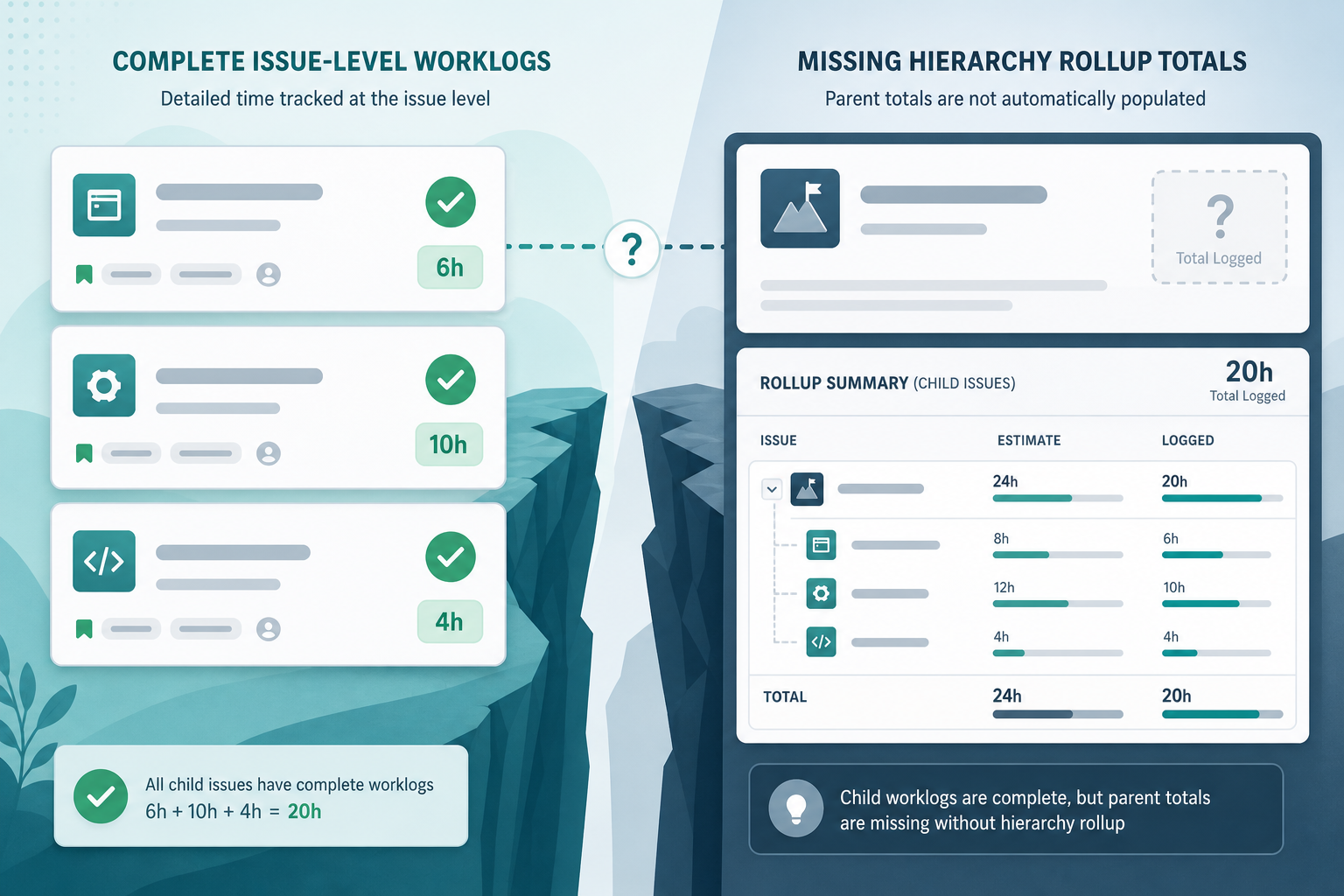
The sprint review starts with good news. Every story in the sprint has worklogs. Developers logged implementation. QA logged validation. Support logged a follow-up fix. Open any one issue and the Jira worklog history looks complete.
Then the scrum master tries to roll the sprint up to the epic and the question changes:
"How many hours did we log on this epic — and are we still inside the estimate?"
Nobody can answer from one screen. Someone adds columns in advanced search. Another exports to a spreadsheet. The team logged time correctly. The rollup is what failed.
That is the gap this article is about: issue-level logging completeness is not the same as hierarchy rollup visibility.
Two Different Questions: Worklog Completeness vs Rollup Total
Project managers and scrum masters often conflate two reporting jobs.
The first job is worklog completeness:
- Did the team log time on the work they performed?
- Are the entries on the right issues?
- Are remaining estimates updated?
The second job is rollup visibility:
- What is the total logged time for this epic, parent, sprint, or filter scope?
- How does that total compare to the baseline?
- Which child issues explain the variance?
Jira handles the first job at the issue level. Atlassian's time tracking documentation says the time tracking panel shows logged time and remaining time on a work item. Each worklog entry belongs to the issue where someone did the work.
The second job requires scope rules, aggregation, and often a path outside the issue view — export math, a planning rollup, or a dedicated Jira time rollup tool. Native Jira does not always assemble child worklogs into the total a stakeholder expects on the parent container.
Where Worklogs Live vs Where Managers Look
Teams usually log where the work happens: stories, tasks, bugs, and subtasks. They rarely log directly on epics or large parent containers.
That is normal delivery behavior. It also creates a visibility mismatch.
Imagine epic PAY-40 with three child stories:
- PAY-41: 6 hours logged
- PAY-42: 10 hours logged
- PAY-43: 4 hours logged
Open any story and the worklogs look healthy. Open the epic for the steering update and someone asks:
"So we have 20 hours on the epic — correct?"
The epic's own time field may show zero, a partial number, or nothing that matches the 20-hour child total without manual addition. The work is not missing. The rollup view is.
This is related to, but not identical to, Why your Jira epic always shows 0 hours. That article focuses on the empty epic field. Here the focus is broader: even when every child issue looks complete, the parent or epic total may still not be explainable from one native screen.
When the Hierarchy Looks Right but Parent Hours Are Missing
Jira hierarchy can be visually correct while time reporting is still incomplete.
Common patterns:
- the epic contains every child story, but the epic's own time spent field is zero
- the parent story is in the sprint, but real worklogs live on subtasks
- the project tree shows the right work, but original estimate and time spent are populated at different levels
- a dashboard gadget lists issues correctly but does not expose the child total behind the parent
This is not evidence that developers logged time incorrectly. It means the reporting view is reading issue-level fields while the manager is asking a hierarchy-level question. The fix is to define the rollup rule and use a reporting path that actually aggregates the children.
Subtasks and Sprint Scope Break the Illusion of Completeness
Subtasks are often how real work gets recorded. They are also where rollup rules get ambiguous.
Developers log on subtasks because that is the work they touched. The parent story may carry the sprint commitment while the evidence sits one level down. Atlassian's sprint report documentation says estimates on subtasks are not included in the sprint report and that the report is board-specific.
Atlassian's burndown chart documentation adds another layer: subtask behavior in the burndown varies with board settings, and time estimates on subtasks may roll up to the parent while estimates are tracked individually across subtasks and the parent.
So a scrum master can honestly say:
- Every issue in the sprint has worklogs.
- The sprint report still may not answer a total-hours question the way stakeholders expect.
See Why Jira subtasks make sprint time reports harder than they look for the sprint-specific checklist. The rollup gap appears whenever subtask worklogs exist but the report scope is parent, epic, or sprint-wide.
Lock Scope Before You Trust Any Rollup
The most common rollup failure is not missing worklogs. It is missing scope rules.
Write the rule before the status meeting:
"Totals include child issues under the epic, include subtask worklogs, exclude done issues moved out of scope, and use native Jira time-tracking fields only."
Or:
"We report from parent estimates only; subtasks explain execution but do not add separate budget."
Without that rule, exports, JQL filters, and stakeholder slides will disagree even when every worklog is valid.
Also watch for double counting. If a parent carries 40 hours and subtasks also carry 40 hours, summing everything inflates the budget. If the parent is empty and subtasks carry the real baseline, ignoring children makes the budget look zero.
Once scope is locked, use workRatio filters to find issues already over estimate. See Jira work ratio over budget for warning-zone JQL patterns.
Worklog Reports vs Hierarchy Rollups
Managers often ask for a Jira worklog report when they need a hierarchy total, or vice versa.
A worklog report answers:
- Who logged time?
- On which dates?
- On which issues?
- With what comments?
A hierarchy rollup answers:
- What is the total logged time for this epic, parent, sprint slice, or filter?
- What was the baseline?
- What remains?
- Which child issues drive variance?
Jira stores both kinds of data, but native views do not always present both answers in one place. Complete worklogs on child issues satisfy the first reporting job. They do not automatically satisfy the second.
Native Paths That Get Closer — and Their Limits
Before adding another tool, check what Jira already provides.
Issue-level search and JQL
Atlassian's JQL fields reference documents timeSpent, originalEstimate, remainingEstimate, workRatio, and parent as issue-level fields. JQL is excellent for finding work items with logged time. It does not natively sum totals across a hierarchy.
parent = PAY-40 AND timeSpent > 0
That returns PAY-41, PAY-42, and PAY-43. It does not return "20 hours total." See Can JQL show time spent in Jira? for the full row-vs-total distinction.
Exports
Atlassian supports exporting search results to CSV, Google Sheets, Microsoft Excel, and other formats. Exports are the standard bridge when worklogs are complete but the rollup lives in a spreadsheet formula.
Exports are enough when the report is occasional and one person owns the math. They become a trap when every review starts with rebuilding the same pivot — the pattern described in Why Jira project managers still live in Excel.
Sprint, board, and dashboard views
Sprint and burndown reports help with sprint accountability. Dashboards help with visibility. Neither is a guaranteed hierarchy rollup with variance explanation. See dashboard time rollup limits when the question is "where did the hours go?" rather than "what is the sprint shape?"
Jira Plans rollups
Jira Cloud Premium and Enterprise include planning features where Atlassian documents that Plans can roll up estimates dynamically as time is logged to child work items. That helps planning conversations. It may not replace the operational report a project manager needs for a client update. See Jira Plans rollups vs project reporting.
Large hierarchies
Atlassian notes that work items with more than 100 child work items cannot include those children in time tracking in some native contexts. Stay cautious with absolute rollup claims on large epics.
Admin Checks Before You Present a Rollup Total
Time-related reporting only works when the underlying setup is usable.
Atlassian's time tracking administration documentation says Jira Cloud time tracking is enabled by default, users need the Work On Work Items permission to log work, and admins can control time field visibility.
Check:
- Can the team see and edit the Time tracking field where they work?
- Do the right users have permission to log work?
- Can the person running the report see every worklog in scope?
- Are original estimates entered before work starts?
- Are remaining estimates updated during delivery?
- Are time units configured consistently across projects?
If worklogs exist but the viewer lacks permission to see them, the rollup will look incomplete even when logging is complete.
A Meeting-Ready Workflow
Use this sequence before a stakeholder update:
- Confirm worklogs exist on the issues where work happened.
- Define the reporting scope: epic, parent, sprint, project, or saved filter.
- Write inclusion rules for subtasks, done issues, and moved work.
- Run issue-level JQL to list the rows that should count.
- Decide whether the meeting needs row inspection or a defended total.
- If you need a total, export or use a rollup path — do not assume the parent view calculated it.
- Explain the drivers: which child issues account for most logged time and variance.
That workflow respects the team's logging discipline while acknowledging Jira's rollup gap.
What to Verify Before Adding a Rollup App
If worklogs are complete and the team still rebuilds the same totals manually, evaluate the gap directly.
Ask:
- Does the app use native Jira time-tracking fields?
- Does it roll up logged time, original estimate, remaining estimate, and variance together?
- Which hierarchy levels does it support: subtask, story, epic, parent, project, filter?
- How does it avoid double counting when parent and child estimates both exist?
- Can managers inspect child issues behind a total?
- Does it respect Jira worklog permissions?
- What Jira products and hosting models are publicly supported?
- Are pricing, privacy, and support details publicly clear?
Trial against one real epic or sprint — not a demo project with perfect logging rules.
Where TimePillar Fits
TimePillar is Backlog Bridge's product for teams whose Jira worklogs are complete on child issues but whose Jira time rollup answer is still rebuilt manually before every review.
It renders as a live rollup panel on the issue view — epic, project, or parent — showing estimate, logged time, variance, and child-work visibility without an export step first.
It complements good logging discipline, sprint ceremonies, and planning views. It does not replace them when those already answer the question.
See how Jira worklog rollups in TimePillar help teams close the gap between complete issue-level worklogs and explainable hierarchy totals.
Log Completely, Then Report at the Right Scope
Jira worklogs can be complete at the issue level while rollup answers remain incomplete at the epic, parent, or sprint level. That is not necessarily a logging failure. It is a reporting scope problem built into how Jira stores time on work items.
Do not ask the team to log more as the first fix. Lock the scope rules, verify which native path can defend the total, and add a rollup layer only when the same manual calculation repeats every cycle.
That is how complete worklogs become trustworthy rollups instead of a pre-meeting export ritual.