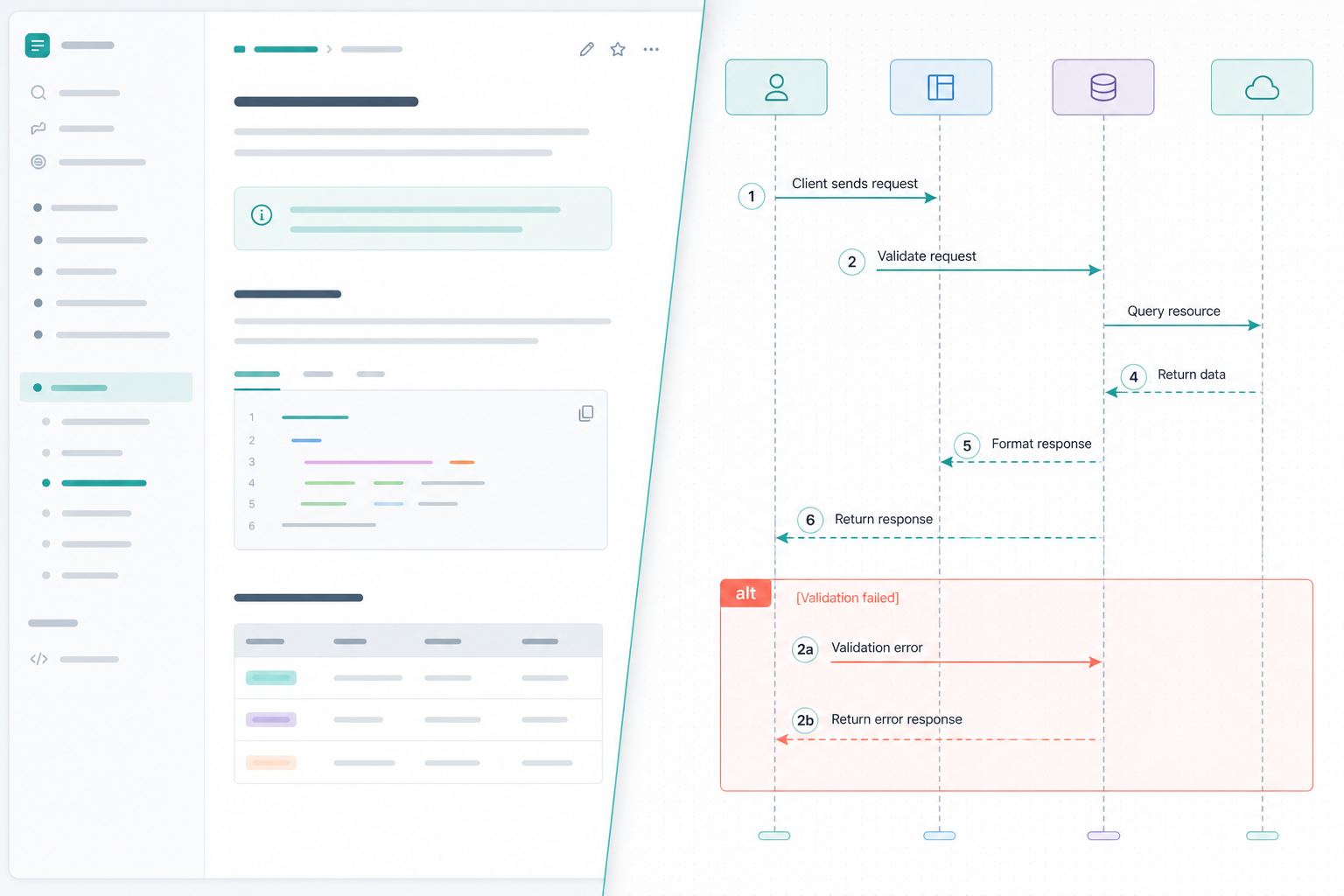
The OpenAPI file was complete.
Every endpoint had a path, method, and schema. During design review, the platform lead still asked the question the spec did not answer cleanly:
"What happens first — and who calls whom when checkout fails?"
Endpoint catalogs describe shape. Mermaid sequence diagrams Confluence pages describe order: requests, responses, async handoffs, retries, and failure branches between named systems.
This how-to walks through a practical API sequence diagram Confluence workflow: choose sequence syntax over flowcharts, define stable participant names, model error paths beside the happy path, preview while you edit, and hand the diagram to reviewers who were not in the authoring session.
Quick Answer
- Use
sequenceDiagramfor API flows. When the question is call order, sequence syntax beats flowcharts. - Stabilize participant IDs early. Use short machine-friendly IDs with readable display labels so diffs and search stay useful.
- Put success and failure in one diagram. Use
alt,opt,loop, andparso error stories do not drift into prose-only sections. - Preview while editing. Any Confluence Mermaid API documentation macro with live preview catches syntax and layout problems before review.
- Hand off with numbered steps and exports.
autonumber, Mermaid source, and SVG give reviewers a shared vocabulary.
BacklogBridge Diagram Lens for Confluence is one macro built for source-first Mermaid with Confluence Mermaid live preview, wide reader, search, and export. Verify the current Marketplace listing before install.
What You Are Trying To Accomplish
You want Confluence pages that explain how services interact over time:
- which system sends the first request
- which dependencies are synchronous vs async
- what the caller receives on success
- what happens on validation failure, timeout, or downstream outage
- how retries, idempotency, or compensating actions fit the flow
The outcome is a review artifact stakeholders can discuss without the author narrating from memory.
Place the diagram on the same page as the API overview or operation section it explains — above request/response tables when order matters, beside webhook or async event notes when callbacks are part of the story. Sequence diagrams complement OpenAPI and AsyncAPI specs; they do not replace machine-readable contracts.
Requirements
| Requirement | Why it matters |
|---|---|
| Confluence Cloud space for API or platform docs | Diagrams should live beside the spec they explain |
| Mermaid macro with preview and save | Reduces syntax trial-and-error during authoring |
| Participant naming convention | Stable IDs keep diagrams maintainable across service renames |
| Review workflow | Numbered steps and export paths reduce walkthrough meetings |
| Admin approval for Marketplace macros | Site admins install apps through Connected Apps |
Why Sequence Diagrams Fit API Flows
The Mermaid documentation describes diagrams defined as text and code. For APIs, the important dimension is time.
| Documentation question | Better diagram type |
|---|---|
| "In what order do these calls happen?" | sequenceDiagram |
| "Which branch runs when a flag is true?" | flowchart |
| "What entities relate to what?" | erDiagram |
| "What runs where in production?" | architecture diagram types when your renderer supports them |
Backlog Bridge's Mermaid chart tips guide recommends sequenceDiagram when the diagram must show request order, responses, async work, retries, and failures.
Map API Concerns To Sequence Constructs
| API concern | Sequence construct | Example label |
|---|---|---|
| Happy-path call chain | ordered messages | POST /checkout |
| Validation or business rule failure | alt / else | 422 Unprocessable |
| Optional enrichment step | opt | when loyalty_id present |
| Retry or polling | loop | Up to 3 attempts |
| Parallel downstream calls | par | fan-out to inventory and pricing |
| Async callback later | separate diagram or Note | Webhook: payment.captured |
| Timeout / unavailable dependency | alt branch | 503 Service unavailable |
| Shared precondition | Note over A,B | Idempotency-Key required |
Step 1: Define Stable Participants
Start with participants that match how engineers talk about the system — but separate stable IDs from display labels.
sequenceDiagram
    actor actor_client as Client app
    participant svc_gateway as API Gateway
    participant svc_orders as Orders Service
    participant db_orders as Orders DB
| Rule | Example |
|---|---|
| Use role prefixes | svc_, db_, queue_, external_, actor_ |
| Keep IDs lowercase snake_case | svc_billing, not Billing Service v2 as the ID |
| Put readable names in aliases | participant svc_billing as Billing Service |
| Declare every participant up front | Avoid surprise actors mid-diagram |
| Match service catalog names | Align with internal registry or OpenAPI title fields where possible |
If a service is renamed, update the alias first. Reviewers see the new name; diffs stay small.
Backlog Bridge's knowledge-base guidance also recommends predictable prefixes when teams use AI tools to revise Mermaid source — the same naming rules help human reviewers.
Step 2: Draft The Happy Path With autonumber
Add the success path before error branches. Use autonumber when reviewers need to reference exact steps in comments, tickets, or incident notes.
sequenceDiagram
    autonumber
    actor actor_client as Client app
    participant svc_gateway as API Gateway
    participant svc_orders as Orders Service
    participant db_orders as Orders DB

    actor_client->>svc_gateway: POST /checkout
    svc_gateway->>svc_orders: Create order command
    svc_orders->>db_orders: INSERT order row
    db_orders-->>svc_orders: order_id
    svc_orders-->>svc_gateway: 201 Created
    svc_gateway-->>actor_client: 201 Created
Use solid arrows (->>) for requests and dashed arrows (-->>) for responses, following Mermaid sequence diagram syntax.
Keep message text short: HTTP method and path, command name, or domain event — not paragraph-length payloads or secret values.
Minimum viable diagram, then failure depth
Teams new to Mermaid API documentation should ship in two passes:
- Minimum viable: participants, happy path,
autonumber, oneNotefor auth or idempotency if needed. - Failure depth: add one
altblock per major failure class — validation, dependency timeout, authorization — then optionallooporoptfor retries.
That keeps preview cycles fast and gives reviewers something concrete early.
Step 3: Add Error, Retry, And Parallel Paths
Model failures beside success so the diagram stays the system of record.
sequenceDiagram
    autonumber
    actor actor_client as Client app
    participant svc_gateway as API Gateway
    participant svc_orders as Orders Service
    participant db_orders as Orders DB

    actor_client->>svc_gateway: POST /checkout
    Note over actor_client,svc_gateway: Idempotency-Key required
    svc_gateway->>svc_orders: Create order command

    alt Valid payload
        par Reserve inventory
            svc_orders->>svc_orders: Check stock
        and Quote price
            svc_orders->>svc_orders: Calculate total
        end
        svc_orders->>db_orders: INSERT order row
        db_orders-->>svc_orders: order_id
        svc_orders-->>svc_gateway: 201 Created
        svc_gateway-->>actor_client: 201 Created
    else Validation failed
        svc_orders-->>svc_gateway: 422 Unprocessable
        svc_gateway-->>actor_client: 422 Unprocessable
    else Database unavailable
        svc_orders-->>svc_gateway: 503 Service unavailable
        svc_gateway-->>actor_client: 503 Service unavailable
    end

    opt Retry policy enabled
        loop Up to 3 attempts
            actor_client->>svc_gateway: POST /checkout (retry)
            svc_gateway->>svc_orders: Create order command
        end
    end
Split into a second diagram when one flow mixes checkout, fulfillment, and billing settlement. One diagram should answer one review question.
For accessibility on shared API docs, add accTitle and accDescr when your Mermaid renderer supports them on sequence diagrams.
Step 4: Edit With Live Preview In Confluence
Syntax errors are cheaper to fix while authoring than during a review meeting.
After an admin installs an approved Mermaid macro, use this loop:
- Paste a minimal happy-path skeleton.
- Validate with a small known-good sample if the macro exposes a syntax panel.
- Confirm participants render with readable aliases.
- Add
autonumberonce message order is stable. - Introduce one
altblock at a time; preview after each addition. - Open wide view if lifelines crowd the page column.
- Save, reopen, and confirm stored configuration renders the same way.
Diagram Lens public pages describe a source editor with live preview, line/character counts for source size, and a wide reader with search and minimap for longer diagrams. Diagram Lens support docs also recommend starting from a small known-good diagram and checking the syntax error panel for line, column, and token details when render fails.
That is the practical value of Confluence Mermaid live preview: the diagram and surrounding spec stay in one place, and authors see layout problems before review.
Step 5: Hand Off For Review
Review handoff fails when only the author can narrate the flow.
| Handoff artifact | What it gives reviewers |
|---|---|
Numbered steps (autonumber) | Shared references — "change step 7" |
| Mermaid source export | Diffable updates in doc reviews |
| SVG export | Static attachment for slides or tickets when needed |
| Confluence page comments | Context beside the diagram |
| Search in wide reader | Fast lookup of participant labels on large diagrams |
Suggested review agenda:
- Confirm participant names match the service catalog.
- Walk the happy path by step number.
- For each
altbranch, confirm status codes and owning team. - Mark async or out-of-band work intentionally off-diagram.
- Record open questions as page comments.
Example reviewer comment that works because of autonumber:
"Step 6 should return 409 when the idempotency key repeats, not 422."
Diagram Lens public support docs describe Mermaid source and SVG as primary reliable export paths. PNG, PDF, and clipboard image export are best effort and may depend on browser support, diagram size, and Forge iframe permissions — verify on your largest real diagram if raster exports matter.
Common Pitfalls
| Pitfall | Better approach |
|---|---|
| Using flowcharts for call order | Switch to sequenceDiagram |
| Display names as participant IDs | Stable ID + alias |
| Errors documented only in prose | Model with alt / opt |
| One diagram for every subsystem | Split by review question |
| Paste full JSON payloads in messages | Reference schema or field names |
| Mermaid click syntax or HTML labels | Use plain labels; many Confluence macros block interactivity |
| Sensitive tokens in message text | Reference header names, not secret values |
Skipping preview on large alt nesting | Preview after each branch you add |
Backlog Bridge's knowledge-base page notes that Diagram Lens-safe examples avoid source-defined interactivity and raw markup patterns — appropriate for API documentation in shared Confluence spaces.
Admin Checks Before Rollout
Atlassian's Manage your apps documentation says Confluence apps are usually installed from Marketplace through Connected Apps and require site admin access.
At the time of research on July 13, 2026, I did not find an official Atlassian Marketplace listing for BacklogBridge Diagram Lens for Confluence through available public sources. Search Marketplace again before install.
| Check | Why it matters for API docs |
|---|---|
| Listing name, vendor, Cloud compatibility | Wrong app or hosting model blocks rollout |
| Install scopes and egress | Diagram source may name internal services |
| Source-size limits | Large API flows with many branches hit limits sooner |
| Export paths | Reviewers may require SVG or source, not PNG |
| Sanitization behavior | Plain labels are safer than HTML or click syntax |
The public Diagram Lens security page describes client-side rendering, storage:app scope, no external egress declared in the current manifest, and strict Mermaid sanitization. For a fuller macro security review, see Mermaid Macro Security in Confluence.
Do not infer SOC 2, ISO, Cloud Fortified, GDPR/DPA, or procurement approval without explicit published evidence.
When To Use A Different Approach
- OpenAPI-only reference pages may be enough when readers never ask about ordering.
- Event schemas and topic diagrams may fit async platforms better than request/response sequences alone.
- Canvas tools such as draw.io or Gliffy may fit workshop sketching better than maintained text source — see Mermaid vs draw.io and Gliffy in Confluence.
- Static images may be enough for rarely changed flows with no source review requirement.
Choose sequence diagrams when call order is debated repeatedly and the diagram should change with the spec.
Trial Checklist
Test with one real API flow your team argues about — not a toy two-box diagram.
- Create a Confluence page beside the relevant API spec section.
- Insert the Mermaid macro and define stable participants.
- Draft the happy path; enable
autonumber. - Add at least one validation failure and one downstream failure with
alt. - Preview after each structural change; fix syntax with the macro's error panel if available.
- Open wide view and search for two participant labels reviewers name often.
- Ask a second reviewer to explain one numbered step without author guidance.
- Export Mermaid source and SVG; test PNG only if your handoff requires it.
Final Recommendation
Mermaid sequence diagrams Confluence workflows work best when teams treat API flows as time-ordered, reviewable source — not as one-off drawings.
Define stable participants, number the happy path, model failures beside success, preview while editing, and hand reviewers numbered steps plus source or SVG exports. If your team already keeps Mermaid in Confluence and wants live preview plus reader tools for longer API flows, Diagram Lens is worth a focused trial — after you verify the current Marketplace listing, install prompt, and export behavior on your own diagrams.
For diagram-type guidance, see Backlog Bridge's Mermaid chart tips guide. For large-diagram reading beyond sequence layout, see Mermaid Diagrams in Confluence: Why Big Diagrams Need a Reader.