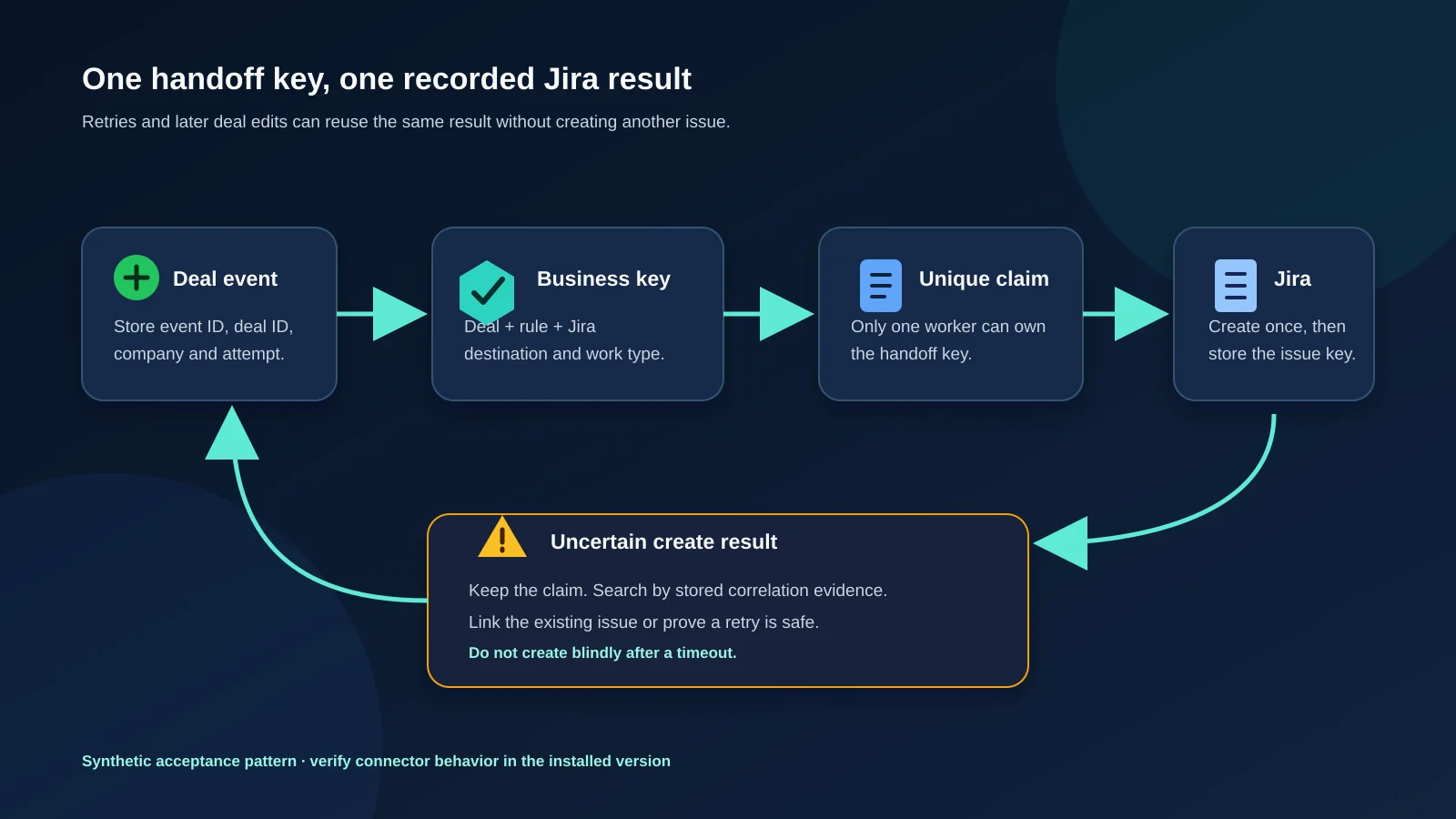
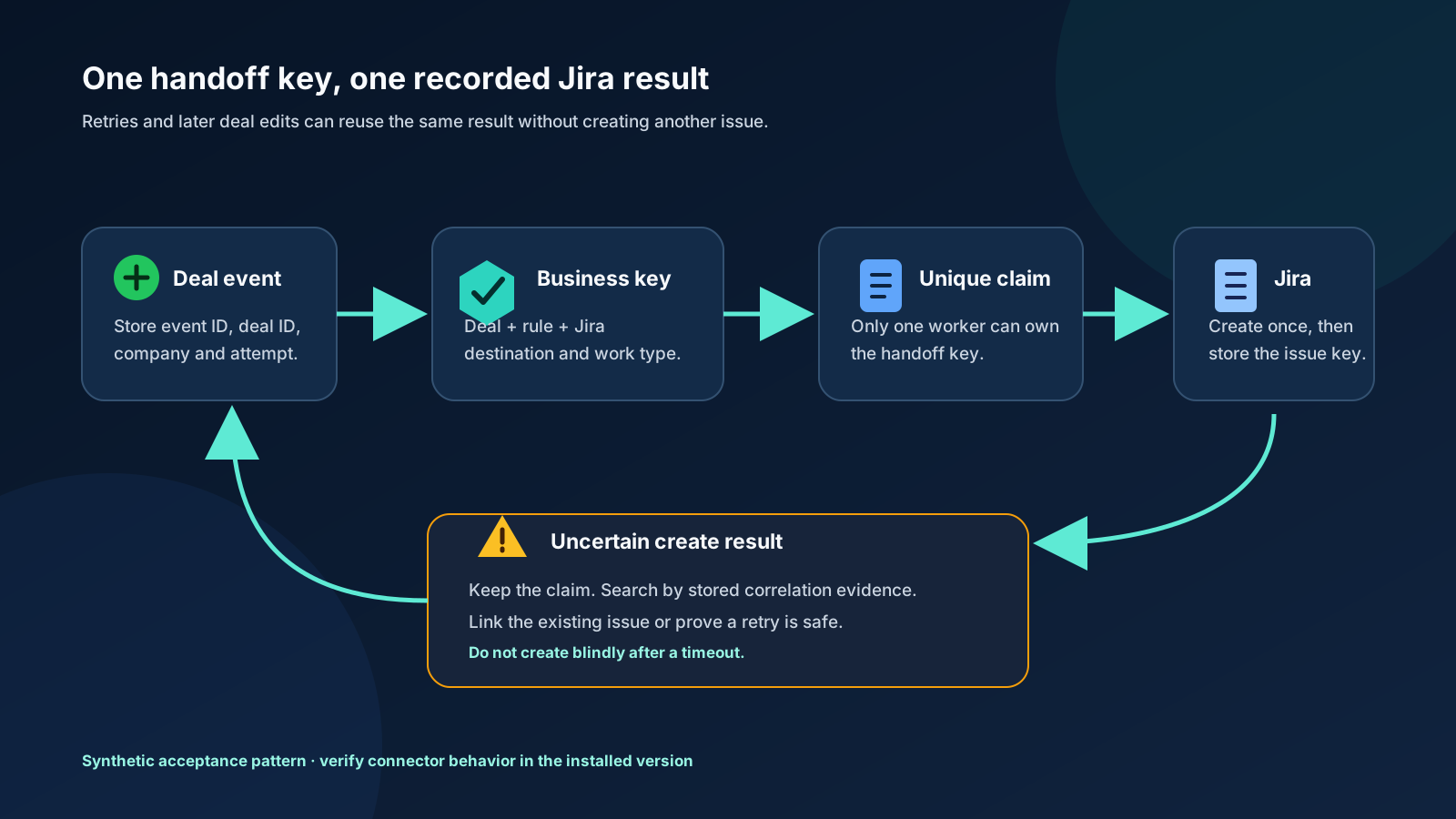
To prevent duplicate Jira issues from Pipedrive deals, define one stable business key for the intended handoff, claim that key before creating an issue, and store the resulting Jira key against it. Treat webhook delivery attempts, later edits to the same deal, and deliberate second handoffs as different cases. If issue creation has an uncertain result, reconcile Jira and the handoff record before retrying.
This is an implementation and acceptance-test pattern for teams connecting Pipedrive to Jira. The examples are synthetic. They do not claim that a particular connector already implements these controls.
First define what “duplicate” means
Two Jira issues with the same Pipedrive deal ID are not always duplicates. A deal might legitimately create an onboarding task and a separate security-review task. Conversely, two different webhook events for one deal can still represent the same intended onboarding handoff.
Write the business rule before choosing a technical key. A useful example is:
Create at most one Jira issue for each Pipedrive company, deal, automation rule, Jira site, project and issue type.
Under that policy, the stable handoff key is conceptually:
company_id + deal_id + rule_id + jira_site + project_id + issue_type_id
Use immutable identifiers rather than display names. Renaming “Implementation” to “Customer onboarding” should not silently create a new handoff identity. If a changed destination is intended to create new work, make that an explicit rule revision or migration decision.
The exact fields belong to your process. A team that allows one issue per contract amendment may need an approved amendment ID. A team that creates one issue per product line may need the product-line ID. The key must express the unit of work the business wants to keep unique.
Keep three identities separate
| Identity | Example | What it answers |
|---|---|---|
| Webhook event | Pipedrive meta.id plus delivery metadata | Which source notification are we tracing? |
| Business handoff | Company + deal + rule + Jira destination | Has this intended unit of work already been claimed? |
| Jira result | Issue ID and key such as DEL-101 | Which Jira work item fulfilled the handoff? |
Pipedrive's webhooks v2 guide documents meta.id as the event ID, entity_id as the affected object ID, company_id, webhook_id, and an attempt number. These values are useful for tracing delivery. They do not answer the business question of whether a later, distinct deal event is allowed to create another Jira issue.
Do not use the visible deal title as the key. Titles can change and need not be unique. Do not use only the webhook event ID as the business key: a deal can generate several change events while remaining eligible for the same handoff.
Why a Jira create attempt can be followed by another delivery
Pipedrive accepts any 2xx response as successful webhook delivery. Its current v2 guide says that a failed initial request, including a request that exceeds the documented 10-second timeout, is retried after 3, 30 and 150 seconds. The payload's attempt value identifies the first delivery and the three retry positions.
That creates a practical race. An endpoint can ask Jira to create an issue, lose the response or take too long to acknowledge Pipedrive, and then receive another delivery. Calling Jira again without checking the first outcome can create a second issue.
A durable intake pattern reduces this risk:
- Validate the minimum event envelope.
- Store the event or enqueue it durably.
- Return a successful response only after that intake succeeds.
- Process the business handoff from the durable record.
- Claim the business key before calling Jira.
Fast acknowledgement does not solve duplicate prevention by itself. The durable record, unique claim and result mapping do the important work.
Prevent duplicates when a Pipedrive deal enters a stage
“The deal entered this stage” and “the deal is currently in this stage” are different triggers. A scheduled rule that lists every deal currently in a delivery-ready stage can select the same deals on every run. A transition-based rule qualifies the change that moved one deal into the target stage.
For a Pipedrive v2 deal-change event, compare the current stage identifier in data with the corresponding prior value in previous. Pipedrive documents data as the current object state and previous as only the fields changed by an update. Use stable stage IDs instead of names, because administrators can rename a stage without changing its identity.
A stage-entry rule should establish all four conditions before attempting Jira creation:
- The event describes a change to the intended deal.
- The current stage ID equals the configured target.
- The prior stage ID differs from the target, establishing an entry rather than an unrelated edit while the deal remains there.
- The stable business handoff key is not already linked to a Jira result.
The transition check avoids treating a full-stage scan as new work. It does not replace the unique claim: concurrent events, webhook retries and an uncertain Jira response can still repeat after a legitimate stage entry.
Decide re-entry behavior explicitly. For one Jira issue per deal and rule over the deal's lifetime, reuse the same handoff key when the deal leaves and later returns to the stage. If the business permits another issue for an approved second delivery cycle, add a controlled generation or amendment identifier to the key. Do not use the delivery attempt or current time to manufacture uniqueness; that would allow every retry to become new work.
Claim the handoff before creating Jira work
Use a data-store constraint or equivalent atomic operation so two workers cannot both decide that the same handoff is absent. A simple state model is:
| State | Meaning | Allowed next action |
|---|---|---|
claimed | One worker owns this business key | Build and validate the Jira request |
create_requested | A Jira request was sent; the outcome may or may not be known | Store a confirmed result or reconcile |
linked | The Jira issue ID and key are recorded | Return or reuse the existing link |
needs_reconciliation | Evidence cannot distinguish failure from an unrecorded success | Search using the stored correlation evidence; do not create blindly |
failed_safe_to_retry | Investigation found no created issue and the cause is corrected | Retry under the same claimed key |
The transition into claimed must be unique for the chosen business key. A “check, then insert” sequence without a unique constraint can fail when two qualifying events run concurrently: both checks see nothing, and both workers create an issue.
Download the accessible duplicate-prevention flow as SVG for an implementation review or runbook.
Treat Jira properties as correlation evidence
Jira Cloud's create-issue API accepts issue fields and can set issue properties during creation. Jira also provides issue-property operations for storing custom JSON data against an issue, subject to the documented permissions and scopes.
An integration can use a property or a supported dedicated field to record a sanitized handoff identifier. That makes later reconciliation more reliable than searching summaries. Store only the identifiers required for the link; avoid copying credentials or unnecessary CRM data.
An issue property is evidence after an issue exists. It is not, by itself, an atomic pre-creation lock across workers. Keep the unique handoff claim in the integration's durable state, and store a correlation value in Jira so the two sides can be reconciled.
Work through seven retry and re-entry cases
The duplicate-prevention test ledger contains seven synthetic observations. Its columns are an acceptance-test format, not a Pipedrive or Jira export schema.
| Case | Existing handoff state | Expected decision |
|---|---|---|
| First qualifying event for deal 4101 | No record | Claim the key and create once |
| Later delivery attempt for the recorded event | Linked to DEL-101 | Return the existing result; do not create |
| A new title-change event while the same rule remains true | Linked to DEL-101 | Record the event and reuse the existing result |
| The same deal qualifies for a distinct security-review rule | No record for that rule | Create once under a different business key |
| Jira create request times out | create_requested, no result recorded | Reconcile before any retry |
| Two workers receive qualifying events together | One worker already claimed the key | The second worker waits for or reads the first result |
| An administrator deliberately resets the handoff | Prior result retained | Require an explicit approved generation or new rule identity |
The ledger's expected actions follow the example policy defined above. Change them when your process intentionally permits several Jira issues for one deal.
Reconcile an uncertain create result
When the Jira response is missing, “try again” is not the first step. Preserve the request time, target site and project, handoff key, source event metadata, and any response fragment. Then:
- Check whether the integration already recorded a Jira issue ID or key.
- Search the intended destination using the stored correlation value or supported link field.
- Verify any candidate issue against the deal, rule, project and issue type.
- If exactly one valid issue exists, repair the mapping and mark the handoff
linked. - If several candidates exist, stop automated creation and resolve them through the team's duplicate policy.
- If the evidence supports that no issue was created, fix the original failure and retry under the existing claimed key.
A summary search alone is weak evidence because users can edit summaries and unrelated issues can use similar text. Build reconciliation around identifiers your integration deliberately records.
Do not delete a suspected duplicate before confirming comments, worklogs, attachments, links, watchers and downstream references. The recovery decision belongs to the Jira owner responsible for that project.
Test behavior before enabling the rule for real deals
Use fictional deal data in a sandbox or controlled test destination. Run these actions and save the results:
- Qualify one deal once and record its Jira key.
- Deliver the same saved test notification again if your tooling permits it.
- Make an unrelated edit while the deal remains in the qualifying state.
- Move the deal out of and back into the qualifying state.
- Trigger two qualifying updates close together.
- Simulate a Jira validation error before creation.
- Simulate an uncertain result after the create request is sent.
- Run a deliberately different rule for the same deal.
For each action, record the source event, attempt, derived business key, state transition, Jira request count, resulting issue keys and operator decision. The acceptance result is stronger than “the webhook was green”: repeated or concurrent delivery must still produce the number of business handoffs your policy allows.
Ask connector vendors precise questions
If you use a packaged connector, ask:
- What fields define duplicate prevention: event, deal, rule, project, issue type, or another key?
- Does the protection survive restarts and simultaneous event processing?
- What happens when Jira creates an issue but the connector does not receive or store the response?
- Can an administrator locate and repair a missing deal-to-issue mapping?
- How does the connector authorize a deliberate second issue for the same deal?
- Which event and result identifiers appear in support logs?
A “no duplicates” statement without a key and recovery behavior is incomplete. Verify the installed version with the test cases above.
Monitor the business result
Count distinct intended handoffs, distinct Jira results, suppressed repeat events and unresolved create attempts. Alert on business keys with more than one Jira issue and on records left in create_requested or needs_reconciliation beyond the team's response target.
The existing Pipedrive Jira webhook troubleshooting guide traces missing results and delivery failures. The deal-to-issue setup guide defines the trigger, destination and acceptance check. Use this duplicate-prevention design when implementing or evaluating the retry and re-entry behavior behind those workflows.
Backlog Bridge's Pipedrive Integration for Jira describes trigger-based issue creation and webhook-status workflows. Evaluate its installed behavior with the same cases rather than inferring duplicate guarantees from the overview page.