Quick answer
Forge customer-managed egress lets a Jira administrator approve the external domain an app may contact for one installation. For a Nextcloud integration, review the exact HTTPS hostname, why the app needs it, which request type is being enabled, what data the tested workflow sends, and how to remove and restore the permission. Approval permits network access to that destination; it does not bypass Nextcloud authentication or folder permissions.
This is an approval and verification guide for Jira admins and security reviewers. It explains Atlassian's control model and uses a fictional cloud.example.com record. It does not claim that every Nextcloud Jira app uses the same egress type or sends the same fields.
Check the feature status before approving
As checked on September 13, 2026, Atlassian labels customer-managed egress and remotes as a Forge Preview feature. Atlassian describes Preview features as stable enough for early production adoption but still under active development, with potentially shorter deprecation windows than generally available features.
The same documentation states that a Forge app using customer-managed egress or customer-managed remotes is not eligible for Runs on Atlassian. Record this as a platform characteristic in the security review. Do not present the admin consent screen as proof of Runs on Atlassian eligibility, data residency, or a completed vendor assessment.
Recheck the linked Atlassian page when reviewing a later app version. The feature status and limitations can change after this article's source-check date.
What the Jira administrator is approving
A useful approval statement is specific:
Allow this installed Forge app to make the stated type of request to
https://cloud.example.comfor the documented Nextcloud workflow.
That statement contains four separate decisions:
| Decision | Evidence to capture | What it does not establish |
|---|---|---|
| Destination | Exact HTTPS scheme and hostname shown for approval | Ownership or safety of every service behind that host |
| Traffic type | For example, backend fetch when that is what the installed app requests | Every HTTP method, path or data field the app will use |
| Purpose | The user-facing reason shown by the app and the tested workflow | A broad right to reuse the destination for unrelated features |
| Installation | Jira site and installed app version receiving the configuration | Approval for another Jira site or another app |
Atlassian's model stores customer-managed choices per installation. Runtime egress permissions remain the enforcement layer that determines whether an outbound call is allowed. The approval therefore has operational meaning, but it is only one layer of the full connection.
Why a Nextcloud destination fits this model
Traditional Forge external permissions declare possible destinations in an app manifest. Atlassian's Forge manifest permissions reference describes the external domains an app can access, while its runtime egress documentation says an undeclared third-party destination is rejected by default for Forge functions.
That works well for a service with one fixed API domain. A self-hosted or customer-selected Nextcloud instance differs: one Jira customer may use cloud.example.com, another may use files.example.org, and neither domain is known when a general app version is built.
Atlassian says customer-managed egress is intended for external endpoints that vary by customer and must not be used to request a predefined, required destination. A per-installation Nextcloud hostname is therefore a plausible use case for the platform feature. Whether a particular app implements the feature correctly still requires installed-version evidence.
Distinguish egress groups from customer-managed remotes
Do not use “egress” and “remote” as interchangeable labels in an approval ticket.
| Forge concept | What it describes | Question for the app vendor |
|---|---|---|
| Customer-managed egress group | External domains and allowed resource types, such as backend fetch | Which group, domain and egress type will the app request? |
| Customer-managed remote | A keyed backend endpoint whose URL an administrator can configure | Is the Nextcloud endpoint implemented as a configurable remote? |
Atlassian documents these as different mechanisms. It also lists different compatibility limits for configurable remotes. Ask the vendor which mechanism the installed version uses, then assess the rules for that mechanism instead of inferring from a generic “Forge app” label.
Backlog Bridge's Nextcloud for Jira product page describes customer-managed egress to the Nextcloud domain. Its official Atlassian Marketplace listing describes a Forge app for Jira Cloud with HTTPS-only URLs, SSRF protections, minimal Forge scopes and admin-approved outbound access. These are public vendor disclosures, not observed proof of a particular installation. Confirm the actual domain, egress type, app version and current feature status in your installed version and Atlassian administration screens.
Follow the approval lifecycle
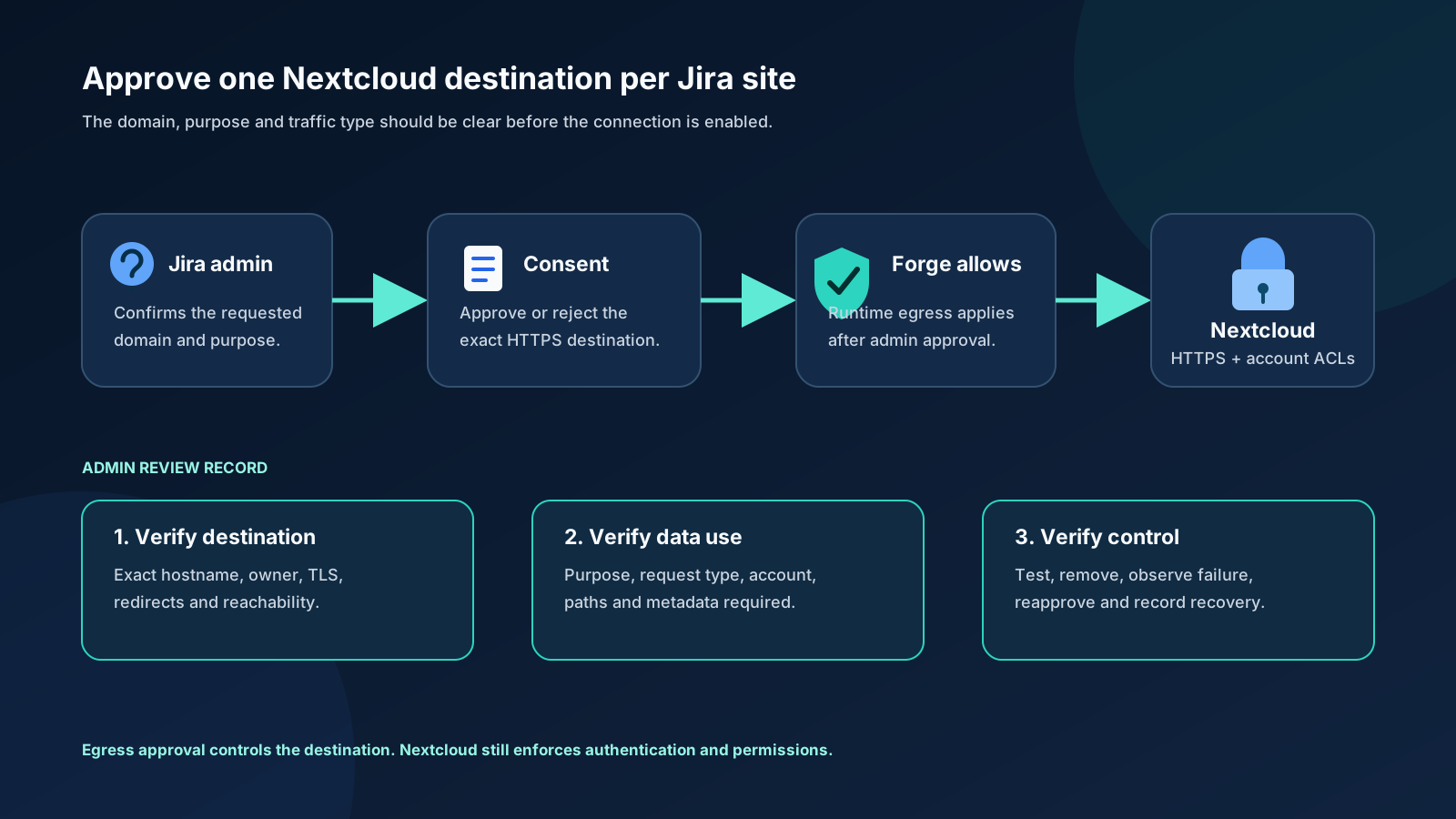
For customer-managed egress, the intended lifecycle is:
- The app is built with configurable external permissions enabled.
- A Jira administrator enters or selects the intended external destination through the app's configuration flow.
- Atlassian shows a consent modal with the proposed domain and description.
- The administrator approves or rejects the change.
- Forge stores the approved configuration for that installation.
- Runtime egress enforcement permits matching requests and rejects destinations that are not allowed.
- An administrator can later review or delete configured domains in the app's Data management area under Connected Apps.
Atlassian notes that when an already configured domain is reused for a different egress type, the modal is not shown again for that domain. Capture the configured egress types from installed-version or vendor evidence instead of treating the consent modal as a complete inventory.
Atlassian says setting and deleting this configuration requires an administrator and cannot be performed through Forge user impersonation. Its documentation also says changes to egress configuration are recorded in Atlassian Guard audit logs. Guard access depends on the organization's Atlassian setup, so record whether your reviewers can actually retrieve the relevant event.
Inspect the exact domain before consent
Do not approve from a screenshot or a copied hostname without confirming ownership. Work through these checks with the Nextcloud administrator:
- Open the proposed base URL through the organization's trusted route and verify it is the intended production instance.
- Confirm the hostname is owned or contractually controlled by the organization.
- Require HTTPS with a valid certificate chain. Nextcloud's server-hardening guidance recommends HTTPS for production because HTTP exposes data and credentials to interception risk.
- Check whether the base URL redirects to another hostname. For third-party fetch requests, the redirected external hostname must also be permitted; Forge Remote requests do not follow redirects.
- Confirm whether a reverse proxy, web application firewall or allowlist will accept requests from the integration path.
- Record who owns certificate renewal, DNS changes and hostname migration.
Approval should stop if the domain is a private placeholder, an unexpected tenant, plain HTTP, a personal development host, or a hostname whose owner cannot be established.
Describe the data flow without guessing
The consent record should state what the tested feature needs to send and receive. For a folder-browsing workflow, review possible categories such as:
- Nextcloud authentication material carried with the request;
- requested folder paths or identifiers;
- file names and metadata returned for display;
- Jira issue identifiers used to associate an issue with a folder;
- error details retained for troubleshooting.
This list is a review prompt, not a declaration that a particular app sends every category. Obtain the installed app's privacy documentation, scopes, configuration screen and observed network behavior. Record whether file contents are transferred, whether only metadata is read, and where any issue-to-folder mapping is stored.
Egress approval identifies a permitted destination. It does not document data minimization, retention, secret storage, logging or deletion by itself.
Keep Nextcloud controls in the decision
Forge allowing a request does not mean Nextcloud accepts it. The Nextcloud server still applies TLS, authentication, account status, folder permissions and any proxy or network controls.
Use a dedicated integration identity with the minimum folder access required for the workflow. Nextcloud's device-password documentation recommends separate device-specific passwords so individual client access can be revoked. It also notes that the generated password is shown only when it is created.
For the full URL, account, app-password and connection test sequence, follow the Nextcloud Jira admin connection guide. Keep this article's egress decision separate from credential custody and folder authorization.
Create an approval record
The customer-managed egress approval record contains one fictional example and one blank template row. Adapt its fields to your security process; it is not an Atlassian or Nextcloud export format.
At minimum, record:
- Jira site and installed app version;
- exact approved scheme and hostname;
- Nextcloud domain owner;
- requested Forge egress type and stated purpose;
- expected data categories;
- integration account owner;
- HTTPS and redirect checks;
- approver and approval time;
- Connected Apps and audit-log evidence;
- removal and recovery test results;
- review or certificate-renewal date.
Download the accessible approval flow as SVG for a security ticket or runbook.
Test that removal fails closed
Run this drill on a non-production Jira site and a fictional or non-sensitive Nextcloud folder:
- Record the configured domain and confirm the app's connection test succeeds.
- Link or open the approved sandbox folder using the documented workflow.
- In Atlassian Administration, open Connected Apps, select the app and locate its data-management controls.
- Delete the relevant customer-managed domain or group.
- Repeat the connection or folder-list action.
- Confirm the feature reports a controlled failure and does not silently call a different destination.
- Re-enter the intended domain through the app and review the Atlassian consent modal again.
- Approve, retest and record recovery.
Do not run the removal step against a production connection without an agreed maintenance window. The purpose is to demonstrate administrative control, failure behavior and recoverability before real project files depend on the integration.
Review hostname changes as new decisions
A Nextcloud migration can change DNS, proxy behavior, certificates or the visible hostname. Treat cloud-old.example.com to cloud.example.com as a new approval decision even when both systems are operated by the same team.
Before the change:
- inventory the old configured destination;
- validate the new HTTPS URL and any redirect chain;
- confirm the integration identity works on the new endpoint;
- schedule a sandbox connection test;
- document how the old domain will be removed;
- preserve audit evidence for both actions.
Do not leave the old domain approved indefinitely as a rollback plan. Give rollback access an owner and an expiry time.
Ask vendors questions that produce evidence
Use these questions during evaluation:
- Does the installed version use a customer-managed egress group or a customer-managed remote?
- What exact domain and description appear in the consent modal, and what egress type does the app configure?
- What changes when the administrator rejects or removes the destination?
- Does the app block HTTP, private-address and metadata-service destinations before requesting approval?
- What Jira identifiers, folder paths, file metadata or file contents cross the boundary?
- Where are credentials and issue-to-folder mappings stored?
- How are redirects, certificate failures and hostname changes reported?
- Which Forge Preview, Runs on Atlassian and data-residency limitations apply to this version?
- Can the vendor provide a reproducible sandbox test without production credentials?
A permission list answers what the platform may allow. A useful vendor response also explains why the app needs it and shows what the installed workflow actually does.
Approval decision table
| Observation | Decision |
|---|---|
| Exact organization-controlled HTTPS hostname; purpose and data categories documented | Proceed to sandbox approval and testing |
| Consent modal shows a different or broader domain than the reviewed record | Reject and ask the vendor to explain the discrepancy |
| App requires a fixed vendor endpoint but requests it as customer-managed egress | Ask why it is not declared as static egress, following Atlassian's stated use rule |
| Reviewer assumes customer-managed egress means Runs on Atlassian | Correct the assessment before approval |
| Removal and reapproval have never been tested | Keep production rollout pending |
| Nextcloud account has broader folder access than the Jira audience needs | Reduce account permissions before go-live |
Approve a controlled connection
Customer-managed egress is useful because the Nextcloud hostname can become an explicit, per-installation admin choice. Treat that choice as a recorded boundary: verify the destination, understand the purpose and data, test removal, and keep Nextcloud authentication and permissions in scope.
The control is strongest when the consent screen, Connected Apps configuration, audit event, Nextcloud account and sandbox result all describe the same destination and workflow. Recheck Atlassian's Preview status and limitations when the app version changes.
If this approval model fits your security requirements, review Nextcloud for Jira and run the connection and removal checks on a sandbox site before production use.
After approval, use the issue-folder linking workflow to validate the reader experience. For the storage-model decision that comes before integration, compare Jira attachments with Nextcloud linked folders.