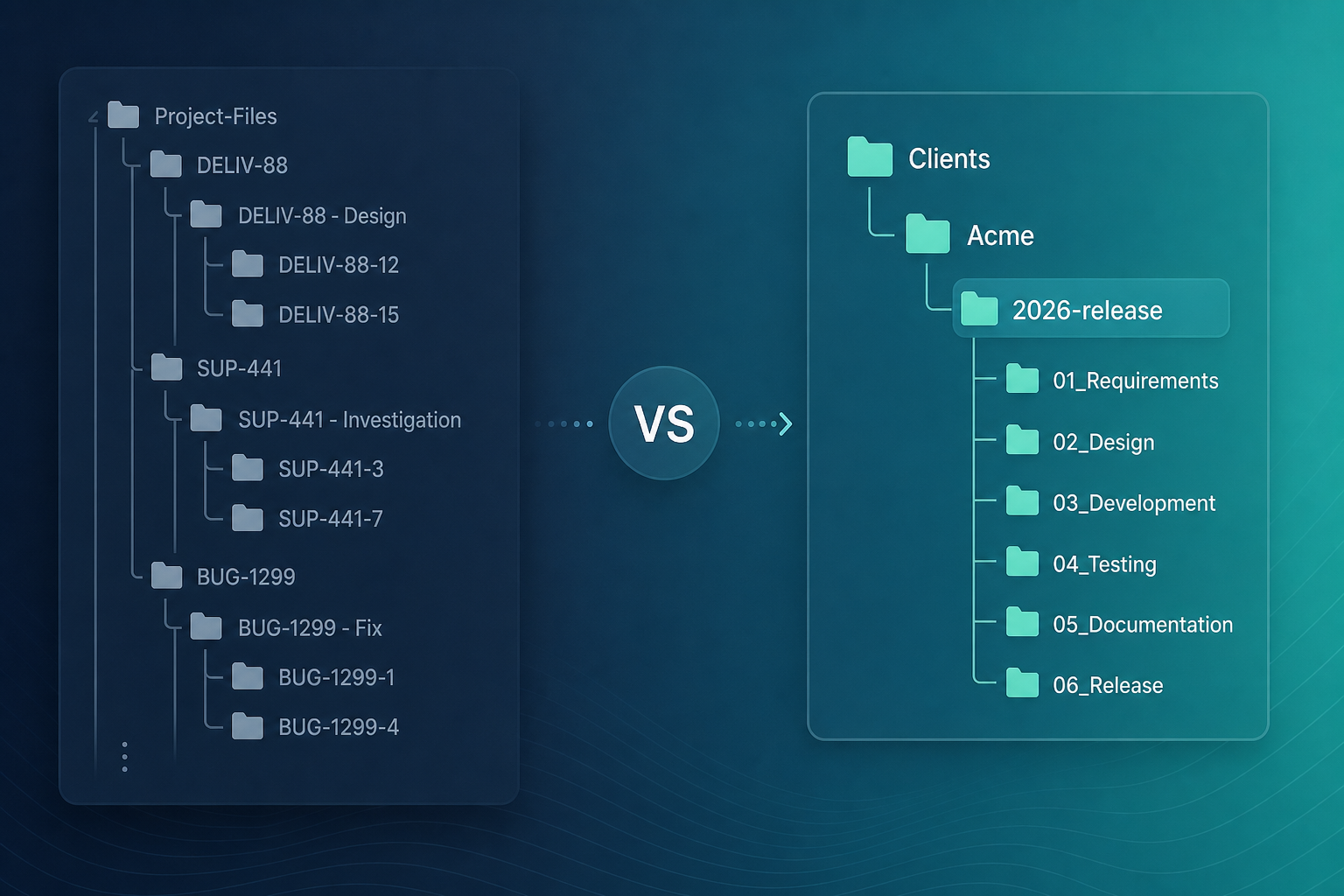
The delivery PM enabled auto-create issue folder on every story type. Six months later, the Nextcloud admin opened the Jira/ tree and counted four hundred directories — most tied to closed tickets nobody cleaned up. Active work still lived in Clients/Acme/2026-release, but half the squad uploaded to Jira/DELIV-88 because the panel made it easy.
"We turned on ISSUE-KEY folders to fix file chaos. Did we just move the chaos into Nextcloud?"
That question belongs to Jira admins designing Nextcloud folder naming before org-wide rollout — not to individual developers picking a path per ticket.
Backlog Bridge's public Nextcloud for Jira product page describes optional auto-create of Jira/ISSUE-KEY folders alongside manual link to existing project directories. The feature is useful. It is not a default every mature team should enable blindly.
This use-case article evaluates Jira ISSUE-KEY folder Nextcloud auto-create versus manual linking by team maturity, issue type, and cleanup discipline — so admins publish a folder convention delivery teams can follow.
Quick verdict
| If your team… | Start with… |
|---|---|
| Has no published folder taxonomy | Manual link to a small set of client roots; fix naming before auto-create |
| Shares specs across epics and stories | Manual link to one client or release folder per engagement |
| Needs predictable per-ticket upload targets | Auto-create Jira/ISSUE-KEY with a cleanup runbook |
| Mixes shared deliverables and issue-local assets | Hybrid — publish rules by issue type |
Verify auto-create path, permissions, and enablement in sandbox before you treat any row as policy.
What auto-create does
Public vendor copy for Nextcloud for Jira describes two linking paths from the Nextcloud files panel on each Jira issue:
- Manual link — browse and select an existing Nextcloud project folder
- Optional auto-create — create a directory named from the issue key, commonly
Jira/ISSUE-KEY(for exampleJira/DELIV-88when the key is DELIV-88)
Project infographic context on the Backlog Bridge site shows a linked path pattern like Jira/CHRON-50 on an issue panel alongside Refresh, Change folder, and Open in Nextcloud actions.
Auto-create answers one narrow question: "Where should someone upload files for this ticket without browsing?" It does not replace client folder taxonomy, PM cleanup, or Nextcloud ACL design.
For step-by-step linking actions, see How to Link a Nextcloud Folder to a Jira Issue Without Copy-Paste URLs. This article stays on the convention decision.
The folder convention decision admins own
Connecting Nextcloud to Jira is infrastructure. Choosing auto-create vs manual link is delivery policy.
Without a written convention, teams recreate the problems URL paste caused — just with more directories:
- Some issues point at
Clients/Acme/specs, others atJira/ACME-12 - Epics share a client folder; stories auto-create orphan subtrees
- Closed issues leave
Jira/ISSUE-KEYfolders nobody archives
Jira admins should publish:
- Which issue types use manual link, auto-create, or hybrid
- Where client deliverables live versus issue-local assets
- Who creates top-level Nextcloud directories
- How orphan auto-created folders are cleaned after close or merge
Who does what
| Role | Responsibility |
|---|---|
| Jira admin | Site connection, egress, sandbox proof, folder policy rollout |
| Nextcloud admin | Service account, ACLs, group folders, auto-create parent paths |
| Delivery lead / PM | Taxonomy, issue-type matrix, cleanup schedule |
| Issue viewers | Link per team rules; refresh after uploads; avoid URL paste |
Team maturity and Jira ISSUE-KEY folder Nextcloud patterns
Folder conventions fail when tooling outruns discipline. Map your delivery org to a maturity stage before enabling auto-create site-wide.
Stage 1 — Ad hoc (no taxonomy)
Signals: Folder names vary by person; final_v3 directories multiply; nobody owns client roots.
Recommendation: Do not lead with auto-create. Connect Nextcloud, use manual link to a handful of agreed client roots, and publish basic naming rules first.
Why: Auto-create adds hundreds of predictable paths to an unpredictable tree. You get sprawl with better labels.
Stage 2 — Emerging (client roots exist)
Signals: PM or Nextcloud admin maintains Clients/<name>/ trees; teams still link inconsistently.
Recommendation: Manual link as default. Pilot auto-create only on one issue type with clearly issue-local assets — for example bugs with reproduction files — and measure sprawl after thirty days.
Why: Shared specs and SOWs still belong in client folders many issues reference.
Stage 3 — Structured (rules by issue type)
Signals: Written rules for which directories exist; epics and stories know where shared files live.
Recommendation: Hybrid — manual link for epics and shared delivery work; auto-create for issue-local drops. Publish the matrix below.
Why: Tooling matches policy. Deviations become visible in audits instead of silent habit.
Stage 4 — High volume, issue-owned assets
Signals: Many tickets each carry distinct assets; browsing client trees slows everyone; cleanup runbook exists.
Recommendation: Auto-create Jira/ISSUE-KEY as default for those issue types, with scheduled orphan cleanup and archived issue handling.
Why: Predictable paths beat browse friction when each ticket truly owns its directory.
"Are we mature enough for auto-create — or do we need client folder rules first?"
If the honest answer is "rules first," manual link is the right starting point regardless of feature availability.
When auto-create helps
Auto-create fits a narrow set of Jira file organization patterns:
| Situation | Why auto-create fits | Example path |
|---|---|---|
| Each issue owns distinct assets | No shared tree to browse | Jira/SUP-441 for logs and screenshots |
| Onboarding templates expect issue-key paths | Reduces "where do I upload?" friction | Checklist says Jira/<key>/ |
| High ticket volume, low shared-file overlap | Browse cost exceeds sprawl cost | Support queue with one folder per case |
| Strict audit of issue-bound files | Path mirrors issue key for traceability | Compliance ticket with isolated evidence |
Public product copy presents auto-create as optional — verify whether it is enabled for your site and which parent path it uses (Jira/ prefix vs configurable root) in sandbox before training teams.
When auto-create hurts
Turning on auto-create without policy often produces these failure modes:
Shared deliverables split across ISSUE-KEY folders
Specs, design packages, and client decks belong in one client directory. Auto-create on every story hides the authoritative copy inside Jira/PAY-204 while the epic still points elsewhere.
Folder sprawl without cleanup
Each closed ticket can leave a directory. Without archival or delete rules, Nextcloud admins inherit storage audits full of empty Jira/ISSUE-KEY folders.
False confidence that taxonomy is "solved"
Predictable paths feel organized. They are not a substitute for client root structure PMs still need for cross-issue deliverables.
Epic and child mismatch
Public product copy describes per-issue folder mapping. Child issues do not automatically inherit an epic's linked folder without explicit linking or verified inheritance in sandbox. Auto-create on stories while the epic uses manual client link is a common hybrid — but only when documented.
Permission surprises
Auto-create may require the integration service account to create directories under a parent path. Read-only service accounts work for manual link to existing folders but may fail auto-create — verify in sandbox with your Nextcloud group-folder setup.
When manual linking wins
Manual link remains the default for most delivery programs until Stage 3–4 signals appear.
Manual link wins when:
- Multiple issues on the same client share one deliverable tree
- PMs already maintain
Clients/<name>/<release>/structure - Specs, contracts, and design systems are engagement-wide, not ticket-local
- You are still negotiating folder taxonomy — browse forces alignment with existing roots
| Situation | Recommended pattern | Example path |
|---|---|---|
| Epic + stories share specs | Manual link each issue to same folder | Clients/PayCo/implementation |
| Program with one client root | Manual link | Clients/Acme/2026-release |
| Low volume, ad hoc files | Manual link or attachments | Case-by-case |
For panel workflow after you pick manual link, see What Is the Nextcloud Files Panel on a Jira Issue?.
Hybrid patterns by issue type
Most mature programs land on hybrid rules:
| Issue type | Pattern | Rationale |
|---|---|---|
| Epic | Manual → client root | Shared scope and milestones |
| Story / task | Manual → same client folder OR auto-create for isolated assets | Shared specs vs local WIP |
| Bug | Auto-create | Reproduction files stay issue-local |
| Spike / research | Manual or auto-create | Team policy on experiment artifacts |
| Sub-task | Match parent rule | Avoid sibling paths that contradict parent |
Worked example: Epic PAY-200 links manually to Clients/PayCo/implementation. Stories PAY-201 through PAY-210 link manually to the same folder because SOWs are shared. Bug PAY-215 uses auto-create Jira/PAY-215 for reproduction assets. That works when the PM publishes it — otherwise PAY-216 lands in a random subtree.
Document the matrix in Confluence or your admin runbook, not only in Slack.
Folder naming conventions to publish
Whether you auto-create or manual link, name rules reduce search pain.
Auto-create paths
- Prefer a single prefix — for example
Jira/<ISSUE-KEY>— over ad hoc roots per squad - Avoid nesting auto-create under client folders unless intentional
- Define whether sub-tasks get their own ISSUE-KEY folder or inherit parent policy
Manual link paths
- Client root + release or program segment:
Clients/<client>/<year-release>/ - Separate
Internal/vsClient-facing/subtrees when external collaborators browse Nextcloud - Ban silent
finalfolder names — use version labels or dates instead
Cleanup
- Archive or delete
Jira/ISSUE-KEYfolders N days after issue close — owner: PM or Nextcloud admin - Merge folders when issues merge; relink in Jira with Change folder after moves in Nextcloud
- Quarterly audit: orphan directories with no open issue reference
Sandbox verification before rollout
Run these checks before publishing a folder convention org-wide:
- Connection — HTTPS URL, service account, app password, test Connected, egress approved (admin guide)
- Auto-create enablement — confirm whether auto-create is available for your site and which UI action triggers it
- Path pattern — create a test issue; confirm directory matches expected
Jira/ISSUE-KEYpattern - Write permissions — service account can create under intended parent; group-folder ACLs inherit correctly
- Manual link — link existing client folder; confirm file list and Refresh
- Hybrid drill — epic manual, bug auto-create; confirm no conflicting panel paths on related work
- Change folder — relink after scope move; confirm mapping updates without moving files automatically
- Persona test — user who sees Jira issue but lacks Nextcloud access; confirm Open in Nextcloud behavior
Also confirm child issues do not assume epic folder inheritance unless you verified that behavior — link explicitly per policy.
Admin and security considerations
Folder conventions are visibility decisions, not only convenience.
- Linked paths on issues — folder names may expose client or program identifiers to everyone who can browse the Jira issue
- Auto-create write scope — service account create permissions should match least privilege; avoid domain-admin integration users
- Separate Jira and Nextcloud ACLs — panel visibility does not grant file access in Nextcloud
- Credential rotation — site connection failures blank every panel; folder policy does not matter until connection is healthy
Public vendor copy mentions HTTPS-only connections, blocked private/metadata hosts as SSRF mitigation, and Forge secret storage for credentials. Admins should read Marketplace privacy materials if procurement requires them.
No Atlassian Marketplace listing URL was provided in editorial metadata for this article, and listing details were not verified at the time of writing (July 2026). Search Marketplace for "Nextcloud for Jira" or vendor "Backlog Bridge" and verify current pricing, hosting, scopes, privacy tab, and install signals before installation.
Do not infer SOC 2, ISO, GDPR, DPA, or Cloud Fortified status without explicit published evidence.
Limitations and unknowns
- Exact admin toggle for auto-create (site-wide vs per-action) was not verified in this article — confirm in sandbox
- Parent path for auto-created folders may be fixed or configurable — verify before documenting internal runbooks
- Multi-instance Nextcloud per Jira site is not described in public copy
- Auto-create on merged or moved issues (key changes) — verify behavior before relying on path stability
- Connection success does not prove every future folder path is readable or creatable — folder-level ACL validation remains required
When to use a different approach
Stay with URL paste when volume is low, admin setup is not justified, and you accept stale link risk.
Stay with Jira attachments when files are small, issue-scoped, and rarely shared across tickets — see Jira Attachments vs Nextcloud Linked Folders.
Use manual link only when every issue shares a well-maintained client folder — skip auto-create even if available.
Fix folder taxonomy first when duplicate specs across epics is the real pain — linking tools show one folder per issue; they do not replace delivery-wide directory decisions.
Folder convention checklist for Jira admins
Before org-wide rollout, confirm:
- [ ] Team maturity stage identified and documented
- [ ] Issue-type matrix published (manual, auto-create, hybrid)
- [ ] Nextcloud client roots exist or are planned before auto-create scale
- [ ] Service account read/create permissions tested for both patterns
- [ ] Cleanup owner named for orphan
Jira/ISSUE-KEYdirectories - [ ] Sandbox hybrid drill completed on representative issue types
- [ ] Marketplace listing, privacy tab, and Forge scopes reviewed if procurement requires them
Choose convention before scale
Jira ISSUE-KEY folder Nextcloud auto-create helps teams that need predictable per-ticket directories and can maintain cleanup discipline. Manual linking wins when deliverables are shared, taxonomy is still emerging, or client roots are the system of record.
Jira admins should match the pattern to team maturity, publish rules by issue type, and prove auto-create paths in sandbox before hundreds of Jira/ directories appear.
See how Nextcloud for Jira describes optional auto-create, manual folder linking, and the Nextcloud files panel for teams running both systems.
For linking workflow detail, read How to Link a Nextcloud Folder to a Jira Issue Without Copy-Paste URLs. For attachments versus linked folders, read Jira Attachments vs Nextcloud Linked Folders.