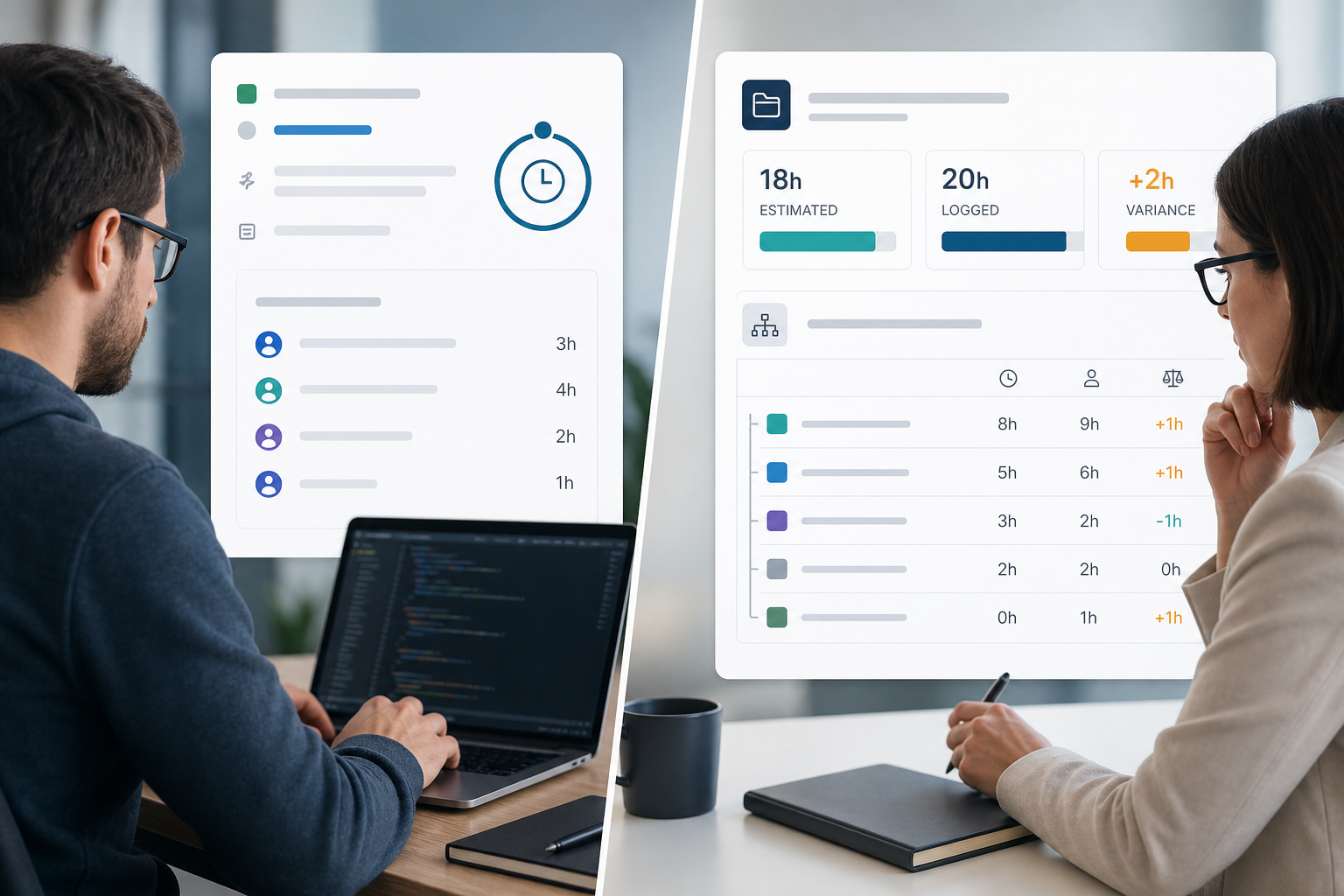
The timer worked.
Developers started a Jira timer from the issue sidebar. Worklogs appeared more consistently. Missed Friday logging dropped. On issue views, Jira time logging looked solved.
Then the project manager opened epic DEL-12 for the steering update:
"What did we estimate on this epic, what have we logged, where is the variance, and which child issues explain the total — from Jira?"
Nobody had a one-screen answer. Someone exported child worklogs again. The Jira timer app had improved capture. Jira budget visibility at epic scope was still missing.
Developers and project managers often evaluate the same install against different success criteria. This use-case article separates logging convenience from stakeholder-ready estimate versus logged-time visibility — without dismissing what timer apps do well.
For category context, see Why "Time Tracker" Marketplace Apps Solve Different Problems. For trial gates, see Jira time tracker apps: 8 questions before you install one.
Quick Answer
Jira timer apps and capture tools answer:
"Can we log time faster and more completely?"
Jira budget visibility for stakeholders answers:
"For this epic or project, what did we estimate, what is logged, what is the variance, and which child issues explain the total?"
Timer apps can be the right layer for the first question. They do not automatically answer the second — even when every child issue has complete worklogs.
Quick Decision Flow
- If missed or late logging is the pain → evaluate a Jira timer app or capture category tool.
- If worklogs are complete but epic totals still require Excel → evaluate rollup reporting, export discipline, or rollup category apps — not another timer by default.
- If both pains are real → treat capture and visibility as two layers with two clear owners; do not assume one Marketplace keyword covers both jobs.
What Jira Timer Apps Do Well
Timer and automated capture apps focus on how hours enter Jira.
Common capabilities in this category include:
- Start/stop timers from the issue context
- Calendar suggestions or background capture
- Reminders for missed logging
- Billable flags, rates, or billing-period hooks on some products
Clockwork Pro is a common reference in this cluster. Public Marketplace and documentation materials emphasize automated and manual tracking, timers, calendar integration, timesheet reporting, billable hours, cost rates, and billing-period controls. Verify current listing metadata — pricing, hosting tabs, and trust signals change.
That is valuable when the pain is incomplete or late Jira time logging. Developers log where work happens. Finance may get cleaner timesheet inputs. Admins may reduce "please fix your worklogs" reminders.
Capture and visibility are related but not the same product job. A timer can make rollup math more trustworthy by improving data completeness — without providing the rollup view itself.
What Budget Visibility Actually Requires
Atlassian's time tracking documentation describes issue-level logging: worklogs on work items, with logged time and remaining time visible on the issue.
For budget conversations, project managers usually need native fields read together at the right scope:
- Original estimate — baseline planned effort
- Time spent — hours logged in worklogs
- Remaining estimate — forecast of work left (when your process uses it)
At issue scope, forecast variance follows:
time spent + remaining estimate - original estimate
See original estimate vs time spent in Jira for why spent variance alone misses early warnings.
At hierarchy scope — epic, parent story, project filter — managers also need:
- Agreement on which issue levels carry estimates and worklogs
- A repeatable aggregation path across child issues
- Variance and child breakdown a second manager can reproduce
JQL finds issues with logged time. It does not return hierarchy sums — see Can JQL show time spent in Jira?.
Native search exports to CSV or Excel are the baseline many teams use for manual rollup math. Dashboard gadgets help with flow and status — not always explainable time rollups by epic. See Why Jira worklogs look complete until you try to roll them up.
Jira budget visibility is therefore a reporting design problem — not only a logging discipline problem.
Why Complete Worklogs Do Not Produce Rollup Answers
Teams log on stories, tasks, bugs, and subtasks. They rarely log directly on epics.
Imagine epic PAY-40 with three child stories:
- PAY-41: 6 hours logged
- PAY-42: 10 hours logged
- PAY-43: 4 hours logged
Open any story and Jira time logging looks healthy. Open the epic for the steering deck:
"So we have 20 hours on the epic — and we estimated 18 — correct?"
The epic field may show zero, a partial number, or nothing that matches the 20-hour child total without manual addition. The work is not missing. The rollup view is.
This pattern appears even when a Jira timer app keeps child worklogs current. Timers improve data entry. They do not change where Jira surfaces parent totals by default.
Subtasks make the gap worse. Developers log on subtasks because that is the work they touched. Sprint and burndown views may not answer total-hours questions the way stakeholders expect — see Why Jira subtasks make sprint time reports harder than they look.
Better Logging Can Feed Better Rollups — But Rollups Are Still a Separate Layer
Healthier worklogs help every downstream report. That is a reason to adopt timers when capture is weak.
It is not the same as having a defended epic total in Jira.
Week one after a timer rollout, logging compliance often improves. By week four, the steering meeting may still follow the same ritual: export child issues, sum hours in a spreadsheet, paste variance into the deck. The timer fixed entry. Nobody added hierarchy visibility.
Plan both layers explicitly when both pains are real:
- Capture layer — timers, reminders, calendar hooks, provider configuration
- Visibility layer — scope rules, export templates, planning rollups, or rollup category panels
Skipping the second layer is how teams conclude "time tracking in Jira still doesn't work" when logging actually improved.
Timer Logging vs Budget Visibility
| Dimension | Jira timer / capture apps | Budget visibility reporting |
|---|---|---|
| Primary question | "Can we log time faster and more completely?" | "What is estimate vs logged at epic/project scope with child breakdown?" |
| Typical buyer | Developers, ops, finance changing capture habits | Project managers, delivery leads, client-facing teams |
| Data foundation | Worklogs entering Jira — native or via provider | Native estimate and time spent fields aggregated by scope rules |
| Success signal | Fewer missed logs; cleaner timesheet inputs | Defended totals in steering reviews without weekly spreadsheet rebuilds |
| Common gap after install | Logging improves; epic totals still manual | Rollup path exists; logging habits still weak |
| Example direction | Clockwork Pro timers and automated capture | Rollup category tools; export discipline; planning rollups with caveats |
This table is a job split, not an app ranking. Verify any named example on current Marketplace listings.
The Common Misfit: Timer App for a Reporting Gap
Symptom: the team adopts a Jira timer app, logging compliance improves, and the PM still exports child worklogs every Friday to calculate epic variance.
Risk: you rolled out capture tooling for a hierarchy visibility problem.
Another symptom: leadership asks for estimate vs logged on epics; buyers shortlist timer apps because Marketplace pages mention "reports" and "dashboards."
Better first step: name the recurring report. If the report is epic estimate, logged time, variance, and child breakdown, you are shopping in the rollup category — not the timer category. See Jira timesheets vs Jira time tracking for the broader map.
Timer apps can still belong in the stack when missed logging is real. Just do not expect them to replace rollup reporting by default.
When a Jira Timer App Is the Right Choice
A timer or capture app is a reasonable direction when recurring questions sound like:
"Can developers log time without forgetting Friday afternoon?"
"Can we reduce manual worklog entry with timers or calendar suggestions?"
"Do we need billable hours, rates, or billing-period discipline alongside capture?"
In those cases, evaluate provider model, uninstall behavior, and whether the app becomes the time tracking provider — changing where worklogs live.
Some capture products also cover timesheet reporting and estimates vs actuals. That can help finance and delivery leads — but verify whether hierarchy rollup views match your epic-level stakeholder report, not only issue-level or timesheet views.
When Logging Is Fine but Visibility Is Not
Re-evaluate the architecture when recurring questions sound like:
"Worklogs look complete — why can't I defend this epic total from one Jira screen?"
"Which child issues pushed us over estimate on DEL-12?"
"Can a second PM reproduce the same rollup without my private export formula?"
Those questions point to Jira budget visibility — scope rules, aggregation, exports, or rollup tooling — not another timer.
Options after logging is healthy:
- Export discipline — documented JQL scope, CSV export, repeatable spreadsheet formulas
- Planning rollups — Jira Plans for planning conversations with known operational limits — see Jira Plans rollups vs project reporting
- Rollup category apps — live panels that read native fields at parent scope
Do not install a second timer because the steering deck still fails. Name the missing report first.
What to Verify After Adopting a Timer
Capture layer
- Do timers write to native Jira worklogs your dashboards already use?
- Does the app require logging through its panel only?
- If you uninstall later, where do worklogs live?
- Do billing periods or provider settings change how remaining estimates behave?
Reporting layer (often still missing)
- Can you open the epic or project and see original estimate, logged time, spent variance, and child breakdown?
- Do on-screen totals match exports your PM sends to clients?
- Can a non-admin viewer see the same totals without leaking restricted child issues?
- Does the app surface remaining estimate or forecast variance at parent scope if your process depends on it?
Run the reproducibility test from Jira time tracker apps: 8 questions before you install one: admin installs, second PM reproduces the same epic report on real data.
Security and admin
- Marketplace Privacy & Security tab and vendor privacy policy
- Whether data stays in native worklogs or is stored per provider documentation
- Scopes and permissions requested at install
- Cloud vs Data Center tab match for your hosting model
Atlassian's time tracking administration documentation notes that third-party providers may store data with the app developer. Review vendor statements — do not treat badges as procurement proof.
For a fuller provider review, see Before you install a Jira time tracking app, ask these 12 questions.
Where Rollup Tools Fit After Logging Works
If Jira time logging is acceptable and the recurring pain is hierarchy math, evaluate rollup category tools — not more capture.
TimePillar public materials position live project and epic rollups of estimated vs logged time, variance, percent of budget used, child-work visibility, and PDF/CSV export from the Jira issue sidebar. The product page states it reads native Jira time-tracking fields and does not use a separate data store — verify in trial and on the Marketplace Privacy & Security tab.
At the time of prior verified research on this site (June 2026), the TimePillar Marketplace listing described Jira Cloud rollups; the product page also mentions Data Center — verify your hosting path before rollout. Prior public-source review on this site did not find support for remaining-estimate rollups at parent scope; verify in trial if forecast variance matters.
TimePillar is not a Jira timer app. It does not provide timers, calendar capture, timesheet approvals, or billing-period locks. It addresses the steering-deck question when worklogs already exist in Jira — including hours logged through a timer app.
Evaluate TimePillar when the recurring question is:
"Can I open this epic or project and see current estimate, logged time, variance, child breakdown, and export — without rebuilding a spreadsheet first?"
For app-level comparison once category is clear, see TimePillar vs Jira time tracking Marketplace apps.
Name Both Jobs Before You Install
Jira timer apps deserve credit for what they do: faster, more complete Jira time logging at the issue level.
They do not automatically deliver Jira budget visibility — estimate vs logged at epic or project scope, variance, and child-issue explanation — just because worklogs improved.
Developers feel the logging win. Project managers still need the rollup report. Treat capture and visibility as two layers: solve logging when logging is broken; solve visibility when the steering deck still exports to Excel.
If logging is healthy and hierarchy totals are the gap, see how Jira time tracking reports with TimePillar fit the rollup category before you add another timer to the stack.