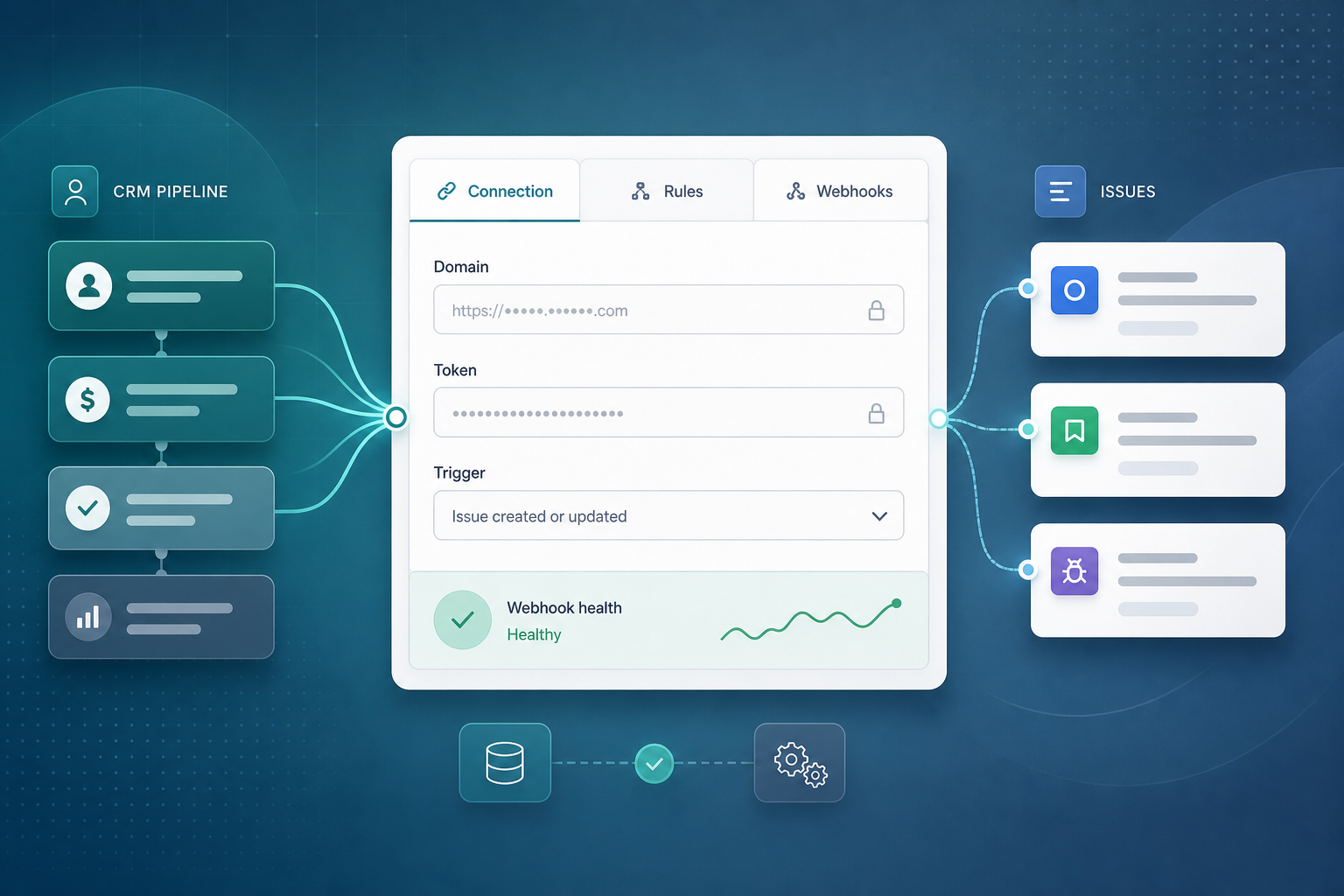
Sales asks you to connect Pipedrive to Jira by Friday — and adds one constraint: no developer time.
You open Atlassian Marketplace, install an integration app, and look for admin settings that feel like configuring Jira permissions — not like standing up middleware. That evaluation moment is what no code Pipedrive Jira integration means for most Jira admins: can you wire CRM to delivery through Jira admin UI alone, and how long does the first pass actually take?
"Can we connect Pipedrive without engineering — just admin clicks?"
Public vendor materials for Pipedrive Integration for Jira by Backlog Bridge describe exactly that path: three admin tabs, no scripts, no custom webhook hosting on your side.
Quick Answer
The described setup is no-code for Jira admins. Configuration happens in three tabs inside the app's admin settings: Connection, Automation Rules, and Webhook & Status.
Follow that order. Valid Pipedrive credentials on Connection must exist before rules load pipelines and stages. At least one automation rule should exist before webhook registration is meaningful.
Vendor copy claims connection in under five minutes and "no code" three-tab setup on the product page. That claim is credible for entering domain and token, saving Connection, and skimming the other tabs — not for full production readiness. Field mapping, sandbox deal tests, and webhook health checks usually need a separate validation block after the first five minutes.
What You Are Trying to Accomplish
You want to answer three evaluation questions without opening an IDE:
- Can a Jira admin configure the integration alone?
- What exactly gets configured in each admin tab?
- Does "under five minutes" match what you will actually do in a trial?
A workable Pipedrive Jira setup through this app should let you:
- Authenticate to Pipedrive with company domain and API token
- Define when deals create Jira issues — created, stage reached, or won
- Register Pipedrive webhooks and read health signals
- Confirm behavior with a sandbox deal before production pipelines carry revenue
The goal is not "connect two logos." It is to know whether admin-only configuration meets your handoff process before you commit procurement time.
Requirements Before You Open the Tabs
Gather these before the five-minute walkthrough.
Jira side
- Jira Cloud site — the site product page and Marketplace link target Cloud hosting; verify compatibility on the Marketplace listing at evaluation time (July 2026).
- Permission to install Marketplace apps and open integration admin settings.
- Agreed target project and issue type for automated handoff work.
- Sandbox project for validation after the tab walkthrough.
Pipedrive side
- Company subdomain — the
{company}inhttps://{company}.pipedrive.com. - API token from a durable integration user — not a departing rep's personal token. See Pipedrive API Tokens and Jira Admins for domain, token ownership, and rotation before you paste credentials.
- Sandbox deal that matches the trigger you plan to test.
Process side
- One owner who will run sandbox validation after the tab tour.
- Agreement on whether Friday's ask means "tabs configured" or "production-ready automation" — those are different milestones.
Install and Open Admin Settings
- Install Pipedrive Integration for Jira from Atlassian Marketplace using your normal Jira admin app install flow. The vendor site links to Marketplace app 3777112677 — verify current pricing, privacy tab, and Forge permissions on the listing before production CRM connect.
- After install, open the app's admin / integration settings as a Jira administrator. Exact menu paths vary by site — use Atlassian admin documentation to locate installed Forge apps and their configuration screens.
- Confirm you see three tabs aligned with vendor copy: Connection, Automation Rules, and Webhook & Status.
Vendor FAQ copy states coding is not required — setup is described through these tabs only.
What the First Five Minutes Usually Cover
Vendor marketing groups all three tabs under "setup in Jira admin." In practice, split the work:
| Time block | Admin actions | Realistic outcome |
|---|---|---|
| 0–2 min | Install app; open admin settings; locate three tabs | Ready to enter credentials |
| 2–4 min | Connection tab: enter Pipedrive subdomain and API token; save | Connection indicator shows success per app UI |
| 4–5 min | Automation Rules tab: pick trigger, project, issue type; skim field list | One draft rule saved; pipelines/stages visible if Connection worked |
| After 5 min | Webhook registration; sandbox deal test; field mapping review; health dashboard check | Evidence the integration actually fires |
Treat "under five minutes" as a Connection and orientation claim, not a go-live certificate.
Tab 1: Connection — Shared Credentials
The Connection tab is step one. Public vendor copy describes two inputs:
- Pipedrive company domain (subdomain only)
- Pipedrive API token
One connection powers every automation rule — you do not re-enter credentials per rule.
Admin actions in the first sitting:
- Enter subdomain and token.
- Save and note the connection success indicator.
- Confirm the Automation Rules tab can load pipelines and stages — vendor copy claims they load automatically after connection.
If pipeline lists stay empty, suspect domain typo or token user lacking pipeline visibility before debugging rules or webhooks.
For credential governance — service accounts, rotation runbooks, and pre-connection checklists — read Pipedrive API Tokens and Jira Admins. This article stays on the no-code tab path; that sibling article stays on token custody.
Tab 2: Automation Rules — When Deals Become Jira Work
The Automation Rules tab defines what happens when Pipedrive events match your process.
Configure at least one rule before webhook testing:
| Setting | What you choose | Why it matters |
|---|---|---|
| Trigger | Deal created, deal reaches pipeline stage, or deal won | Must match when delivery actually starts |
| Jira project | Where handoff issues land | Wrong project floods the wrong backlog |
| Issue type | Epic, task, story, etc. | Drives required fields and workflow |
| Field selection | Which Pipedrive fields appear in created issues | Determines whether tier, SKU, and contacts survive handoff |
Vendor copy states pipeline stages and custom fields load automatically after Connection — reducing manual API mapping for admins. Still verify every custom field your process requires appears in the picker and survives a sandbox create.
Most teams evaluating connect Pipedrive without coding choose deal won or a named pipeline stage trigger. Write your rule in one line first:
"Create a Jira
{issue type}in{project}when deal{trigger}."
For trigger choice, field mapping depth, and duplicate policy, see How to Auto-Create Jira Issues from Pipedrive Deals.
Tab 3: Webhook & Status — Event Pipe and Health
Forward automation — issue create on won deals, deal-update comments — depends on Pipedrive events reaching the integration. The Webhook & Status tab handles registration and monitoring.
Admin actions:
- Register the webhook — vendor copy describes one-click registration in Pipedrive after Connection and rules exist.
- Note last event received timestamp on the status dashboard.
- Fire a sandbox deal trigger and confirm the timestamp advances.
- Confirm the downstream Jira action — new issue, comment, or link — matches your rule.
Vendor copy describes health indicators including last processed deal, last created issue, and a No errors summary when working. Treat field labels as UI copy to verify in your trial — not procurement guarantees.
The live deal panel on issue open uses API fetch, not webhooks — panel behavior can work while forward create is broken, and vice versa. For webhook recovery, monitoring routines, and troubleshooting tables, see Pipedrive Webhooks for Jira: An Admin Setup Checklist.
No-Code Does Not Mean No Validation
Admin UI setup removes developer work. It does not remove sandbox proof.
Drill A — Happy path (post-tab tour)
- Create sandbox deal matching your trigger.
- Fire trigger (move stage or mark won).
- Confirm Webhook & Status timestamp updates.
- Confirm Jira issue appears with mapped fields.
Drill B — Connection sanity
- Open a linked issue (or create via trigger).
- Confirm live Pipedrive panel loads deal context if enabled — see Why Delivery Teams Need a Live Pipedrive Panel Inside Every Jira Issue.
Drill C — Tab order mistake
- Attempt webhook registration before Connection succeeds.
- Confirm failure is visible — do not assume partial setup is production-ready.
Document results before telling sales Friday's deadline is met.
What Each Tab Powers (and What It Does Not)
| Capability | Connection | Automation Rules | Webhooks |
|---|---|---|---|
| Issue create on trigger | Credentials for deal read | Trigger + mapping | Event delivery |
| Live deal panel | Credentials for API fetch | — | Not required |
| Deal-update Jira comments | Credentials | Field change detection per app | Event delivery |
| Jira status → Pipedrive activity | Credentials | — | Uses Jira-side trigger per vendor copy |
One green Connection tab does not prove every mapped field is readable or every rule matches production pipeline names.
Common Pitfalls
| Symptom | Likely cause | Admin action |
|---|---|---|
| Pipelines empty on Rules tab | Bad domain or token visibility | Fix Connection; see token guide |
| Webhook registered; no Jira issue | No matching rule or wrong stage | Review Automation Rules against test deal |
| Everything worked until rep left | Token tied to personal account | Reissue from integration user; update Connection |
| Green tabs; stale last event | Token rotated without Jira update | Update Connection; re-register webhook |
| Assumed five minutes = go-live | Skipped sandbox drills | Run Drill A before production pipelines |
Install ≠ configured ≠ production-ready. Three tabs can be clicked through quickly; reliable handoff automation still needs ongoing monitoring.
Admin and Security Considerations
No-code setup still moves commercial deal data into Jira issues, comments, and sidebar panels.
Ask before production connect:
- Who can view deal value and contacts on issues your Jira permission scheme exposes?
- Who owns the Pipedrive API token and who updates Connection on rotation?
- What do Marketplace Privacy & Security tabs state — verify on the listing at install time?
- What Forge permissions does install request — confirm on Marketplace before procurement?
I did not find a public SOC 2, ISO, GDPR, or DPA claim specific to this app in site materials reviewed for this article. Verify compliance statements on the Marketplace listing or vendor privacy policy if your process requires them.
Do not treat vendor marketing copy or this walkthrough as procurement evidence. Confirm behavior with reproducible sandbox deals.
Marketplace Checks Before You Install
The vendor site links to Marketplace app 3777112677. At evaluation time, verify on the listing:
- Jira Cloud hosting matches your site
- Pricing and trial terms — site schema describes a free offer; pricing can change
- Privacy & Security and Permissions tabs
- Version and last updated signals — they change over time
I did not fetch live Marketplace pages in this research run (July 2026). Treat ratings, review counts, and install numbers as time-sensitive if you cite them elsewhere.
Limitations and Unknowns
- Exact admin menu path to integration settings varies by Jira site — use trial UI as source of truth.
- Whether "five minutes" includes webhook registration and first sandbox test is ambiguous in vendor copy — assume it means Connection and tab orientation.
- OAuth versus personal API token — public materials describe token entry only.
- Multi-Pipedrive-account connections per Jira site are not described in public copy.
- Data Center support was not verified — site materials emphasize Jira Cloud.
When to Use a Different Approach
iPaaS (Zapier, Make, n8n). More filter flexibility; separate credential stores; no vendor webhook status dashboard — see comparison articles if middleware is already standard.
Custom middleware. Your team hosts the webhook endpoint and owns token storage — higher build cost, full control.
Low deal volume. Manual issue create may cost less admin overhead than automation infrastructure.
Configure the Tabs, Then Prove the Handoff
No code Pipedrive Jira integration for Jira admins means three tabs — Connection, Automation Rules, Webhook & Status — configured in order without developer involvement. Vendor copy's under-five-minute claim fits entering credentials and skimming the guided flow; sandbox validation and field mapping belong in the next admin block.
Install from Marketplace. Walk the tabs. Save one automation rule. Register the webhook. Fire a sandbox deal. Only then tell sales the integration is ready for production pipelines.
See how Pipedrive Integration for Jira describes the three-tab setup, live deal panel, and webhook status dashboard for teams evaluating a trial install.
For why handoff context disappears when systems stay disconnected, read The Sales-to-Delivery Handoff Gap. For Connection credential depth, read Pipedrive API Tokens and Jira Admins.