The Slack message arrives five minutes after the deal is marked won.
Sales shares a Pipedrive link, a one-line summary, and a note that "everything is in the CRM." Implementation opens Jira, creates onboarding epic ONB-104, and pastes what fits into the description field. By sprint planning on Monday, the tech lead asks which integration tier the customer bought — a detail that sits in a Pipedrive custom field and a pre-sale call note, neither of which made it into Jira.
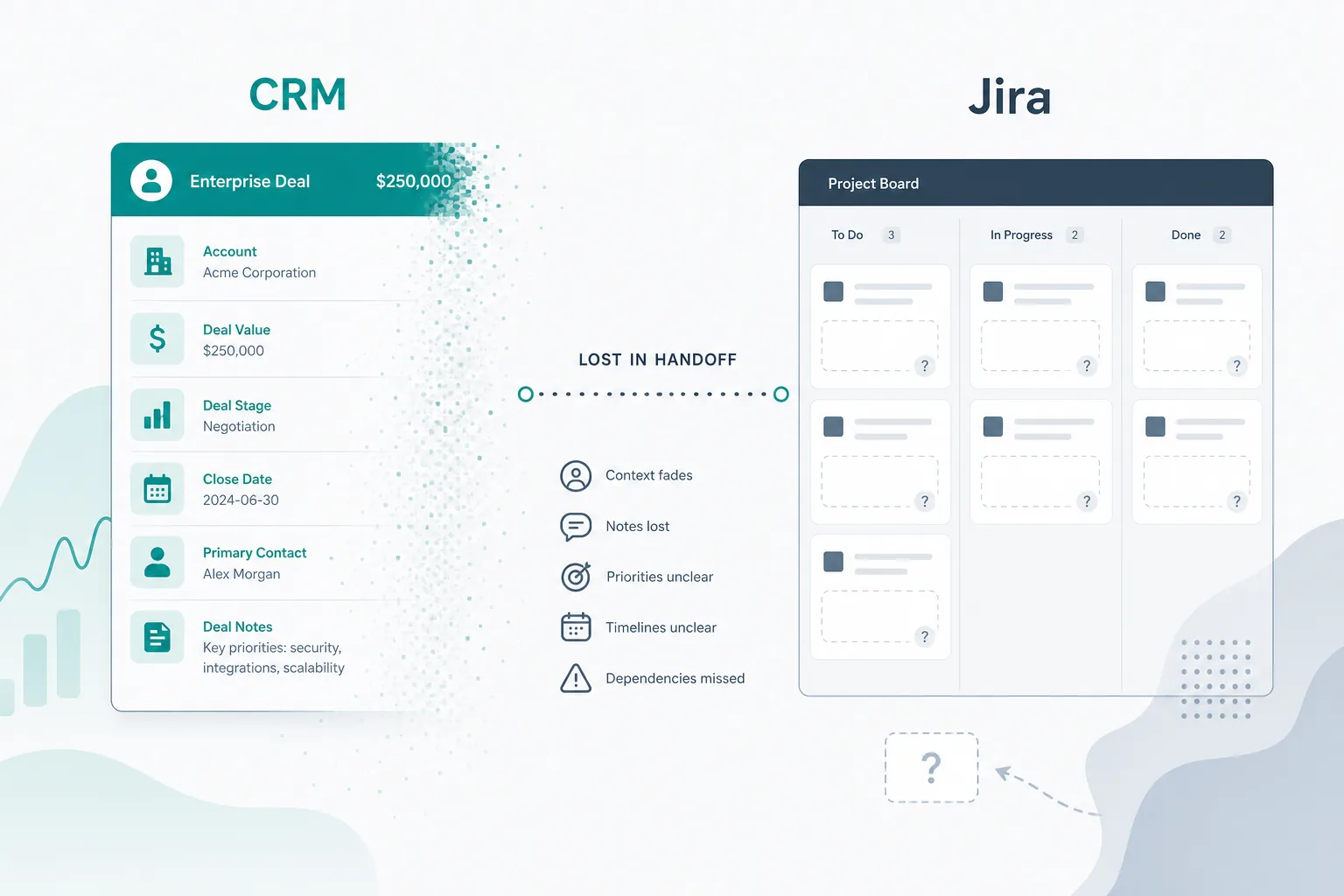
That is the everyday Pipedrive Jira integration problem. The deal closed. The work started. The Pipedrive deal context Jira needs never traveled with it.
For product capabilities and installation, use the Pipedrive Integration for Jira product overview. This guide stays focused on designing the sales-to-delivery handoff itself.
Two Systems, One Customer Journey
Most sales-led delivery teams run the same split.
Pipedrive holds the pipeline. Atlassian's counterpart is not in CRM — delivery lives in Jira. Pipedrive's deal documentation treats deals as the central object for value, stage, contact, organization, owner, and history. Jira holds epics, stories, assignments, statuses, estimates, and execution detail.
Neither tool is wrong for its job. The gap opens between them. Sales closes in CRM. Delivery plans in Jira. Without a structured sales to delivery handoff, those systems stay disconnected — and humans become the integration layer.
"Can you just paste the deal into Jira and we'll start Monday?"
That request sounds reasonable. It is also how context gets lost.
Why Companies Connect Pipedrive and Jira
Teams usually connect Pipedrive and Jira when manual handoff stops scaling.
Common integration goals include:
- create Jira work when a deal is won or reaches a delivery-ready pipeline stage
- move selected deal fields into the first Jira issue without copy-paste
- keep delivery aware of deal value, owner, contact, company, and implementation scope
- show live CRM context on the Jira issue instead of a stale description snapshot
- send delivery progress back to sales as a Pipedrive activity or status signal
- monitor failed webhook events before a won deal is missed
The goal is not a two-way sync for every field. It is a clear handoff architecture that preserves ownership: sales owns CRM truth, delivery owns Jira execution, and the integration carries only the signals each side actually uses.
What "Deal Context" Actually Means
When implementation managers say they need deal context, they usually mean more than a title and dollar amount.
Typical Pipedrive deal context Jira teams expect includes:
- Deal value, currency, and expected close date
- Pipeline stage and won/lost/open status
- Contact person and company (person and organization records in Pipedrive)
- Sales owner, labels, and source channel
- Pre-sale notes and latest activities from calls or demos
- Custom fields — scope tier, package, SLA, region, integration requirements
- Changes after the initial handoff — value revisions, contact swaps, scope clarifications
Much of the story lives in activities and notes, not the deal title. A Jira summary of "Acme — onboarding" does not carry the conversation.
The Mid-Delivery Surprise
The handoff gap is not always visible on day one.
Week two of implementation, finance asks whether the project is still aligned to contract value. The Jira epic description still shows the original $48,000 from handoff day. Sales updated the deal to $56,000 after a scope add-on. Delivery planned sprints against the old number. Nobody lied — the CRM project handoff copied a snapshot and never refreshed it.
That pattern repeats across:
- Missing custom fields that sales considers mandatory
- Contact changes after the primary stakeholder leaves the customer company
- Notes from solution design calls that never leave Pipedrive
- Sales owner changes that Jira assignees never hear about
The work in Jira can be healthy while the commercial context is wrong. That is a handoff problem, not a sprint execution problem.
Where Context Disappears
The snapshot paste
The most common pattern: copy deal fields into a Jira description at creation time.
That creates a snapshot, not a connection. Post-handoff CRM changes do not reach delivery unless someone re-communicates them manually.
Fields that never get copied
Busy handoffs skip custom fields, activity history, and labels. Sales assumes the CRM record is complete. Engineering assumes the Jira ticket is complete. Both can be true inside each tool while the bridge between them is incomplete.
No reverse visibility
Delivery progress lives in Jira statuses and comments. Sales stays in Pipedrive. Account owners ask in chat:
"Where are we on the Acme implementation?"
Someone screenshots a board or schedules a status meeting — work that exists because the tools do not share a live picture.
Trigger timing mismatches
Some teams create Jira work too early and flood delivery with immature deals. Others create work too late — after onboarding already started in email. The gap is often process: no agreed rule for when a deal becomes delivery work and what must be present first.
Manual Handoff vs Structured Handoff
| Handoff element | Manual copy-paste | Structured Pipedrive–Jira connection (when configured) |
|---|---|---|
| Issue creation | Someone creates Jira work after Slack or email | Rule-based creation at agreed stage or won status |
| Deal fields in Jira | Static description text | Mapped fields plus optional live deal panel |
| Sales notes | Often missing or summarized | Selected fields at creation; live fetch if supported |
| Post-handoff CRM changes | Manual re-communication | Comments, field updates, or live panel refresh |
| Delivery progress in CRM | Manual updates or meetings | Status or activity sync back to Pipedrive, if enabled |
| Audit trail | Scattered across chat and two tools | Linked records with timestamps in both systems |
This is a pattern comparison, not a product ranking. Teams can tighten manual processes before buying software — but the table shows why snapshots alone struggle at scale.
What a Bad Handoff Costs
Rework. Delivery builds against outdated scope because revised deal terms never reached Jira.
Slow onboarding. Implementation managers chase contact details or requirements that already sit in Pipedrive activities.
Trust friction. Sales promises dates from CRM notes; delivery plans from a thin epic. Customer calls surface the mismatch.
Hidden work. Project leads become copy-paste clerks instead of running onboarding.
Reporting blind spots. Leadership cannot connect pipeline revenue to delivery status without manual spreadsheet joins.
Five Process Fixes Before You Buy Anything
- Write the trigger rule. Document whether Jira work starts at deal won, a specific pipeline stage, or another event — and who approves exceptions.
- Publish a minimum field list. Sales must populate listed custom fields before delivery accepts the handoff.
- Standardize the Jira template. One issue type, one project queue, one description outline — even if content is still pasted manually.
- Assign a handoff owner. One role verifies the first Jira issue matches CRM before sprint planning starts.
- Define the change path. Decide how post-handoff CRM updates reach delivery — standing meeting, comment discipline, or automation later.
If step five is undefined, you still have a manual handoff regardless of tooling ambitions.
What a Complete Handoff Checklist Should Include
Use this when evaluating process or integration:
- Trigger: Deal won, stage reached, or deal created — one rule per workflow.
- Minimum fields: Title, value, contact, company, owner, close date, and custom fields delivery uses.
- Notes policy: Which Pipedrive notes or activities appear in Jira at creation.
- Jira target: Project, issue type, and default assignee or queue.
- Change path: How CRM updates after handoff reach delivery.
- Reverse path: How Jira progress reaches sales — activity log, status summary, or agreed exceptions.
- Monitoring: Who checks failed automations or missed webhooks.
Integration Architecture Choices
There are several ways to implement the checklist. Choose by ownership, reliability, and support burden.
| Architecture | Good fit | Watch-outs |
|---|---|---|
| Manual checklist | Low deal volume, simple handoff fields | People become the retry system; context still goes stale |
| Native Jira app | Jira admins want setup close to Jira with linked issue context | Verify Marketplace scopes, data handling, webhook health, and exact sync behavior |
| iPaaS automation | Ops team already maintains Zapier, Make, n8n, or similar | Error handling, deduplication, credential ownership, and live context may live outside Jira |
| Custom middleware | Security or product teams need full control over webhook handling | Highest build, monitoring, logging, and maintenance responsibility |
Use narrower guides when you are already inside one decision:
- Auto-create Jira issues from Pipedrive deals for trigger and issue-creation setup.
- Map Pipedrive custom fields into Jira descriptions for field-selection rules.
- Pipedrive API token for Jira admins for credential handling.
- Pipedrive webhooks for Jira for integration health and monitoring.
- Live Pipedrive panel inside Jira for live versus copied CRM context.
- Pipedrive deal updates as Jira comments and Jira status to Pipedrive activity for reverse and update signals.
Manual Workarounds and Where They Break
Slack or email works at low volume; search and history fragment as deals scale.
Confluence templates standardize questions but duplicate CRM data unless maintained in parallel.
Spreadsheet trackers linking deal IDs to Jira keys work until a row is missed.
Pipedrive Projects can cover lighter delivery tracking for some sales-led teams. Software implementation, agency delivery, and engineering-heavy work often still land in Jira. The handoff problem appears when both tools stay in active use for different parts of the same customer journey.
Valid interim steps — until volume, custom-field complexity, or post-sale change rate outgrow human copying.
What Jira Admins Should Verify Before Connecting Pipedrive
Connecting CRM data to Jira is an admin decision, not only a sales request.
Access and visibility
- Who owns the Pipedrive API token, rotation policy, and least-privilege scope?
- Which Jira users can see linked deal value, contacts, and notes on issues?
Automation behavior
- Which pipeline stages create Jira work, and how are duplicate issues prevented?
- Which Pipedrive custom fields map to description text vs Jira custom fields?
- Pipedrive webhooks must reach your integration endpoint; confirm retry and failure visibility.
Data handling
- Deal updates may post as Jira comments, field writes, or live panel refresh — confirm actual behavior in trial.
- Which Jira status transitions create Pipedrive activities, and is noise controlled?
- Read vendor privacy statements and Marketplace security materials if procurement requires them.
No Atlassian Marketplace listing URL was provided in editorial metadata for this article, and listing details were not verified at the time of writing (July 2026). Search Marketplace for the app name and verify current pricing, hosting, scopes, and privacy tabs before installation.
Where Pipedrive Integration for Jira Fits
Backlog Bridge's public Pipedrive Integration for Jira product page describes a pattern that maps to the checklist above:
- Trigger-based Jira issue creation when a deal is created, reaches a pipeline stage, or is won — according to vendor copy
- Pre-filled issue content with deal title, value, contact, owner, and selected custom fields
- A live Pipedrive panel on linked Jira issues, with deal data fetched when the issue is opened per vendor description
- Jira status changes logged as Pipedrive activities, and deal updates posted as Jira comments — vendor-described two-way signals
- Jira admin setup through connection, automation rule, and webhook status tabs without coding according to vendor materials
Evaluate this direction when the recurring pain is stale snapshots and missing reverse visibility — not when the primary problem is delivery execution inside Jira alone.
Before rollout, verify on a sandbox site:
- Your real custom fields map correctly
- Trigger timing matches sales process
- Webhook health is visible when events fail
- Jira permission boundaries match who should see deal commercial data
- Vendor claims match observed behavior in trial
Treat marketing copy as a hypothesis. Confirm with reproducible test deals.
Define the Handoff Before the Next Won Deal
The sales-to-delivery handoff breaks when teams assume CRM completeness equals delivery readiness.
Pipedrive holds the pre-sale story. Jira holds the delivery plan. Without rules for timing, fields, updates, and reverse visibility, context disappears between them — no matter how disciplined each team is inside its own tool.
Write the checklist first. Tighten manual steps if volume allows. When copy-paste cannot keep up, evaluate structured integration against the same checklist — and verify every claim in trial rather than at procurement slide depth.
That is how won deals stop arriving in Jira as empty shells with the real story still locked in CRM.
See how Pipedrive Integration for Jira approaches live deal context, automated issue creation, and two-way updates for teams ready to test a structured handoff.