
Review an AI-generated Mermaid change by comparing the proposed source with the last accepted source, inventorying every added, removed, relabeled and reversed relationship, and then comparing both renders. A clean parse and a plausible picture do not prove that unchanged relationships survived the edit.
This worked example starts with an accepted incident-response flowchart. The requested change is narrow: add a path from failed recovery verification back to the service owner. The AI-proposed edit adds that path, but it also reverses one existing relationship and removes another. All three sources are valid Mermaid and render successfully in Mermaid 11.16.0.
The fixtures are constructed teaching examples, not output from a named model. They isolate the review method without making a claim about the error rate of a particular AI product.
Review the change, not the AI summary
An AI-generated change description may say “added a retry path” even when the complete regenerated source also changes unrelated edges. Treat the baseline and proposal as the two review endpoints.
Mermaid's official AI-editing documentation says proposed changes are shown as a diff before they are applied. Git's diff documentation likewise defines comparison between two endpoints. The important review object is therefore the actual source delta—not a natural-language claim about it.
For this example, the approved request is:
Add a
Nopath fromverifyback toownerso failed recovery checks return to investigation. Preserve every existing node, relationship and label.
That last sentence makes unintended changes reviewable. Without it, a reviewer may notice the new loop but have no explicit preservation rule for the rest of the diagram.
Freeze the accepted baseline
The baseline contains six nodes and six directed relationships:
flowchart LR
  report["Incident report"]
  triage{"Known failure?"}
  runbook["Approved runbook"]
  owner["Service owner"]
  verify{"Recovery verified?"}
  record["Incident record"]

  report -->|Start triage| triage
  triage -->|Yes| runbook
  triage -->|No| owner
  runbook -->|Apply fix| verify
  owner -->|Investigate and repair| verify
  verify -->|Yes: record evidence| record

Download the baseline Mermaid source. A useful baseline is an accepted revision, not whatever source happened to be open when the AI edit began.
Record relationships as (source, label, target) signatures:
| ID | Source | Label | Target |
|---|---|---|---|
| R1 | report | Start triage | triage |
| R2 | triage | Yes | runbook |
| R3 | triage | No | owner |
| R4 | runbook | Apply fix | verify |
| R5 | owner | Investigate and repair | verify |
| R6 | verify | Yes: record evidence | record |
Direction belongs in the identity. triage → owner and owner → triage are different claims even when both nodes remain on the canvas.
Inspect the proposed edit
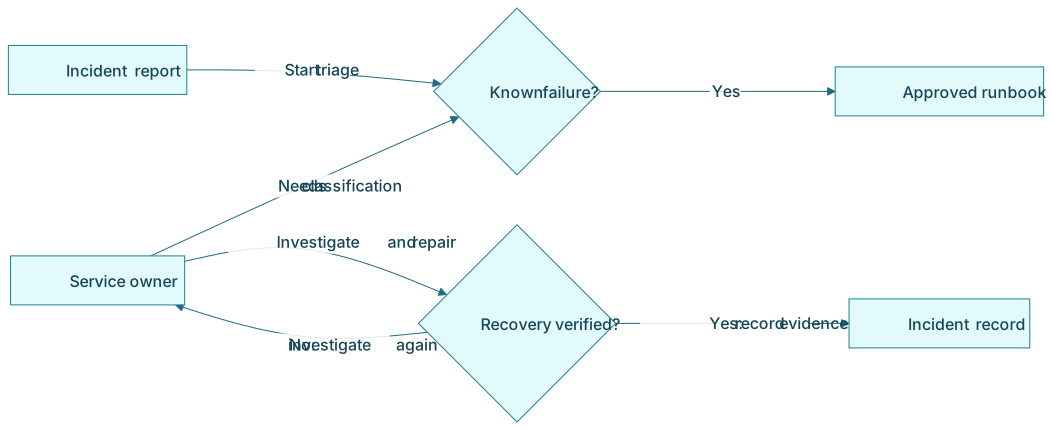
The proposed source looks close to the requested result:
flowchart LR
  report["Incident report"]
  triage{"Known failure?"}
  runbook["Approved runbook"]
  owner["Service owner"]
  verify{"Recovery verified?"}
  record["Incident record"]

  report -->|Start triage| triage
  triage -->|Yes| runbook
  owner -->|Needs classification| triage
  owner -->|Investigate and repair| verify
  verify -->|Yes: record evidence| record
  verify -->|No: investigate again| owner
Download the proposed Mermaid source.
The proposal does add the requested verify → owner relationship. But it also contains two defects:
- Reversed and relabeled relationship: baseline R3 is
triage → ownerwith labelNo; the proposal containsowner → triagewith labelNeeds classification. - Removed relationship: baseline R4,
runbook → verify, is absent. The runbook path now ends without recovery verification.
Every node is still present. The diagram parses. The render looks balanced. A node-count check, syntax check or quick visual glance can therefore pass while the behavior changes.
Read the source diff as relationship evidence
The baseline-to-proposal diff exposes the unrelated changes:
   report -->|Start triage| triage
   triage -->|Yes| runbook
-  triage -->|No| owner
-  runbook -->|Apply fix| verify
+  owner -->|Needs classification| triage
   owner -->|Investigate and repair| verify
   verify -->|Yes: record evidence| record
+  verify -->|No: investigate again| owner
Download the complete source diff, including the proposal-to-accepted correction.
Do not read a reversal as a harmless line replacement. Normalize it into two findings:
- required relationship removed:
(triage, No, owner); - unsupported relationship added:
(owner, Needs classification, triage).
That two-sided description makes the defect harder to dismiss as layout or wording. Apply the same rule when only the label changes: removing (A, old label, B) and adding (A, new label, B) may change the documented contract even though the endpoints stay fixed.
Mermaid documents mermaid.parse as syntax validation without rendering. Parsing belongs in the review, but it cannot compare the relationship set with the baseline or change request.
Compare the rendered baseline and proposal
Source review catches exact additions and deletions. Render review answers a different question: what will a reader infer from the delivered picture?
| Baseline render | AI-proposed render |
|---|---|
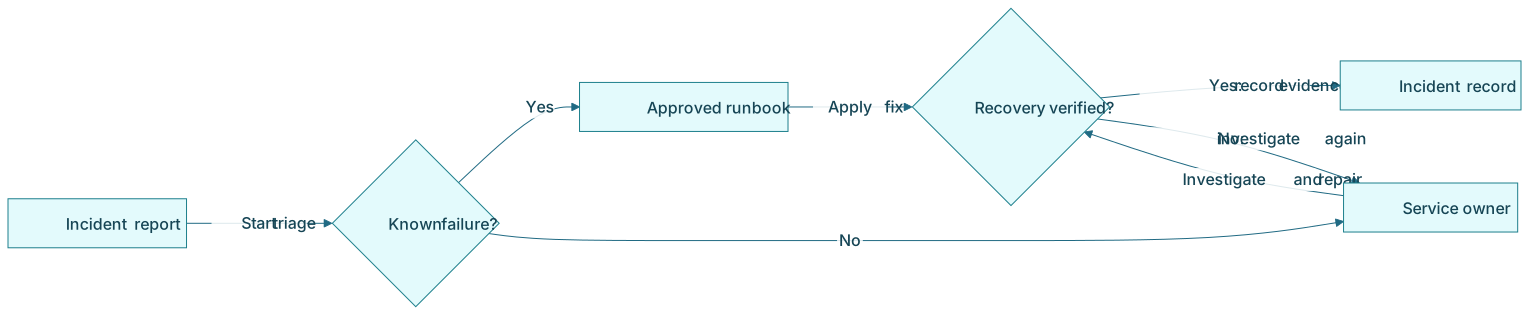
Unknown failures move from triage to owner. | The arrow points from owner back to triage. |
The runbook path reaches verify. | The runbook has no outgoing relationship. |
| Verification has only a successful exit. | The requested failed-verification loop is visible. |
Use the same Mermaid version, theme, direction and viewport for the comparison. Layout can move when one edge is added, so position is not a stable relationship identifier. Inspect arrowheads, labels and endpoints rather than asking whether two screenshots look generally similar.
The Mermaid flowchart syntax reference documents how links and link text are expressed. The business meaning of each edge still comes from the accepted baseline and approved request.
Accept a corrected edit, not the flawed proposal
The accepted source restores R3 and R4 and adds only the approved R7 loop:
flowchart LR
  report["Incident report"]
  triage{"Known failure?"}
  runbook["Approved runbook"]
  owner["Service owner"]
  verify{"Recovery verified?"}
  record["Incident record"]

  report -->|Start triage| triage
  triage -->|Yes| runbook
  triage -->|No| owner
  runbook -->|Apply fix| verify
  owner -->|Investigate and repair| verify
  verify -->|Yes: record evidence| record
  verify -->|No: investigate again| owner
Download the accepted Mermaid source.
The accepted edit has seven relationships: baseline R1–R6 unchanged, plus R7 (verify, No: investigate again, owner). Its successful render demonstrates deliverability. The relationship inventory demonstrates that it implements the approved delta.
Use a seven-step Mermaid change-review workflow
- Identify the baseline. Record the accepted file, commit, page version or other immutable revision.
- State the requested delta. Name the nodes and relationship to add, remove, reverse or relabel. State what must remain unchanged.
- Retain the full proposal. Do not review only the assistant's summary or a cropped screenshot.
- Parse and render it. Use the Mermaid version and settings in the publishing environment.
- Review the source diff. Classify node and relationship additions, removals, reversals and label changes.
- Compare the renders. Inspect arrowheads, endpoints, labels, disconnected nodes, crossings and readability.
- Save the accepted revision. Preserve the accepted source, reviewer decision, unresolved questions and render artifact.
If the assistant repairs a finding, rerun the complete review. A second regeneration can restore one edge while modifying another.
Reviewer checklist
| Check | Approval question |
|---|---|
| Baseline | Is the exact accepted source revision identified? |
| Request | Is the requested relationship delta explicit? |
| Nodes | Are stable IDs and meanings preserved unless a change was approved? |
| Removed edges | Is every deleted baseline relationship intentional and justified? |
| Added edges | Is every new relationship requested or supported by evidence? |
| Direction | Did any source and target reverse? |
| Labels | Does each label still agree with its direction and meaning? |
| Syntax | Does the complete source parse in the target Mermaid version? |
| Render | Were both endpoints rendered with comparable settings? |
| Acceptance | Does the accepted source contain only approved changes? |
Download the Mermaid change-review checklist. It includes the filled findings for this example plus reviewer and review-date columns for reuse.
Keep this review separate from adjacent checks
This workflow answers: “Did an edit change any relationship beyond the approved delta?” Nearby articles answer different questions:
- If the source will not parse, use the Mermaid parse-error workflow.
- If a new diagram must be checked against system evidence, use the AI-generated architecture-diagram review.
- If you are generating from written facts, start with the requirements-to-Mermaid workflow.
- If you need the broader parse, render and semantic gates, use the LLM-to-Mermaid validation workflow.
- If the accepted source will become model context, follow the Mermaid-as-LLM-context example.
FAQ
Can a valid Mermaid render still contain a relationship error?
Yes. Parsing and rendering show that Mermaid can interpret and draw the source. They do not prove that an edge matches the accepted baseline, requirement or system evidence.
How do I detect a reversed Mermaid relationship?
Compare relationships as (source, label, target) signatures. A reversal appears as removal of the accepted signature and addition of a signature with source and target exchanged, even if the same nodes remain visible.
Should I compare only the Mermaid source or only the renders?
Use both. The source diff identifies exact structural changes; the rendered comparison shows the meaning and readability delivered to the audience. Neither replaces the other.
If your team edits Mermaid in Confluence, Diagram Lens provides source editing and rendered preview tools. The reviewer still needs an accepted baseline and an explicit change request to decide whether the proposed relationships are correct.