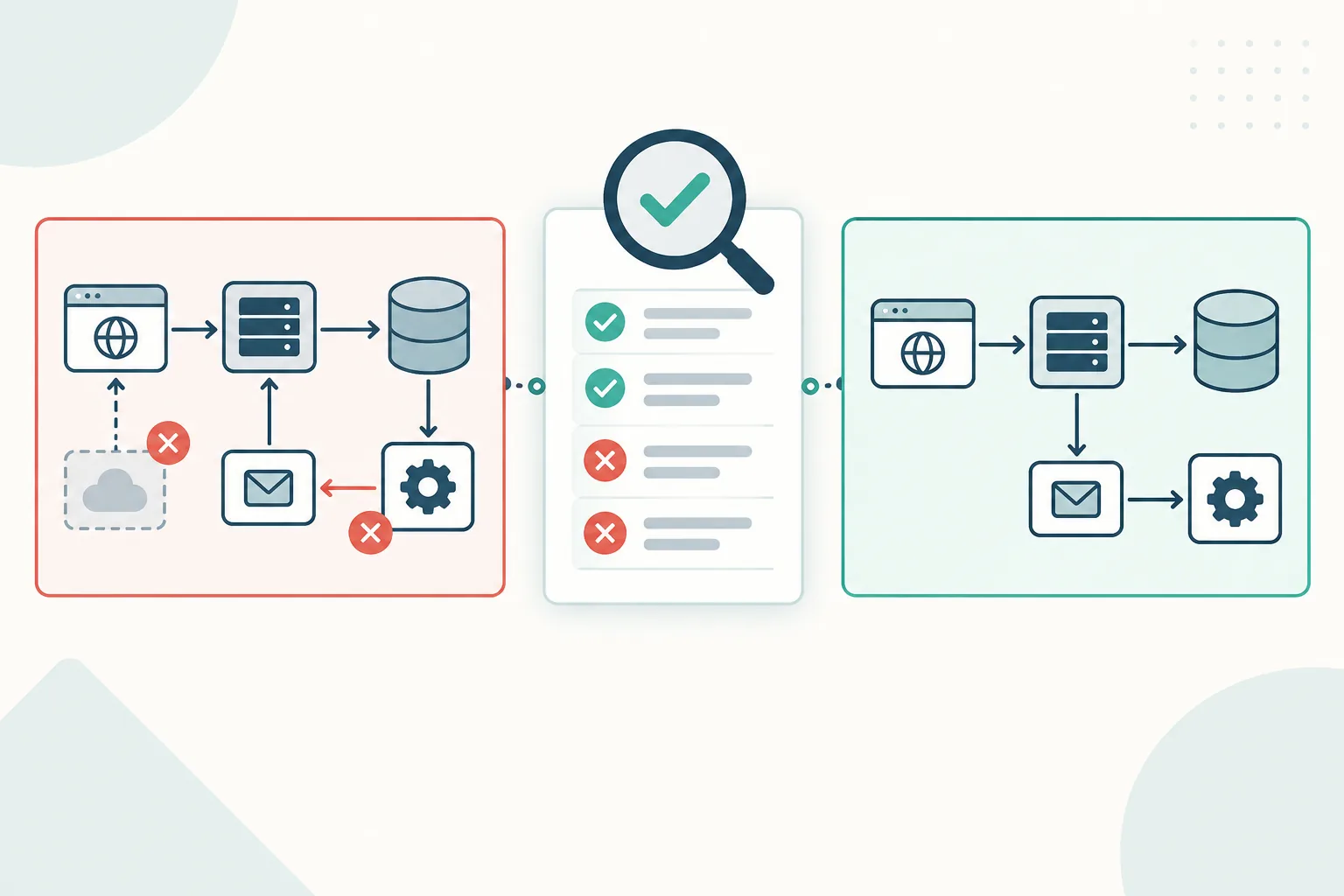
Review an AI-generated architecture diagram by checking every component and directed relationship against a named source of evidence. Look for unsupported additions, omitted relationships and arrows whose labels contradict their direction. Render the Mermaid source too, because factual review and rendering answer different questions.
This guide uses a fictional order system and a deliberately flawed Mermaid candidate. Both the flawed and corrected sources passed a local Mermaid 11.16.0 parse and render check. The exercise demonstrates errors that syntax validation cannot detect; it does not measure the quality or failure rate of any AI service.
Build the evidence register before reviewing the diagram
Start with the system record rather than the generated picture. An architecture diagram can look familiar and polished while adding a component that nobody approved.
NIST uses confabulation for confidently presented false content and for generated output that diverges from the supplied input. The term is also commonly called an AI hallucination. The practical response is to compare the output with evidence rather than treating confidence or visual quality as proof. NIST's Generative AI Profile.
Our fictional scoped record contains five components and four directed relationships:
| Fact | Source | Target | Meaning |
|---|---|---|---|
| F1 | Web client | Orders API | Submit an order |
| F2 | Orders API | Order records | Write the order |
| F3 | Orders API | Order queue | Enqueue a fulfillment job |
| F4 | Order queue | Fulfillment worker | Deliver a job to the worker |
Download the component and relationship register. When adapting it, replace the fictional evidence reference with a versioned specification, implementation reference, service catalog entry or reviewed system record.
The arrows show the labeled logical transfer in this view. They do not establish network connection initiation, deployment topology, transaction boundaries or whether the worker polls the queue. Those questions need their own evidence.
For this exercise, the register is complete within its stated scope. In a real review, record whether the evidence is complete or partial. An absent component in a partial record is an unresolved question, not immediate proof that the component does not exist.
What is an invented relationship in an architecture diagram?
An invented relationship is a connection whose source, target, direction or label is not supported by the accepted evidence for the diagram's scope. A relationship can be technically plausible and still be invented in the current-state view. Valid Mermaid syntax, a clean render and familiarity with common architecture patterns do not establish that the connection exists in this system.
Use the same test for components. If the evidence does not establish a component, remove it from the accepted current-state diagram, mark it clearly as proposed, or record it as unresolved until an owner confirms it.
Use a five-part architecture review
Run the review in an order that makes omissions and additions visible:
- Scope: What system, scenario and level of detail does the diagram claim to show?
- Components: Does every drawn component have supporting evidence, and is every required in-scope component present?
- Relationships: Does every arrow have a supporting fact, and is every required relationship drawn?
- Direction and label: Do the arrow direction and label describe the same interaction?
- Source and render: Does the Mermaid source parse, and does the rendered picture communicate the accepted source clearly?
The C4 model is notation independent, but its notation guidance provides a useful review rule: relationships should be unidirectional and their labels should match their direction and intent. Its architecture diagram checklist also asks reviewers to check scope, element meaning, arrow labels and direction. This article borrows those general review questions; the small flowchart below is not presented as a complete C4 diagram.
Use AI to inventory differences, then verify the findings
An AI assistant can format a first comparison, but its answer is not independent evidence. Give it the scoped register and Mermaid source, require exact evidence IDs, then verify every returned row yourself:
Review the candidate Mermaid architecture diagram against the evidence register.

Rules:
- Treat the register as the only accepted evidence for this scoped review.
- Do not infer components or relationships from common architecture patterns.
- Compare register to diagram to find omissions.
- Compare diagram to register to find unsupported additions.
- Compare each relationship's source, target, direction and label.
- Mark uncertain cases unresolved instead of guessing.

Return one row per finding with:
finding_type, source_id, target_id, label, evidence_id, disposition

EVIDENCE REGISTER:
[paste the scoped register]

CANDIDATE MERMAID:
[paste the Mermaid source]
Review the result against the original inputs, especially “no finding” claims. The assistant may overlook an edge, cite the wrong fact or turn missing evidence into a confident conclusion. Record the checked result in the findings ledger rather than copying the response directly into an architecture decision.
Inspect a plausible but flawed candidate
The candidate below has valid Mermaid syntax and recognizable architecture shapes:
flowchart TD
  web["Web client"]
  api["Orders API"]
  db["Order records"]
  queue["Order queue"]
  worker["Fulfillment worker"]
  cache["Order cache"]
  web -->|Submit order| api
  api -->|Write order| db
  api -->|Enqueue job| queue
  api -->|Read cache| cache
  web -->|Write directly| db
  worker -->|Publish job| queue
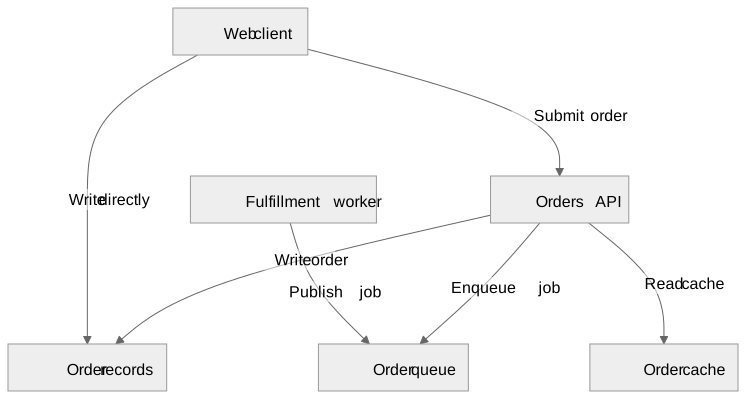
Download the flawed Mermaid source and rendered SVG.
There are six nodes and six arrows. A cache might be a reasonable design proposal, but the supplied record does not include one. Likewise, a direct browser-to-database write cannot become an accepted fact because a generator drew a convincing arrow.
Mermaid documents that mermaid.parse validates a graph definition without rendering it. Parsing establishes that Mermaid recognizes the syntax. Rendering establishes that a picture can be produced. Neither operation has access to the separate system record used in this review.
Compare evidence to diagram in both directions
First walk from evidence to diagram: locate every registered component and relationship. This catches omissions. Then walk from diagram to evidence: justify every node and arrow. This catches unsupported additions.
The comparison produces these findings:
| Finding | Evidence | Disposition in this example |
|---|---|---|
Added cache and api → cache read | No component or relationship in the complete scoped record | Remove from the current-system view |
Added web → db direct write | F1 routes submission to the API; F2 identifies the API's write | Remove the unsupported connection |
Added worker → queue publication | F4 records delivery from queue to worker | Remove the unsupported publication |
Missing queue → worker delivery | Required by F4 | Restore the missing relationship |
Download the findings ledger to reuse the disposition format.
The fixture check reports one extra component, three extra directed relationships and one missing relationship. The final two table rows are the two sides of one direction mismatch: an unsupported arrow is present and the required arrow is absent. Counting both source differences does not mean there are two independent design defects.
Write findings that identify the exact gap. “The worker section looks wrong” is hard to act on. A reviewer can resolve: “F4 requires queue → worker, labeled Deliver job; the candidate instead contains worker → queue, labeled Publish job.”
Correct the diagram against the record
The accepted source for this exercise contains only registered elements and relationships:
flowchart LR
  web["Web client"]
  api["Orders API"]
  db["Order records"]
  queue["Order queue"]
  worker["Fulfillment worker"]
  web -->|Submit order| api
  api -->|Write order| db
  api -->|Enqueue job| queue
  queue -->|Deliver job| worker

Download the corrected Mermaid source and rendered SVG. The source contains the five registered components and four registered relationships. The local check compares IDs, labels and edge direction with the register and confirms that the SVG renders.
The Mermaid flowchart reference explains the node and connector syntax used here. The system names, relationship meanings and acceptance decisions come from this article's constructed evidence pack.
This remains a small logical interaction view. It does not establish authentication behavior, atomicity across the database and queue, delivery guarantees, infrastructure boundaries or runtime sequence. Add another focused, evidence-backed view when one of those questions becomes the reader's task.
Separate contradictions from unresolved questions
A confirmed contradiction, an unsupported claim and an intentional omission need different dispositions:
| Review result | Meaning | Next action |
|---|---|---|
| Contradiction | The diagram conflicts with the accepted record | Correct the source or update the record through its change process |
| Unsupported claim | The diagram asserts something outside the available evidence | Remove it, mark it as proposed, or obtain evidence |
| Unresolved question | The evidence is incomplete or ambiguous | Assign an owner and keep it out of accepted current-state claims |
| Intentional omission | The detail sits outside the diagram's declared scope | State the boundary near the diagram |
If an engineer confirms that a cache exists, update the evidence pack and review its responsibility and relationships. If the cache is only a proposal, show it in a proposed-design view with its decision status. Do not silently mix proposed and current architecture.
Record the decision and preserve the accepted source
Record the candidate revision, evidence revision, findings, dispositions, unresolved questions, reviewer and review date. Keep the accepted .mmd file with that record. A screenshot alone may not reveal whether the underlying source changed after approval.
Before generating a diagram, use the requirements-to-Mermaid workflow to request editable source and evidence mappings. For the broader component, boundary and audience workflow, use the Confluence architecture diagram guide. The large-diagram review guide covers navigation when the view no longer fits comfortably on one screen.
After the diagram is verified, the Mermaid-as-LLM-context example compares one troubleshooting prompt with and without that system structure.
If your team maintains the accepted source in Confluence, Diagram Lens provides a source editor, rendered preview and reader tools. It does not generate the architecture or verify its facts automatically. Keep the evidence review as a separate human and technical control, whichever Mermaid editor you use.
Before publication, add a plain-language explanation using the accessible Mermaid diagram guide. If the source fails to render, use the tested Mermaid parse-error examples before returning to the factual review.