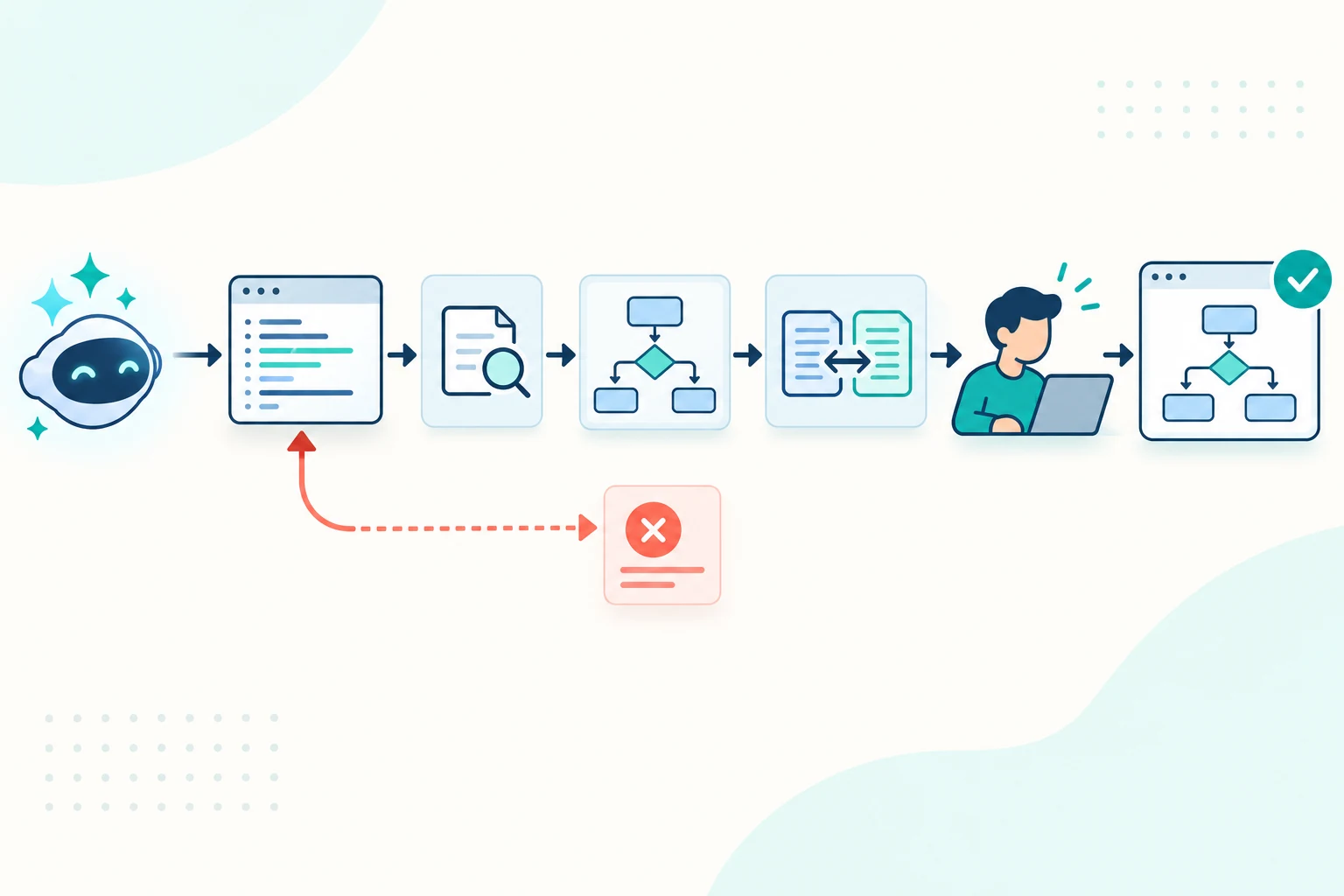
To validate an LLM-generated Mermaid diagram, test four different properties: whether the source parses, whether it renders clearly, whether it matches the supplied facts, and whether its diagram-specific behavior is correct. A clean render proves only that Mermaid can draw the source. It does not prove that messages occur in the right order, every failure path exists or every arrow is supported by evidence.
The practical workflow is:
Requirements → generate → parse → render → compare → inspect behavior
                                     ↑                    ↓
                                     └──── repair ← findings
This guide applies that loop to a fictional password-reset sequence diagram. The candidate and corrected Mermaid sources are constructed teaching fixtures, not outputs from a named model. They were checked locally with Mermaid 11.16.0. The research discussed below evaluates methods and models under particular test conditions; it is not a ranking of the AI tools available to your organization.
Use separate gates for separate failure modes
Do not compress validation into a single “looks good” decision. Each gate answers a different question and produces different evidence.
| Gate | Question | Examples of defects it catches | Evidence to retain |
|---|---|---|---|
| Input contract | What must the diagram represent? | Missing scope, ambiguous actors, unstated exception behavior | Numbered requirements and unresolved questions |
| Syntax | Can the target Mermaid version parse the source? | Invalid keywords, broken labels, malformed blocks | Parser result and Mermaid version |
| Render | Can a reader use the resulting picture? | Clipped labels, unreadable density, confusing crossings | Rendered output at the publishing size |
| Semantic comparison | Does every important statement match the supplied evidence? | Invented steps, omitted relationships, reversed arrows | Requirement-to-source comparison |
| Diagram behavior | Is the notation used correctly for this diagram type? | Wrong message order, missing alternatives, impossible transitions | Type-specific review findings |
| Approval | Is this source suitable for its stated audience and status? | A technically valid but misleading or outdated view | Reviewer, decision and accepted revision |
MermaidSeqBench evaluates natural-language-to-Mermaid sequence diagrams across separate criteria including syntax, activation handling, error handling and practical usability. Its results show capability gaps across models and evaluation modes. A related paper on evaluating ill-defined LLM tasks argues that aggregate scores can hide distinct failure modes and that LLM judges can be unstable. For a working team, the implication is straightforward: retain the individual checks instead of replacing them with one model-generated score.
Start with a testable input contract
Mermaid's official AI generation guide recommends identifying the diagram type, subject, and important elements or relationships. Add numbered requirements so the output can be compared with its input.
For this example, the requested sequence is:
| ID | Required behavior |
|---|---|
| R1 | The user asks the web app to reset a password |
| R2 | The web app asks the authentication service to create a one-time token before contacting the email service |
| R3 | The authentication service can return either a token or an error |
| R4 | The web app asks the email service to send a reset link only after a token is returned |
| R5 | If the email service accepts the message, the web app tells the user to check their email |
| R6 | If the email service rejects the message, the web app tells the user to try again later |
| R7 | If token creation fails, the web app tells the user to try again later and does not contact the email service |
A bounded generation prompt can then say:
Create a Mermaid sequence diagram for requirements R1-R7.

Rules:
- Use only the four named participants.
- Preserve the required order of messages.
- Represent token success and failure explicitly.
- Represent email acceptance and rejection explicitly.
- Do not add retries, storage, expiry rules or security controls that are
  not stated in the requirements.

Return:
1. One Mermaid code block.
2. A table mapping R1-R7 to participants, messages and branches.
3. Unresolved questions separately.
The mapping table is useful, but it remains generated content. Validate the Mermaid source and the table independently against R1-R7.
Gate 1: parse the exact source you will publish
Extract one Mermaid block without explanatory prose or Markdown fences. Parse it with the same Mermaid version used by the destination when possible. Mermaid documents that mermaid.parse checks a graph definition without rendering it.
Record:
- the exact source revision;
- the Mermaid version and relevant configuration;
- whether parsing passed or failed;
- any transformation applied before parsing;
- unsupported syntax that was removed or replaced.
Version alignment matters. Source accepted by a newer editor may use syntax that an older documentation renderer does not support. Parsing the text in one environment and publishing it in another leaves that compatibility question unanswered.
Parsing is still only the first gate. This candidate is valid Mermaid syntax:
sequenceDiagram
  autonumber
  actor User
  participant App as Web app
  participant Auth as Authentication service
  participant Mail as Email service

  User->>App: Request password reset
  App->>Mail: Send generic reset link
  Mail-->>App: Message accepted
  App->>Auth: Create one-time token
  Auth-->>App: Token
  App-->>User: Check your email
It can parse and render while still contradicting the input contract. The email request occurs before token creation, the reset link is unsupported, and both failure paths are missing.
Gate 2: inspect the rendered diagram
Render the accepted source in the component your readers will use. Inspect a normal desktop width, a narrow viewport and any exported format that matters to the workflow.
Check whether:
- participant and message labels are visible without relying on hover behavior;
- branches and loops can be followed in the intended order;
- long labels wrap or clip;
- arrows remain distinguishable at the delivered size;
- the surrounding explanation remains available when the diagram is exported;
- the renderer reports a warning, fallback or unsupported feature.
This is a usability check, not a factual one. Recent diagram-generation research increasingly separates source correctness from rendered structure. OmniDiagram uses targeted questions about rendered diagrams rather than relying only on syntax rules or pixel similarity. The general lesson is useful outside model training: inspect what the reader actually receives, because valid code can still produce a poor or misleading visual result.
Gate 3: compare requirements and source in both directions
First walk from every requirement to the Mermaid source. This reveals omissions. Then walk from every participant, message and branch back to a requirement. This reveals unsupported additions.
Applied to the candidate above:
| Check | Result | Finding |
|---|---|---|
| Syntax | Pass | Mermaid recognizes the source |
| Render | Pass | The simple sequence is readable |
| R1 coverage | Pass | User sends the reset request to the web app |
| R2 and R4 ordering | Fail | Email is contacted before token creation |
| R3 coverage | Fail | Authentication error branch is absent |
| R5 coverage | Pass | Accepted email leads to the success message |
| R6 coverage | Fail | Email rejection branch is absent |
| R7 coverage | Fail | Token failure and the “no email” constraint are absent |
| Unsupported content | Fail | “Generic reset link” is not supported by R1-R7 |
Do not let the generated explanation grade its own diagram. It may repeat the same omission or invention in prose. Use the original requirement statements as the comparison baseline.
For system architecture, this becomes a component-and-relationship comparison. The AI-generated architecture review provides a worked example of detecting invented nodes, missing links and reversed arrows.
Gate 4: test the behavior implied by the diagram type
A generic source comparison is necessary but not always sufficient. Different Mermaid diagrams make different claims.
| Diagram type | Behavior to inspect |
|---|---|
| Flowchart | Decision outcomes, loops, unreachable nodes and unintended shortcuts |
| Sequence diagram | Participant order, message direction, alternatives, loops, activations and error paths |
| State diagram | Allowed transitions, terminal states, guards and impossible jumps |
| ER diagram | Entity names, cardinalities, optionality and key meaning |
| Gantt chart | Dates, dependencies, overlaps and milestone interpretation |
For a sequence diagram, read from top to bottom and ask what must already be true before each message occurs. Then trace every alt, else, opt and loop block. The official Mermaid sequence-diagram reference documents those constructs; the business rules determine when they are needed.
The corrected source makes the required alternatives explicit:
sequenceDiagram
  autonumber
  actor User
  participant App as Web app
  participant Auth as Authentication service
  participant Mail as Email service

  User->>App: Request password reset
  App->>Auth: Create one-time token
  alt Token created
    Auth-->>App: One-time token
    App->>Mail: Send reset link with token
    alt Message accepted
      Mail-->>App: Accepted
      App-->>User: Check your email
    else Message rejected
      Mail-->>App: Rejected
      App-->>User: Try again later
    end
  else Token creation failed
    Auth-->>App: Error
    App-->>User: Try again later
  end
Download the corrected Mermaid source and the validation checklist.
The corrected diagram covers all seven requirements. In the token-failure branch, the email service is never called. In the success branch, the web app contacts the email service only after receiving a token. The two “try again later” messages have different immediate causes, and the nested alternatives preserve that distinction.
This is still a scoped teaching fixture. It does not define token expiry, account-enumeration behavior, rate limits or whether the delivery provider retries messages. Adding those familiar security and delivery details without evidence would make the picture more elaborate but less trustworthy.
Repair from findings instead of regenerating blindly
Turn failed checks into a constrained repair request. Preserve the parts that passed so a local correction does not become an uncontrolled rewrite.
Repair the Mermaid source using only the findings below.

Constraints:
- Keep the four participant IDs and labels unchanged.
- Keep R1 and R5 behavior unchanged.
- Move email sending after successful token creation.
- Add explicit token-error and email-rejection alternatives.
- Remove the unsupported generic-link message.
- Do not add any behavior outside R1-R7.

Return:
1. The complete corrected Mermaid source.
2. A concise change log tied to each failed requirement.
3. Any finding that could not be resolved without more information.
Review the diff before applying it, then rerun every gate. Mermaid's AI editing guide describes showing a diff before changes are applied. Whether editing happens in that product, an IDE or a chat assistant, the principle is the same: inspect the actual source change rather than approving a summary of it.
For a baseline, proposed and accepted source example with a deliberately reversed arrow and a removed edge, use the AI-generated Mermaid change-review workflow.
Do not run only the previously failed checks. A repair can correct one branch while changing a participant name, deleting another message or introducing syntax unsupported by the publishing renderer.
Automate deterministic checks and keep judgment visible
Useful automated checks include:
- isolating the Mermaid block from surrounding Markdown;
- enforcing source-size and security policies;
- parsing with the target Mermaid version;
- rendering at known viewport sizes;
- checking required stable IDs, participants or directed edges;
- preserving a source diff and render artifact for review.
Constrained generation can reduce malformed output. The YieldLang paper evaluates grammar-guided generation on tasks including Mermaid flowcharts and reports higher accuracy than its comparison methods. That approach addresses conformance to a formal language; it does not establish that the generated diagram matches your real process or system.
Keep human review for questions such as:
- Is the supplied evidence current and complete enough for this scope?
- Does an arrow describe the intended business or technical meaning?
- Is an omitted exception harmless here or materially misleading?
- Is the diagram understandable to its actual audience?
- Is the view current state, proposed state or only an example?
Record the accepted source revision, requirements revision, Mermaid version, findings, reviewer and decision. If the underlying process changes, validation should run against the new evidence rather than treating the old approval as permanent.
Use a practical acceptance rule
Approve an LLM-generated Mermaid diagram only when all of the following are true:
- the source parses in the target environment;
- the delivered render is readable;
- every in-scope requirement is represented;
- every important diagram claim has supporting evidence;
- diagram-specific behavior has been reviewed;
- unresolved questions are visible rather than guessed;
- a named person accepts the source for its stated status and audience.
If source parsing fails, use the Mermaid parse-error workflow. If the input is still unstructured, begin with the requirements-to-Mermaid guide. To reuse an accepted diagram as AI context, follow the worked Mermaid-as-LLM-context example.
For a source that must serve both documentation readers and AI-assisted workflows, use the human-and-LLM diagram guide. Before publishing, add a plain-language explanation and run the accessible Mermaid checklist.
If your team maintains Mermaid in Confluence, Diagram Lens provides source editing, preview and reader tools. Those tools help inspect the source and delivered diagram; the evidence comparison and approval decision still belong to the people responsible for the documented system.