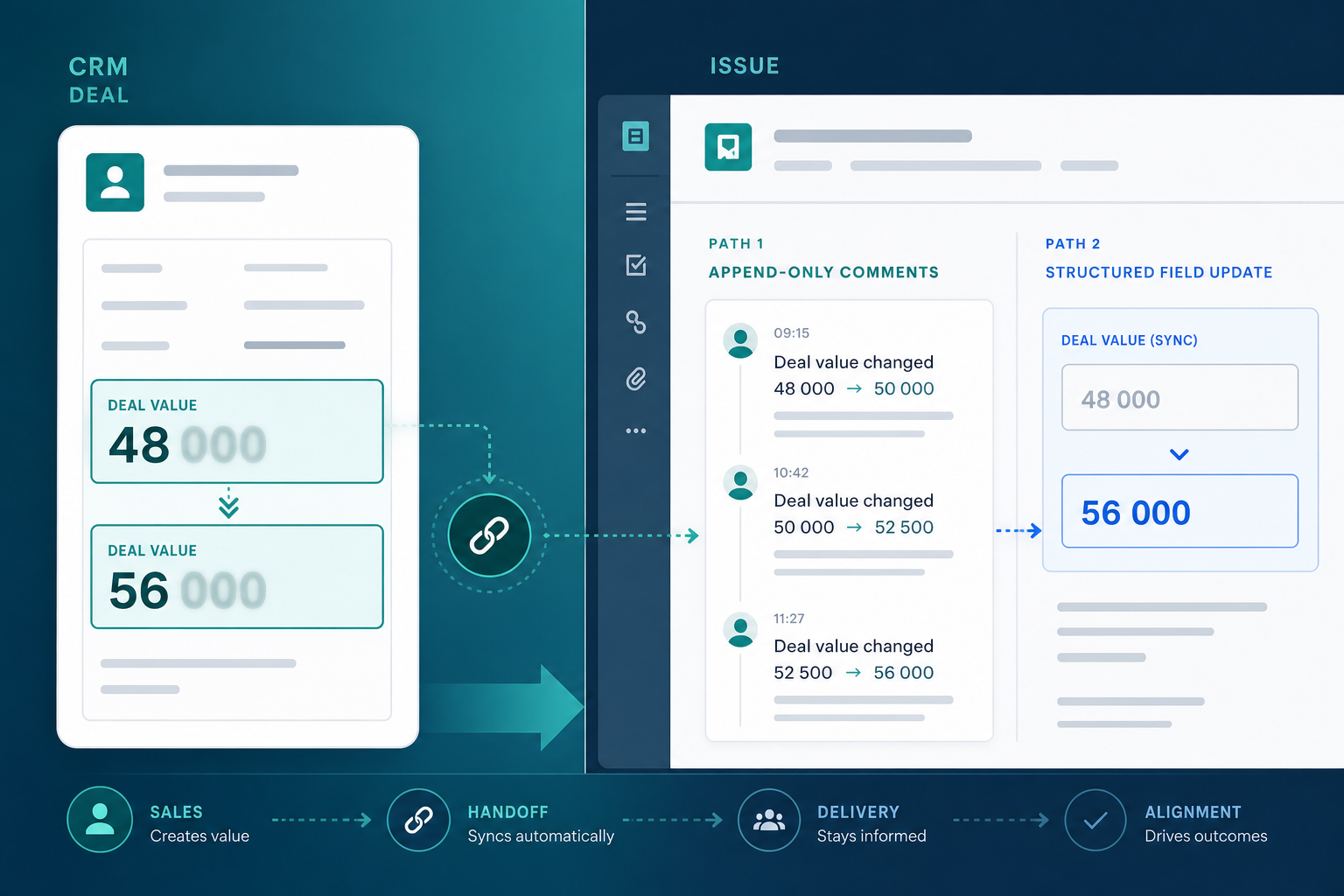
Sales revises the Acme deal in Pipedrive on Wednesday.
Value moves from USD 48,000 to USD 56,000 after a scope add-on. The deal owner changes when the account executive goes on leave. In Jira, onboarding epic ONB-104 still shows the handoff-day description — original value, original sales contact, no note that anything changed in CRM.
Thursday standup, finance asks whether sprint capacity still matches contract value. The implementation manager opens the epic, scrolls past twenty workflow comments, and still cannot answer without opening Pipedrive in a second tab.
That is the question behind Pipedrive deal update Jira sync design: when CRM changes after handoff, should delivery see a comment, a field update, or something else?
"Sales changed the deal again — why didn't Jira tell us?"
Because issue create solved day one. Post-handoff Pipedrive value change Jira visibility still needs an explicit rule.
Quick Answer
Default to Jira comments for tracked deal-change awareness. Comments preserve an append-only audit trail — ideal when delivery needs to know that value, primary person, stage, or a selected custom field changed and what the prior value was.
Add native field updates only where Jira reporting requires them. Custom fields support JQL, dashboards, and automation conditions, but overwriting a field erases the previous value unless you log changes elsewhere.
Add a live deal panel when the primary question is current state. Panels answer "what is true now when I open this issue?" — complementary to comments, not a replacement.
Most teams need two layers: comments for tracked revisions, plus a current-state view so nobody hunts through the thread before sprint planning. In the current BacklogBridge behavior tested on October 11, 2026, an owner-only change did not create a Jira comment or update Assignee; the live panel showed the current sales owner.
What You Are Trying to Accomplish
You want delivery teams working in Jira to learn when tracked values on linked Pipedrive deals change and to see current CRM context such as sales owner without manual Slack reminders or CRM tab-switching.
A workable CRM sync Jira comments or field-update path should:
- Detect meaningful deal changes on records linked to Jira issues.
- Surface the change inside Jira where implementation managers already work.
- Preserve enough context to answer "what changed?" and "when?"
- Avoid drowning issues in noise from minor CRM edits.
- Complement create-time mapping — automation at won or stage does not keep fields current afterward.
The goal is not full bidirectional field mirroring by default. It is reliable change awareness for teams that live in the issue view.
Comments vs Field Updates vs Live Panel
Three mechanisms appear in most Pipedrive–Jira integration discussions. They are not interchangeable.
| Mechanism | What delivery gets | Strength | Weakness |
|---|---|---|---|
| Jira comment from deal update | Timestamped event in the issue thread | Append-only audit trail; shows before → after | Current value buried in scroll; not JQL-queryable |
| Native Jira custom field update | Current scalar value on the issue | Dashboards, JQL, automation conditions | Overwrites prior value; weak change history |
| Description rewrite | Updated narrative text | Readable summary in one block | Same overwrite problem; poor reporting |
| Live panel on issue open | Current CRM snapshot in sidebar | Answers "what is true now?" at open time | Not an event log; not queryable in JQL |
Backlog Bridge's public Pipedrive Integration for Jira product page describes deal updates reflected in Jira comments — for example, "Pipedrive deal updated: Value: 5000 USD → 6000 USD" when value or person changes in Pipedrive. Vendor copy does not describe automatically rewriting native Jira custom fields on every CRM edit. Treat field-update behavior as unverified unless your trial shows otherwise.
Which Question Are You Answering?
| If delivery needs to… | Prefer |
|---|---|
| Know a tracked value or primary person changed after handoff | Comment with before → after text |
| See the current Pipedrive sales owner | Live panel; add a separate notification rule if owner-change alerts are required |
| Filter onboarding epics by current deal tier in JQL | Custom field update (verify integration support) |
| See today's deal value when opening the issue | Live panel fetch on open |
| Keep handoff narrative intact in the description | Comment — avoid rewriting description on every CRM edit |
| Trigger automation when CRM tier changes | Custom field update on watched fields |
Why Post-Handoff CRM Changes Break Delivery
Pipedrive deals are living records. Value, person, organization, owner, stage, labels, and custom fields change after the onboarding epic exists.
Jira issue descriptions and custom fields mapped at create time are snapshots unless something updates them. Delivery plans sprints, staffing, and customer conversations against those values.
Common post-handoff surprises:
- Scope add-on raises deal value; Jira description still shows the original number
- Primary contact changes after procurement handover; Jira contact block is stale
- Sales owner rotates; delivery escalates to someone no longer on the deal
- Tier or package custom field revised; Jira never received the SKU delivery should build against
These are handoff-layer problems. Sprint execution can be healthy while commercial context is wrong. For readiness rules before handoff day, see Deal Won in Pipedrive — What Should Happen in Jira Before Onboarding Starts?.
When Comments Are the Right Default
Comment-based deal change notifications fit teams that need change awareness and audit history more than structured reporting.
Choose comments when:
- Delivery needs to know that something changed and what the prior value was
- You want append-only history without overwriting handoff narrative in the description
- Multiple stakeholders read the issue and benefit from a visible timeline of CRM edits
- You do not need every deal field in JQL or dashboard filters
Comments align with how Jira already handles collaboration. The REST API supports adding comments without replacing issue fields — a natural fit for event-style CRM signals.
Trade-offs to accept:
- Thread noise — busy deals with frequent CRM edits can flood the comment stream
- Current value hunting — readers may scroll to find the latest change unless paired with a live panel
- Watcher notifications — Jira may email assignees and watchers when new comments arrive; deal-change comments can ping delivery unexpectedly
- No JQL — you cannot filter "all issues where deal value exceeded X after handoff" from comments alone
When Field Updates Matter More
Native Jira custom field updates fit reporting and automation more than storytelling.
Choose field updates when:
- Portfolio dashboards must show current deal value or tier across many onboarding epics
- JQL filters drive queues — "show all issues where CRM tier = Enterprise"
- Automation rules depend on structured field values
- Leadership reports join Jira work to commercial attributes without exporting to Excel
Field updates replace the stored value. They answer "what is it now?" in a machine-readable place. They do not automatically preserve "what was it before?" unless you also log changes elsewhere — often in comments.
Practical pattern for many teams:
- Map stable create-time fields at issue creation (title, initial value, tier)
- Post change events as comments when CRM edits occur
- Add selective field rewrites only for fields that must stay current in JQL — and verify whether your integration supports that
How Deal-Update Comment Sync Works
Whether you use a Marketplace app or middleware, the reliable pattern looks similar:
- Issue exists and links to a Pipedrive deal ID — usually from create automation.
- Sales updates the deal in Pipedrive — value, person, stage, label, source, or a selected custom field.
- Pipedrive fires a webhook for the deal update event (webhook guide).
- Integration receives the payload at its registered endpoint.
- Integration compares previous and current values for configured fields.
- Integration posts a Jira comment on the linked issue with change summary text.
- Delivery opens the issue and sees the new comment in the activity stream.
Jira does not natively subscribe to Pipedrive. Something with Pipedrive webhook access, stored deal↔issue links, and Jira write permission performs step 6.
Backlog Bridge describes webhook registration and health monitoring on the Webhook & Status admin tab. If forward create automation works but deal-update comments never appear, check webhook delivery before assuming comment logic is disabled.
Layer Deal Sync With the Rest of the Handoff Stack
Pair comment sync with other layers from the two-way maturity model in Sync Jira Status Changes Back to Pipedrive:
| Layer | Direction | Purpose |
|---|---|---|
| Issue create | Pipedrive → Jira | Day-one handoff |
| Deal-update comments | Pipedrive → Jira | Change awareness |
| Live deal panel | Pipedrive → Jira (on open) | Current CRM state |
| Status activities | Jira → Pipedrive | Sales visibility on delivery movement |
For the live panel layer, see Why Delivery Teams Need a Live Pipedrive Panel Inside Every Jira Issue.
Configure Comment-Based Deal Updates
Public vendor materials describe three admin tabs — Connection, Automation Rules, and Webhook & Status. Deal-update comments depend on the forward path working first.
Practical sequence:
- Connection tab: Valid Pipedrive domain and API token with deal read scope.
- Automation Rules tab: Trigger, project, issue type, and field mapping so issues link to deals at create time. Unlinked issues receive no deal-update comments.
- Webhook & Status tab: Register Pipedrive webhook; confirm last event received and processing health indicators.
Deal-update comments are typically bundled with the linked integration once webhooks flow — public copy does not describe a separate "comment only" toggle. Verify which Pipedrive field changes produce comments in sandbox; do not assume every custom field edit triggers one.
Design Rules for Which CRM Changes Reach Jira
Implementation managers and Jira admins should agree a noise policy before enabling comment sync.
Usually worth a Jira comment:
- Deal value or currency change
- Primary person change
- Stage move that affects delivery scope (for example, back to negotiation)
- Critical custom fields — tier, package, SLA — when sales revises them post-handoff
Often skip or handle differently:
- Deal owner change — the current live panel shows the latest owner, but owner-only changes need a separate alert rule if delivery must be notified
- Minor label edits that do not affect delivery
- Internal CRM housekeeping fields
- High-frequency edits during data cleanup sprints
Document the list in your handoff runbook alongside minimum Pipedrive fields from The Sales-to-Delivery Handoff Gap.
Validate Deal-Update Comments in Sandbox
Run these after forward sync creates linked issues reliably.
Test A — Value change
- Create a sandbox deal and trigger linked Jira issue creation.
- Change deal value in Pipedrive.
- Open the Jira issue and confirm a comment appears with before → after text.
- Confirm description text and mapped custom fields behave as expected — unchanged unless your integration also rewrites them.
Test B — Primary person and owner change
- Swap the primary person on the linked deal and confirm a comment appears with readable names.
- Change only the Pipedrive sales owner and confirm the live panel shows the current owner.
- With the currently tested behavior, verify that the owner-only change does not create a comment or update Jira Assignee.
- If delivery needs an owner-change alert, test and document a separate notification rule rather than assuming one exists.
Test C — Noise and duplicates
- Make a minor CRM edit your policy says to ignore, if configurable.
- Document whether a comment still appears — adjust expectations or ask vendor about filtering.
- Retry the same deal edit or simulate webhook retry and confirm whether duplicate comments appear.
Test D — Webhook failure
- Note health indicators on the Webhook & Status tab.
- Break webhook delivery temporarily (revoked token or disabled webhook).
- Change deal value and confirm failure surfaces in admin UI — not silent absence.
- Restore connectivity and confirm the next change writes successfully.
Document observed latency in trial; do not assume instantaneous comment delivery.
Common Pitfalls
No deal link. Issues created manually without CRM linkage never receive deal-update comments.
Assuming create equals ongoing sync. Issue create removes copy-paste on day one. Post-handoff changes still need comments, panels, or field updates — see How to Auto-Create Jira Issues from Pipedrive Deals.
Comments without current-state layer. Teams scroll twenty comments hunting today's value. Add a live panel or agreed field rewrite for fields that must be obvious at open time.
Field updates without history. Dashboards show USD 56,000 but not that it was USD 48,000 last week. Pair field rewrites with comments when both reporting and audit matter.
Comment flood. Active deals with daily CRM edits spam the issue thread. Align with sales on which changes warrant Jira visibility.
Webhook silence. Sales updates CRM; Jira stays quiet. Usually webhook or token failure — not delivery ignoring the deal.
Permission surprises. Commercial change history in comments is visible to everyone who can read the issue. Review project roles before connecting production deal data.
What Jira Admins Should Verify Before Rollout
Linking and behavior
- How are issues linked to deals — automation at create, manual linking, or both?
- Which Pipedrive field changes post comments, and which are ignored?
- What comment text format appears for value, person, stage, and selected custom-field changes?
- Does an owner-only change update the live panel without creating a comment, as in the October 2026 test?
- Does the integration also rewrite custom fields, or comments only?
Access and visibility
- Which Jira users can read commercial change history in comments?
- Should contractors see commercial CRM edits in the activity stream?
- Will deal-change comments trigger watcher emails your team wants or noise they do not?
Credentials and compliance
- Who owns the Pipedrive API token, rotation schedule, and least-privilege scope?
- Read vendor privacy statements and Marketplace security materials if procurement requires them.
No Atlassian Marketplace listing URL was provided in editorial metadata for this article, and listing details were not verified at the time of writing (July 2026). Search Marketplace for the app name and verify current pricing, hosting, scopes, and privacy tabs before installation.
Do not treat vendor marketing copy as procurement evidence. Confirm deal-update comment behavior with reproducible test deals rather than slide-deck claims.
When to Use a Different Approach
Low change rate after handoff. A standing weekly CRM review for active onboardings may suffice until parallel deals make manual discipline costly.
Reporting is the primary pain. Prioritize native custom field mapping or scheduled field sync for JQL and dashboards; add comments only where history matters.
Current state matters more than change log. Prioritize a live panel; comments become optional context.
Existing iPaaS. Zapier, Make, or similar can map Pipedrive updates to Jira comments or field writes with custom filtering — flexible, higher maintenance.
Primary pain is sales visibility. Reverse status activities help account owners in Pipedrive, not delivery reading CRM changes in Jira.
Choose the Layer That Matches the Question
Pipedrive deal update Jira sync is not a single setting. It is a design choice about which question delivery asks:
- What changed? → Comments and audit-friendly event text
- What is it now for reporting? → Native custom fields or selective field updates
- What is true when I open this issue? → Live panel fetch on open
For most sales-led delivery teams, the answer to the title question is comments first for tracked changes such as value, person, stage, label, source, and selected custom fields because comments preserve history without overwriting handoff text. Add field updates where JQL and dashboards require current scalars. Use the live panel for the current sales owner and other current CRM context.
Define which CRM edits matter, validate in sandbox, monitor webhook health after go-live, and layer comment sync alongside create automation and optional reverse status signals.
See how Pipedrive Integration for Jira describes deal updates posted as Jira comments alongside live deal panels and status activity sync.
For why context disappears between systems in the first place, read The Sales-to-Delivery Handoff Gap.