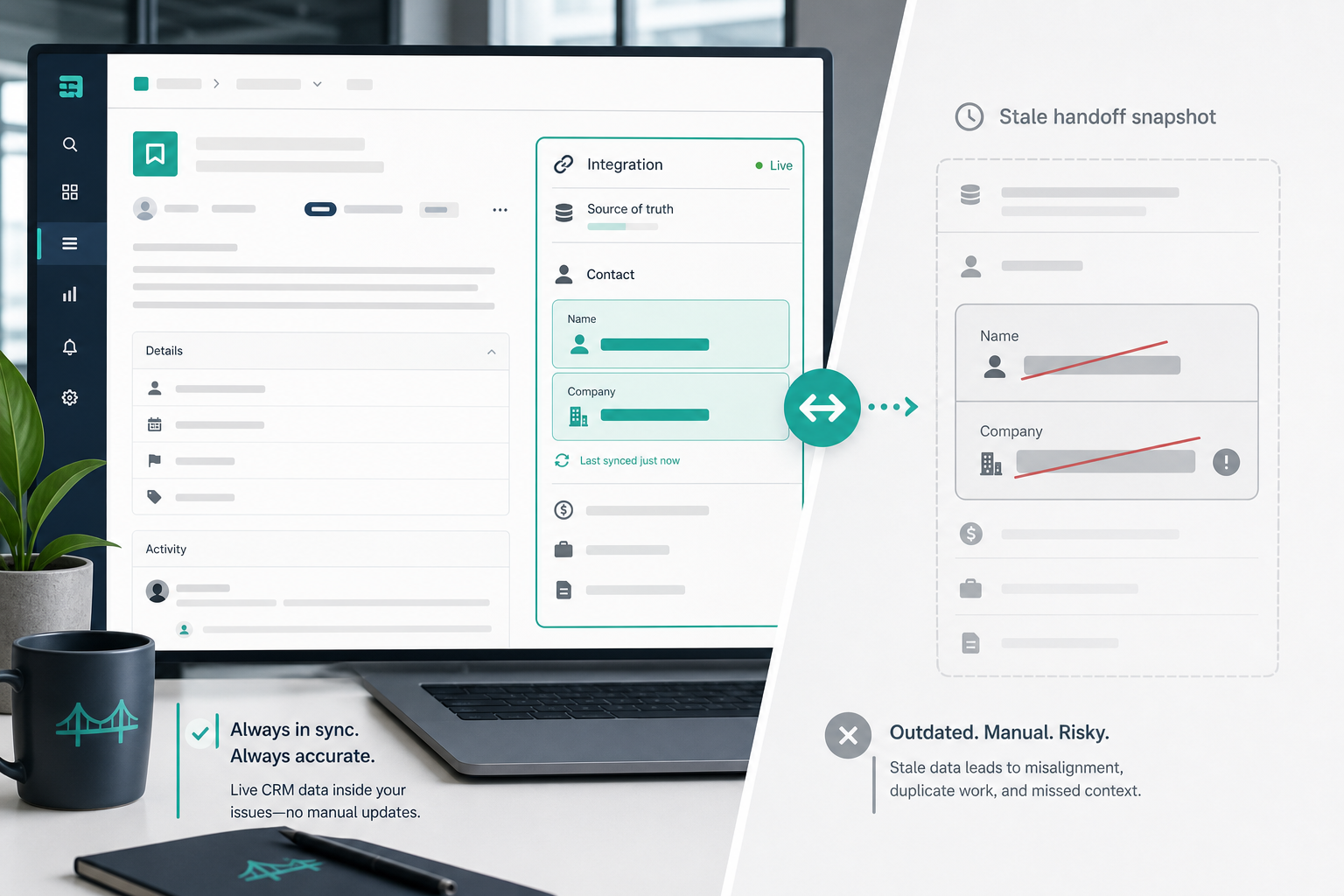
Week two of onboarding, the implementation manager opens ONB-122 to send a sandbox invite.
The Jira epic description still lists Jordan Lee at Northwind LLC — copied from Pipedrive on handoff day. Sales replaced Jordan with Sam Rivera after procurement took over. The organization renamed to Northwind Group in CRM. Delivery sends the invite to the wrong inbox because the Pipedrive contact Jira issue block never updated.
That is not a sprint execution problem. It is a CRM contact context Jira gap. The team connected systems. Person and company data stayed frozen in description text — even though the live panel on linked issues is designed to show current contact name and company when someone reopens the issue.
"Who is the customer contact now — and which company name goes on the contract?"
Without a plan for Pipedrive person Jira visibility, delivery trusts a handoff snapshot while Pipedrive already moved on.
Quick Answer
- Map a minimum contact block at issue creation: primary person name, organization (company), reachable email, and role note when sales records one.
- Treat issue descriptions as day-one snapshots. They answer kickoff questions well; they do not auto-refresh when CRM person or organization changes.
- Use a live deal panel for current contact name and company on linked issues — vendor copy describes fetch-on-open behavior; verify additional person fields (email, phone) in trial.
- Layer deal-update comments so person reassignment leaves an audit trail — complementary to the panel, not a substitute for current state.
- Review permissions before contact email and company names appear on broadly shared Jira projects.
Quick Decision Flow
- If delivery sends kickoff or access emails from Jira context → map person name, organization, and email at create; enforce required person fields in Pipedrive before trigger.
- If primary contacts or company names change after handoff → enable live panel on linked issues; do not rely on description-only mapping.
- If sales reassigns deal contact mid-engagement → confirm deal-update comments fire; pair with panel for "who is it now?"
- If portfolio views filter by customer account → promote organization to a Jira custom field; keep narrative contact in description or panel.
- If contractors or partners should not see customer email → restrict projects/roles or omit email from mapped fields.
What You Are Trying to Accomplish
You want linked Jira issues to carry the Pipedrive person and organization context delivery teams need — who attends kickoff, who approves access, which legal entity owns the contract — without opening CRM in a second tab every week.
A workable deal contact delivery team plan should:
- Define a minimum person/org field list sales must complete before handoff triggers fire.
- Map those fields into readable Jira issue content at creation time.
- Keep contact and company current after CRM edits through live panel fetch and/or change notifications.
- Limit PII exposure to Jira roles that actually need customer contact details.
- Validate behavior in sandbox before production onboarding epics carry real names and emails.
The goal is trustworthy customer context inside the issue view — not a full CRM person export on every ticket.
How this guide relates to sibling articles
- Stale commercial context broadly → Why Delivery Teams Need a Live Pipedrive Panel Inside Every Jira Issue
- Post-handoff CRM change notifications → When a Pipedrive Deal Changes, Should Jira Get a Comment or a Field Update?
- Tier, SLA, and custom-field mapping → Mapping Pipedrive Custom Fields into Jira Issue Descriptions
How Pipedrive Person and Organization Data Relates to Deals
Pipedrive separates people, organizations, and deals as linked records.
- Persons hold individual contact details — name, email, phone, and links to organizations.
- Organizations represent companies — the legal or commercial entity on the deal.
- Deals reference a primary contact person and an organization; sales can reassign the person or update the organization after Won.
Delivery teams rarely need every CRM attribute on a person record. They need the deal-linked primary contact and company name that match what the customer expects on kickoff invites and access requests.
Person and organization fields change for predictable reasons:
- Procurement replaces the technical champion mid-onboarding.
- The customer rebrands or merges entities — organization name updates in CRM.
- Sales links a different person as primary contact after contract signature.
- Email domains change when the customer moves to a new tenant.
If Jira only stores create-time text, each change sends delivery back to Pipedrive unless something refreshes context.
Minimum Contact Block Delivery Should See in Jira
Agree this list with sales and delivery before configuring automation. Adjust labels to your Pipedrive account.
| Delivery question | Typical Pipedrive source | Include in Jira? |
|---|---|---|
| Who is the primary customer contact? | Deal-linked person name | Yes |
| Which company owns the engagement? | Deal-linked organization name | Yes |
| How do we reach them this week? | Person email (and phone if your process uses it) | Usually yes for onboarding epics |
| Who sold it / who clarifies scope? | Deal owner (sales) | Yes — separate from customer contact |
| What role does the contact play? | Person label, title custom field, or latest activity note | When available |
| Secondary stakeholders | Additional persons on deal or org | Optional — often panel or CRM only |
| Internal CRM hygiene tags | Person/org labels for sales segmentation | Usually skip |
Illustrative description block after automation:
Contact: Sam Rivera, sam@northwind.com (Northwind Group)
Customer role: Procurement lead — replaced technical champion post-signing
Sales owner: Alex Chen
That answers the sandbox-invite question from the intro without parsing fifteen CRM fields.
Sales runbook rule worth publishing:
Primary contact must have a reachable email before the deal reaches the handoff trigger stage.
For agency and SaaS onboarding playbooks that include contact in the first artifact checklist, see How Agencies Should Hand Off Won Pipedrive Deals to Jira Delivery Teams.
Which Issue Types Should Carry Contact Context?
Practical default for sales-led delivery:
- Onboarding epics or parent delivery tickets — yes; this is where kickoff, access, and stakeholder questions concentrate.
- Child stories and tasks — usually no; repeating contact on every subtask adds noise and widens PII exposure.
- Internal engineering work without a CRM deal — never; do not copy person fields into unrelated issue types via loose automation rules.
Document the boundary in your handoff runbook alongside minimum fields from Deal Won in Pipedrive — What Should Happen in Jira Before Onboarding Starts?.
Four Surfaces for Contact and Company Context
Contact data can appear in more than one place. Each surface answers a different question.
| Surface | When data reflects CRM | Best for | Weak for |
|---|---|---|---|
| Description at create | Handoff moment | Readable kickoff block in issue body | Current contact after person swap |
| Live deal panel | When linked issue opens (vendor: fetch on open) | Contact name and company — current state in sidebar | JQL filters; automation conditions |
| Deal-update comment | Each logged person/org change event | Audit trail; before → after awareness | Quick current-state read in long threads |
| Native Jira custom field | Last create or verified update | Dashboards filtered by account/org | Narrative role notes; change history |
Backlog Bridge's public Pipedrive Integration for Jira product page describes contact name and company in the live issue panel, contact person in auto-created issue content, and deal updates — including person reassigned — reflected in Jira comments. Public copy emphasizes name and company in the panel; treat email, phone, and exact comment wording as verify-in-trial details.
Map Contact Fields at Issue Creation
Create-time mapping solves day-one kickoff. Configure it after sales and delivery sign the minimum field list.
Prerequisites
- Connection tab: Valid Pipedrive domain and API token — see Pipedrive API Token Setup for Jira Admins.
- Trigger rule agreed: Won, stage, or handoff-ready — see Which Pipedrive Pipeline Stage Should Trigger Jira Issue Creation?.
- Minimum contact fields enforced in Pipedrive before the trigger — empty person email at create produces empty Jira lines.
Automation Rules tab
Per vendor product page flow:
- Choose trigger, target Jira project, and issue type — typically onboarding epic or parent delivery ticket.
- Open the field checklist and select person and organization attributes from your minimum list alongside commercial fields.
- Confirm standard deal attributes include contact person; add organization if exposed as a mappable field in your trial.
- Save; repeat per pipeline if contact requirements differ.
Vendor copy lists contact person and sales owner among auto-created issue fields. Confirm organization name appears in description mapping or panel — not every integration exposes org as a separate mapped line.
Sandbox checks:
- Person name and organization render as readable labels, not raw API keys.
- Email formatting survives special characters and long domain names.
- Empty person at trigger time produces a visible gap — fix with Pipedrive required fields, not silent omission.
For the full create flow, see How to Auto-Create Jira Issues from Pipedrive Deals.
Keep Contact and Company Current After Handoff
Description mapping alone recreates the intro scenario when CRM person or organization changes.
Live panel for current name and company
Vendor product copy describes a live Pipedrive panel on linked Jira issues showing contact name and company among deal status, value, notes, stage, owner, and label — with data fetched from Pipedrive when the issue is opened.
Use the panel when:
- Primary contacts swap after procurement or leadership changes.
- Organization names change mid-engagement.
- Delivery reopens the same epic weekly and needs current CRM identity without tab-switching.
The panel does not replace a well-written day-one description. It reduces stale-contact risk after handoff.
Comments when person on the deal changes
Vendor product page copy states that when a deal is updated in Pipedrive — value changed, person reassigned — a comment can be added to the linked Jira issue. That gives delivery a timestamped signal that contact context changed.
Comments complement panels:
- Comment answers "something changed — when?"
- Panel answers "who is the contact now?"
Do not rely on comment threads alone before customer-facing emails — scroll cost is real on active epics.
Description rewrite — usually skip
Automatically rewriting the entire description on every person change destroys the handoff narrative and trains teams to distrust the issue body. Prefer panel plus comment unless you have a narrow, documented exception.
When to Promote Organization to a Jira Custom Field
Keep human-readable contact blocks in description or panel. Promote organization name or account ID to a native Jira custom field when:
- Portfolio dashboards filter onboardings by customer account
- JQL queues drive staffing — "show all Northwind Group epics"
- Automation rules branch on account identity
Organization in a Jira custom field still goes stale unless separately updated. Pair with panel or comment layers for person changes.
Validate Contact Behavior in Sandbox
Run these before production issues carry customer PII.
Test A — Create-time contact block
- Sandbox deal with known person name, email, and organization.
- Fire handoff trigger; open created issue.
- Confirm description shows expected contact block formatting.
Test B — Person reassignment
- Change primary person on the deal in Pipedrive.
- Reopen linked Jira issue — confirm panel shows new contact name and company per vendor behavior.
- Confirm whether a Jira comment documents the person change; note exact wording for your runbook.
Test C — Organization rename
- Update organization name in Pipedrive.
- Reopen issue — confirm panel reflects new company name while description snapshot stays unchanged unless separately updated.
Test D — Permissions
- Open issue as implementation manager, contractor, and read-only role.
- Confirm who sees contact email and company in description, panel, and comments.
Document results. Adjust project permissions or field selection if contractors should not see customer email on onboarding epics.
Common Pitfalls
Description-only contact mapping. Person swaps invisible until someone opens CRM.
Map every person field. Phone, social links, and internal tags bury the primary contact line.
Assume panel includes email. Public copy emphasizes name and company — verify email visibility in trial.
Panel as reporting field. Sidebar contact data is not searchable in native Jira filters unless also mapped to custom fields.
Skip sales required fields. Empty person at trigger creates empty Jira contact blocks.
Ignore PII on shared projects. Contact email on broadly permissioned boards exposes CRM data to roles that never needed it.
Confuse sales owner with customer contact. Both belong in context; only one receives sandbox invites.
What Jira Admins Should Verify Before Rollout
Behavior
- Which person and organization attributes map into issue description at create?
- Does the live panel show contact name and company only, or additional person fields?
- What comment text appears when primary person on the deal changes?
- What displays when Pipedrive API is unreachable or the token expired?
Access
- Which Jira project roles can read customer email and company on linked issues?
- Should external collaborators see contact details in the issue panel?
Procurement
- Pipedrive API token custody, rotation, and least-privilege scope.
- Vendor privacy materials and Marketplace security tab if required.
The site product page links to an Atlassian Marketplace listing for Pipedrive Integration for Jira. Listing details such as pricing, ratings, review counts, privacy tab contents, and exact Forge scopes were not verified via live fetch at the time of writing (July 2026). Confirm current Marketplace metadata before installation.
When to Use a Different Approach
Low volume, stable contacts. Manual paste into a Jira template may suffice until person swaps become weekly.
Strict PII minimization. Omit email from Jira; store account ID only and keep person details in CRM with role-restricted access.
Complex multi-stakeholder mapping. iPaaS middleware can branch person lists by product line — higher maintenance; site comparison articles cover Zapier, n8n, and similar paths.
Reporting-first pain. Prioritize organization custom fields and account labels; keep contact narrative in panel.
Name the Contact Block — Then Keep It Current
Pipedrive contact Jira issue context works when teams define a minimum person and organization block, map it at creation, and layer live panel fetch plus change comments so CRM drift does not mislead kickoff and access workflows.
Agree the field list with sales. Enforce reachable email before handoff triggers. Put contact context on parent epics, not every subtask. Validate person reassignment and organization rename in sandbox. Review who can read customer email on shared delivery projects.
See how Pipedrive Integration for Jira describes contact and company in auto-created issues, live deal panels, and deal-update comments.
For why context disappears between systems, read The Sales-to-Delivery Handoff Gap.