The procurement shortlist had three CRM connectors and one label nobody could explain.
Two Marketplace listings showed Forge. One older result still said Connect. All three promised deal-to-issue automation and CRM context inside Jira. The Jira admin's question was not which logo looked better — it was what a Forge Pipedrive Jira app actually means for webhook endpoints, API token storage, and who owns integration uptime after install.
"Is Forge just marketing, or does it change where our Pipedrive data goes?"
It changes where integration code runs, where inbound webhooks terminate, and where you look when automation stops. For Jira Forge integration evaluations, the hosting badge is a trust-boundary label — not a feature score.
This is a buyer guide about Jira Cloud integration architecture, not a ranking of CRM apps.
For the general connector overview rather than this hosting comparison, see Pipedrive Integration for Jira features and setup.
Quick Decision Flow
- If you are standardizing on Jira Cloud for the next several years and shortlisting Marketplace apps → prefer Forge listings unless a Connect vendor documents a clear migration plan verified against current Atlassian announcements.
- If delivery needs live CRM context in the issue view and Jira admins want integration health inside Jira admin → evaluate app behavior in sandbox; Forge apps often package admin modules natively, but verify each listing individually.
- If your team already runs handoffs on Zapier, Make, or n8n → you are comparing a different category (iPaaS, not Forge vs Connect) — see Zapier vs a dedicated Pipedrive–Jira connector.
- If you only need a one-time export or low-volume manual handoff → tighten process before buying middleware on any hosting model.
Quick Answer
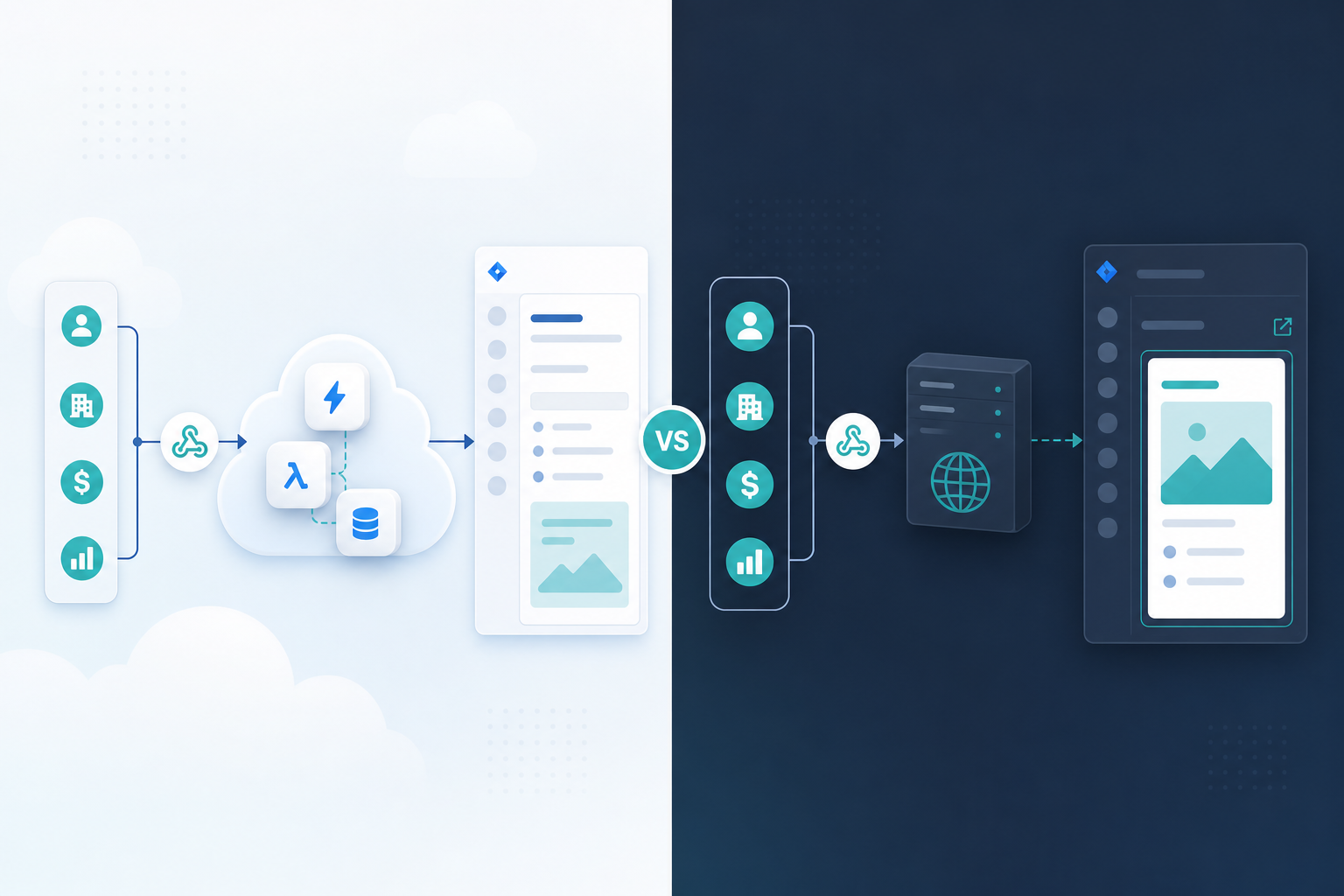
Forge means the app's backend runs on Atlassian's serverless platform, UI modules load through Forge, inbound Pipedrive webhooks typically hit Forge web triggers, and outbound CRM calls use declared external fetch — sometimes requiring admin egress approval per Forge egress controls.
Connect means the vendor hosts the app backend on infrastructure they operate. Jira talks to that backend with Connect patterns, UI often loads in iframes, and Pipedrive webhooks typically hit vendor HTTPS URLs.
Read the hosting badge before feature bullets. Then verify Permissions, Privacy, pricing, and version signals on the Marketplace listing at evaluation time — those tabs answer different questions than architecture alone.
Pipedrive Integration for Jira by Backlog Bridge is described on the public product page as a Jira Cloud integration configured in admin tabs — sibling articles and site materials position it as a Forge app. Verify hosting on Marketplace app 3777112677 before production CRM connect. Live listing details were not verified in this research run (July 2026).
Why Hosting Model Matters for Pipedrive↔Jira
Every credible Pipedrive↔Jira path must handle the same workflow jobs:
- React to deal events (created, stage change, won)
- Create or update Jira issues with commercial context
- Keep deal context current inside Jira after handoff day
- Optionally write delivery signals back to Pipedrive
Platform facts both models share: Pipedrive documents webhooks for deal changes. Jira Cloud's REST API supports creating issues and adding comments. Neither product natively bridges the other — middleware sits in the middle.
The hosting model tells you where that middleware runs and where credentials live. That drives security review questions, incident ownership, egress approvals, and long-term viability as Atlassian evolves Cloud app platforms.
This article focuses on Jira Cloud. Data Center or Server hosting badges follow different rules — confirm the listing's hosting tab matches your site before install.
What Forge Is (Buyer View)
Atlassian's Forge platform documentation describes Forge as the app development platform for Cloud products. For buyers evaluating an Atlassian Marketplace CRM app:
| Element | Typical Forge behavior |
|---|---|
| Backend | Serverless functions on Atlassian infrastructure |
| Issue UI | Forge modules such as issue panels |
| Admin UI | Forge admin or global pages |
| App config | Forge app storage scopes (commonly storage:app for integration settings) |
| Inbound HTTP | Forge web triggers receiving external callbacks |
| Outbound CRM API | Declared external fetch to CRM domains |
| Updates | Vendor deploys app versions; Atlassian documents that installed sites often pick up deployed changes without a full reinstall — verify per app |
For a Forge Pipedrive Jira app, expect Pipedrive API tokens and automation rules to be managed through Forge admin surfaces, webhook registration toward Atlassian-side endpoints, and deal panel UI rendered as a Forge issue module.
What Connect Is (Buyer View)
Atlassian's Jira Cloud Connect documentation describes Connect as the older framework where the vendor hosts the application backend:
| Element | Typical Connect behavior |
|---|---|
| Backend | Vendor-operated servers |
| Issue UI | Often iframe-based Connect UI embedded in Jira |
| Admin UI | Connect admin pages loading vendor-hosted UI |
| App config | Vendor-operated databases or secret stores |
| Inbound HTTP | Pipedrive webhooks hit vendor HTTPS endpoints |
| Outbound CRM API | Vendor servers call Pipedrive APIs |
| Authentication to Jira | Connect/JWT patterns between Jira and vendor backend |
Connect apps can still solve CRM handoffs. For long-lived Jira Cloud integrations, also read Atlassian's public Connect transition materials on developer.atlassian.com and ask vendors about Forge roadmap — timelines change; verify at procurement time rather than assuming indefinite Connect support.
Architecture Comparison
| Dimension | Forge (typical CRM app) | Connect (typical CRM app) |
|---|---|---|
| Where integration logic runs | Atlassian serverless runtime | Vendor-hosted service |
| Where Pipedrive webhooks land | Forge web trigger URLs | Vendor webhook URLs |
| Where Pipedrive API token likely stored | Forge app storage | Vendor infrastructure |
| Issue sidebar pattern | Forge issue panel module | iframe / Connect JS |
| Outbound network control | Declared egress domains; possible admin approval | Vendor network path — ask vendor |
| Primary admin question | "What Forge scopes and egress domains does install request?" | "Where does vendor process CRM payloads?" |
| Long-term Cloud direction | Described as Atlassian's Cloud app platform in public Forge docs | Transition plans published — verify timeline |
Individual apps may differ — read each listing's documentation and security materials.
CRM Integration Implications
Webhooks, panels, and reverse sync
| Workflow need | What to verify in trial | Forge pattern (typical) | Connect pattern (typical) |
|---|---|---|---|
| Forward create on deal events | Sandbox deal fires; Jira issue appears with mapped fields | Web trigger + Forge functions | Vendor webhook endpoint + vendor backend |
| Live deal context in issues | Open linked issue; fields match current Pipedrive | Forge panel fetches on open | Vendor iframe/API via vendor backend |
| Reverse visibility to sales | Jira transition creates expected Pipedrive activity | Jira triggers + Forge functions | Vendor backend listens to Jira events |
| Failure detection | Timestamp or health UI moves on test events | Vendor status UI + Forge ops (if exposed) | Vendor dashboard + vendor incident response |
Stale description text is a workflow problem on any model — see Why Delivery Teams Need a Live Pipedrive Panel Inside Every Jira Issue. Forward webhook outages are common — see Pipedrive Webhooks for Jira: An Admin Setup Checklist. Reverse noise still belongs in your trial — see Sync Jira Status Changes Back to Pipedrive.
Credential custody
Both models require a Pipedrive API token with enough visibility to read deals and write activities.
- Forge: token entered in Forge admin UI; stored under Forge app storage — verify Marketplace Privacy tab and vendor statements.
- Connect: token entered in vendor UI; stored on vendor systems — verify vendor DPA, subprocessors, and retention statements.
Read Pipedrive API Tokens and Jira Admins before production connect on either path.
Monitoring and ownership
| Operational task | Forge (typical) | Connect (typical) |
|---|---|---|
| First owner when create stops | Jira admin checks app status UI; may involve vendor support | Jira admin + vendor ops; webhook URL on vendor infra |
| Token rotation | Update Forge admin Connection; retest webhooks | Update vendor admin UI; retest vendor endpoints |
| Egress or network change | Re-verify Forge egress approvals | Ask vendor about outbound IP or domain changes |
| Long-term platform risk | Track Atlassian Forge platform updates | Track Connect transition announcements + vendor roadmap |
Neither hosting model removes the need for sandbox drills and an on-call owner.
Forge Example: Pipedrive Integration for Jira
Pipedrive Integration for Jira by Backlog Bridge is the Forge product this article series discusses — a concrete example, not a claim that Forge always implements CRM sync the same way.
Public vendor copy describes Jira admin configuration through Connection, Automation Rules, and Webhook & Status tabs, plus auto-created issues, a live Pipedrive issue panel, Jira status→Pipedrive activities, and deal updates→Jira comments. That packaging fits a native admin experience consistent with Forge modules. Treat every vendor claim as a sandbox trial hypothesis — not procurement evidence.
Site product page links to Marketplace app 3777112677 and describes Jira Cloud hosting. At evaluation time, verify on the listing:
- Hosting badge shows Cloud / Forge
- Permissions tab lists acceptable Forge scopes
- Privacy & Security tab matches procurement needs
- Pricing and trial terms — site schema describes a free offer at research time; pricing can change
For tab-by-tab setup depth, see auto-creating Jira issues from Pipedrive deals. For iPaaS comparison when Marketplace hosting is not the decision, see Native Forge App vs Zapier.
If You Still Evaluate a Connect Listing
Some Marketplace searches may surface older Connect CRM connectors. Before shortlisting:
- Confirm the listing's hosting tab targets your Jira Cloud site
- Ask the vendor for Forge roadmap or migration plan language and verify against current Atlassian announcements
- Compare webhook URL ownership and token storage location to your security questionnaire
- Run the same sandbox drills: forward create, live context, reverse noise, token rotation
Do not assume Connect and Forge listings are interchangeable because marketing copy mentions the same triggers.
Security and Privacy Checks by Model
Both models move commercial CRM data into Jira and may write delivery signals back to Pipedrive.
Verify before production on either path:
- Who can view deal value, contacts, and notes on Jira issues, panels, or comments?
- Where are Pipedrive credentials stored, who can rotate them, and what audit trail exists?
- What do Marketplace Privacy & Security tabs and vendor privacy policies state?
- For Forge: what scopes and egress domains does install request?
- For Connect: what subprocessors and data residency statements does the vendor publish?
- Does procurement require Marketplace listing, DPA, or specific compliance badges — and does either path satisfy that today?
I did not verify SOC 2, GDPR, Cloud Fortified, or Bug Bounty claims for specific listings in this article (July 2026). A human reviewer should verify before publishing procurement guidance.
Connect Transition Context
Atlassian's public developer documentation describes Forge as the Cloud app platform and publishes Connect transition plans for Jira Cloud. Exact dates and migration requirements change — verify current wording on developer.atlassian.com rather than treating any third-party summary as permanent.
Practical buyer takeaway: for multi-year CRM integrations on Jira Cloud, prefer listings whose vendor and hosting story align with Forge unless you have a documented Connect migration plan from the vendor verified at procurement time.
What to Verify Before Installing
Marketplace checks (any hosting model)
- Hosting matches Jira Cloud
- App name and vendor match the listing you intend to install
- Permissions/scopes are proportionate to CRM read/write needs
- Privacy & Security materials answer your data-handling questionnaire
- Pricing, trial, version, and last-updated signals — treat as time-sensitive
Forge-specific checks
- Forge scopes at install time match workflow (issue read/write, storage, user read if claimed)
- Egress domains include Pipedrive and any other endpoints the app documents
- Admin UI location is acceptable to your Jira admin team
- Vendor describes webhook or forward-path health monitoring you will actually use
Connect-specific checks
- Vendor documents webhook endpoint availability and incident response
- Vendor publishes data processing and subprocessors clearly
- Vendor states Cloud roadmap if Connect transition affects your procurement horizon
Sandbox workflow checks (both models)
- Trigger timing matches sales process — see Which Pipedrive Pipeline Stage Should Trigger Jira Issue Creation?
- Custom fields survive create and week-two panel reads
- Forward-path health is observable before production pipelines carry revenue
- Reverse sync noise level is acceptable to sales
Confirm behavior with reproducible sandbox deals — not slide-deck claims.
The Buying Question
Marketplace feature bullets overlap. Hosting labels do not.
Forge centralizes runtime on Atlassian's platform, routes webhooks to Atlassian-side endpoints, and surfaces egress declarations during install review.
Connect centralizes runtime on vendor infrastructure — which can be valid, but your security and longevity questions point at the vendor's operations and roadmap.
For teams evaluating Atlassian Marketplace CRM app options between Pipedrive and Jira, read architecture first, then run the same handoff checklist on each candidate: trigger, minimum fields, live context path, reverse path, failure detection, token rotation.
If your workflow center is deal → Jira work → sales visibility inside Jira admin, a Forge Pipedrive Jira app such as Pipedrive Integration for Jira deserves structured sandbox comparison against any Connect listing still on your search results.
See how the product approaches live deal context, trigger-based issue creation, webhook status monitoring, and two-way updates. For the process any architecture must satisfy, read The Sales-to-Delivery Handoff Gap.